

Why does the Xiaomi Pad Mini consume battery quickly?
Background Apps on the Xiaomi Pad Mini can occupy memory, causing the system to reload apps when switching, which affects smoothness. To improve performance, it is recommended to clean up unused background Apps regularly, freeing memory and reducing unnecessary processing. Additionally, the default high refresh rate can increase battery consumption. If you're concerned about battery endurance, you can also change the screen refresh rate to 60 Hz.
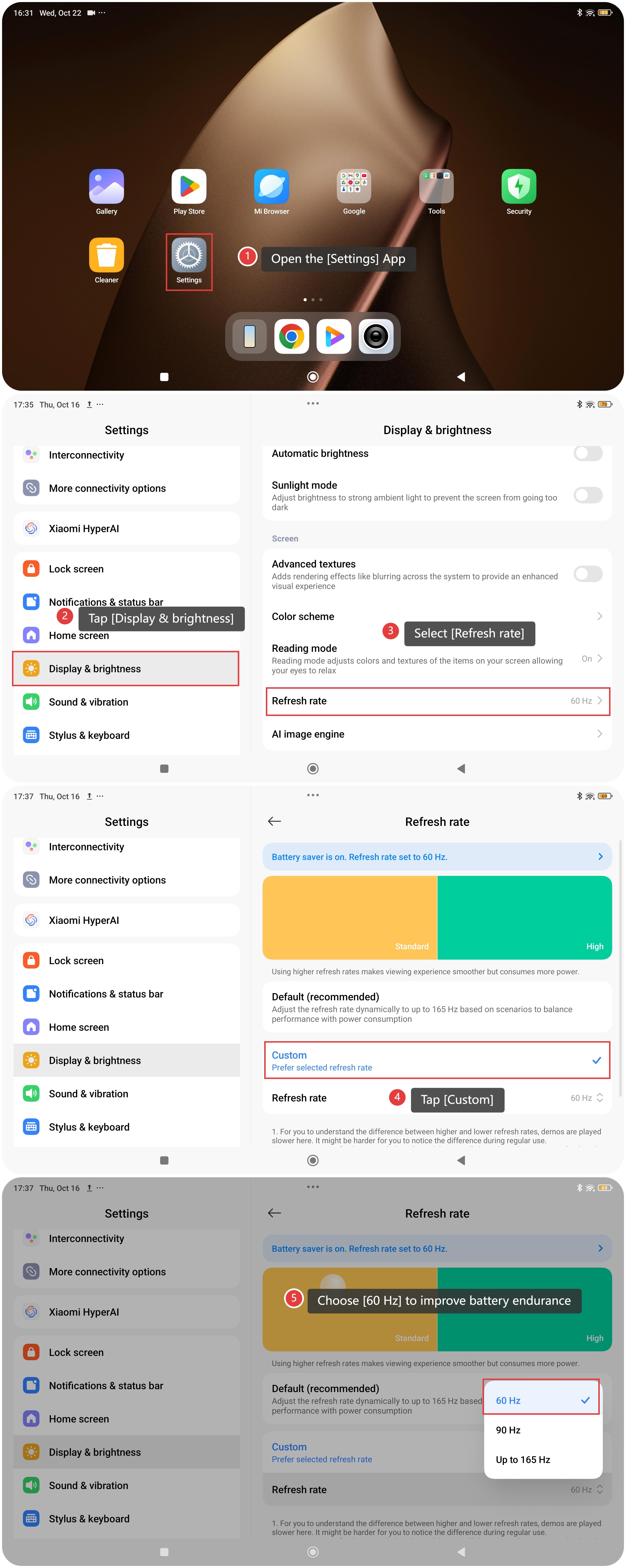
To change the refresh rate on the tablet, please refer to the following steps:
- Open the [Settings] App.
- Tap [Display & brightness].
- Select [Refresh rate].
- Tap [Custom].
- Choose [60 Hz] to improve battery endurance.
Does it help?
Yes
No