

Why do the photos in the Xiaomi Pad Mini gallery appear faded after transferring them to the Xiaomi Pad Mini from an old device?
The Xiaomi Pad Mini gallery uses a color management of a wide color gamut. Combined with the built-in Xiaomi Camera, it can provide you with a more realistic visual experience. We hope you will try the official Xiaomi Camera and Gallery in the future. Color variations in historical photos are a normal phenomenon in the industry's color management. New photos taken with the Xiaomi Camera will not have this issue, so please feel free to use it.
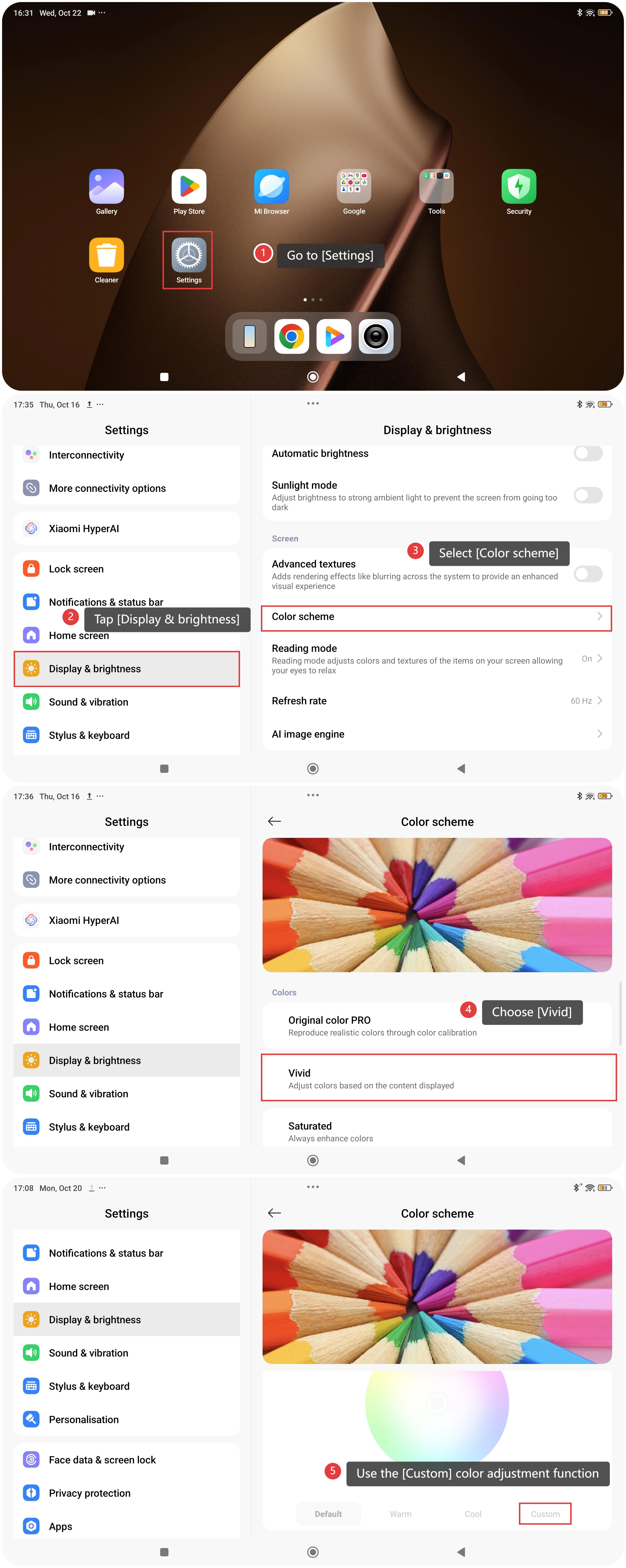
If you want to improve the display quality of historical photos, please refer to the following steps:
- Go to [Settings].
- Tap [Display & brightness].
- Select [Color scheme].
- Choose [Vivid], or use the [Custom] color adjustment function to enhance the display experience.
Does it help?
Yes
No