

How to clean the filter of the Mijia Air Conditioner Pro Eco Inverter 1.0 HP?
The Mijia Air Conditioner Pro Eco Inverter 1.0 HP does not have a filter element. Instead, it comes equipped with a built-in washable filter, which is designed to be durable, long-lasting, and resistant to damage under normal use.
To help maintain optimal performance, the Xiaomi Home App offers filter clogging alerts, reminding you when it’s time to clean the filter. Regular cleaning ensures efficient airflow, better cooling, and improved air quality.
To clean the filter of the Mijia Air Conditioner Pro Eco Inverter 1.0 HP, please refer to the following steps:
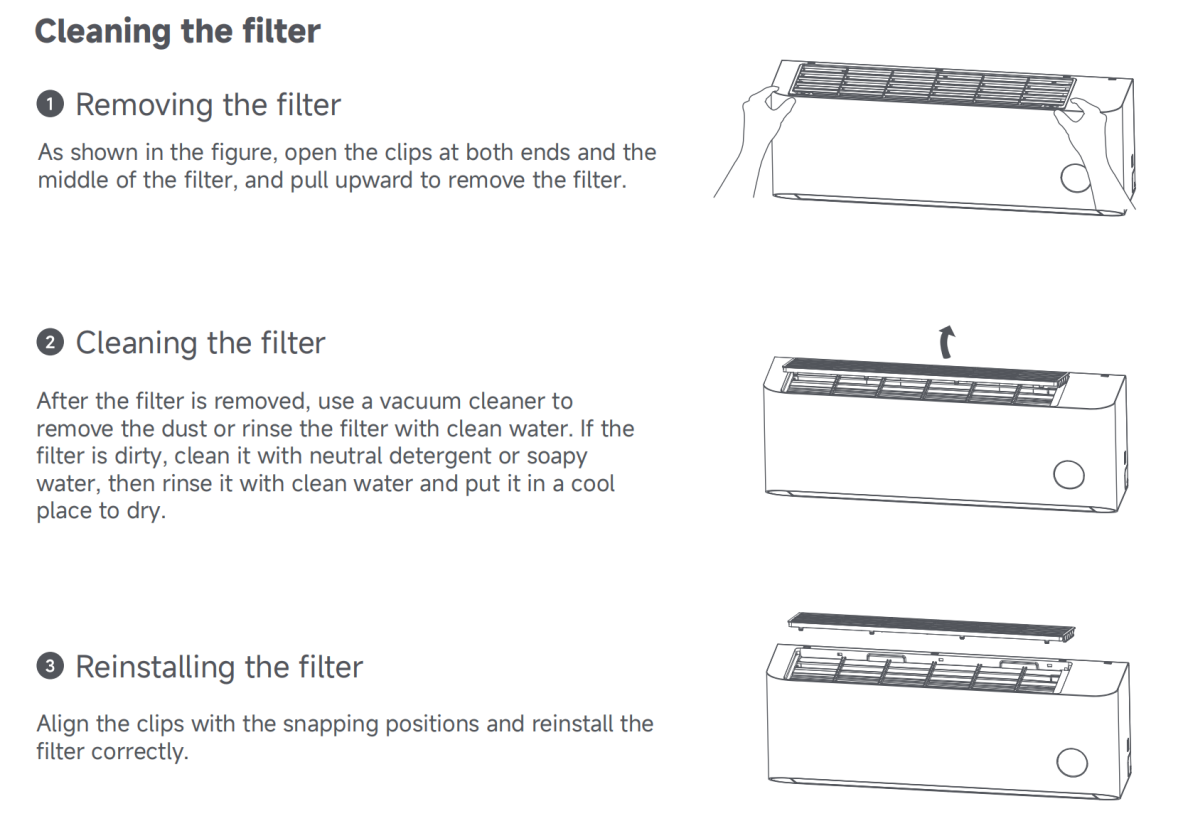
1. To remove the filter, open the clips at both ends and the middle of the filter, and pull upward to remove the filter;
2. After the filter is removed, use a vacuum cleaner to remove the dust or rinse the filter with clean water. If the filter is dirty, clean it with neutral detergent or soapy water, then rinse it with clean water and put it in a cool place to dry;
3. To reinstall the filter, align the clips with the snapping positions and reinstall the filter correctly.
Note:
The air conditioner adopts an integrated top-mounted filter design to simplify product development and meet the need for top air intake and dust blocking.
To help maintain optimal performance, the Xiaomi Home App offers filter clogging alerts, reminding you when it’s time to clean the filter. Regular cleaning ensures efficient airflow, better cooling, and improved air quality.
To clean the filter of the Mijia Air Conditioner Pro Eco Inverter 1.0 HP, please refer to the following steps:
1. To remove the filter, open the clips at both ends and the middle of the filter, and pull upward to remove the filter;
2. After the filter is removed, use a vacuum cleaner to remove the dust or rinse the filter with clean water. If the filter is dirty, clean it with neutral detergent or soapy water, then rinse it with clean water and put it in a cool place to dry;
3. To reinstall the filter, align the clips with the snapping positions and reinstall the filter correctly.
Note:
The air conditioner adopts an integrated top-mounted filter design to simplify product development and meet the need for top air intake and dust blocking.
Does it help?
Yes
No