

What to do if the Xiaomi Smart Band 10 can’t be found by Xiaomi/REDMI phones?
If the Xiaomi Smart Band 10 can’t be found by Xiaomi/REDMI phones, please refer to the following steps to troubleshoot:
1. Please check whether the region setting on the Mi Fitness APP is the region where you purchased the device;
2. Reopen the Bluetooth on the phone and try again;
3. If there are multiple mobile phones nearby, you need to confirm whether there is a pop-up prompt for connection on the nearby mobile phone. If so, you need to refuse;
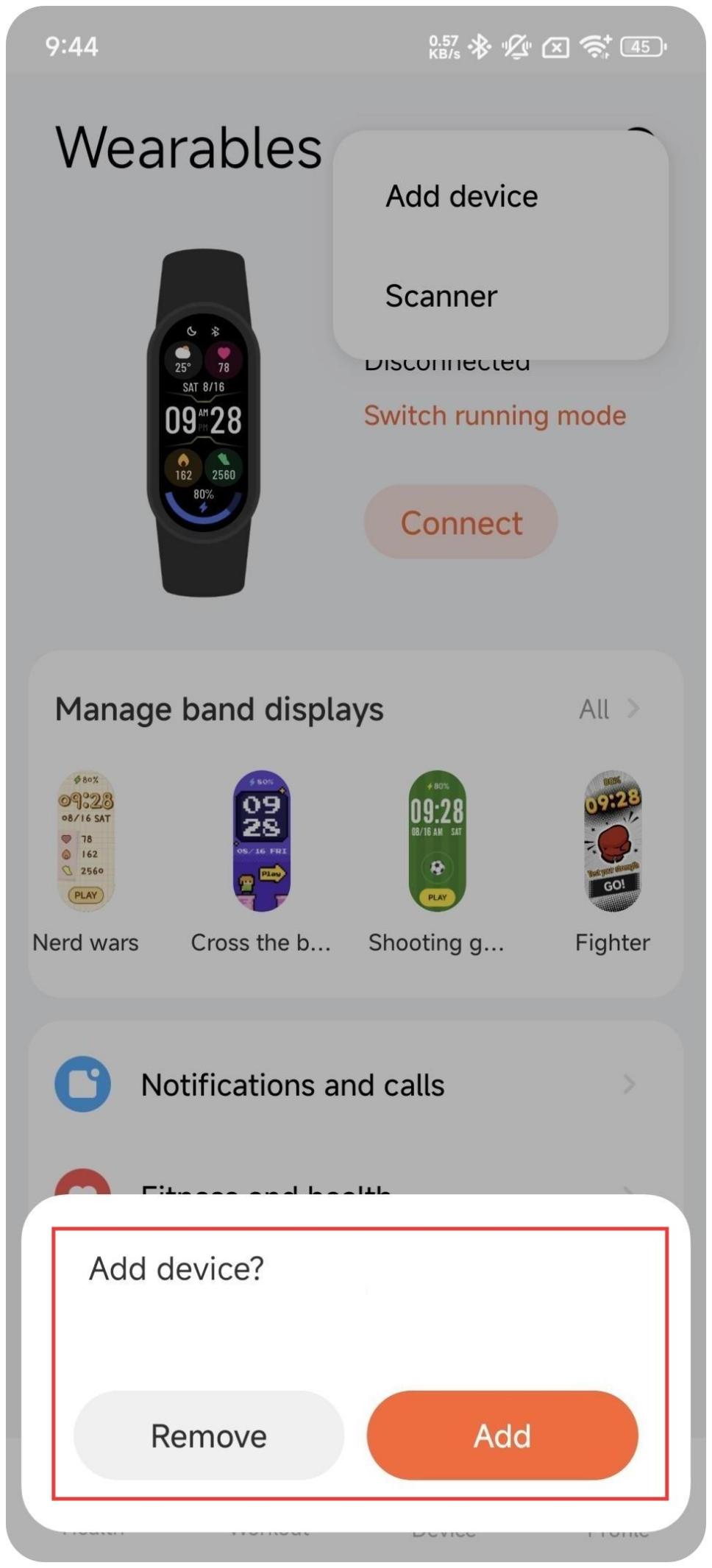
4. If the device is restored to factory settings, the previously paired Mi Fitness APP will try to reconnect while the device is paired, and prompt you to tap [Remove] or [Add]. At this time, the unpaired phone cannot search for the device. Tap [Remove] and then use the unpaired phone to search and connect the band.
If the Xiaomi Smart Band 10 fails to bind to the Mi Fitness APP, please refer to the following methods for troubleshooting:
1. Check the network connection of your phone. If the Wi-Fi is disconnected, try to reconnect. If the Wi-Fi connection is normal but you still cannot bind, please use the mobile data;
2. Restore the device to factory settings;
3. Clear the Bluetooth information of the device in the Bluetooth list of the phone (if there is no Bluetooth pairing information of the device in the Bluetooth list, you can skip this step);
4. Disable the Bluetooth and then enable it;
5. Open the Mi Fitness APP and add the device again.
Note:
1. If the band is added to the blacklist in the Bluetooth settings of the Xiaomi HyperOS/MIUI phone, Bluetooth pairing and binding can no longer be performed. You need to manually delete this device from the blacklist before you can perform Bluetooth pairing and binding;
2. If these methods can’t solve the issue, it is recommended that you restart the band and the phone's Bluetooth, and then retry after restarting the phone.
1. Please check whether the region setting on the Mi Fitness APP is the region where you purchased the device;
2. Reopen the Bluetooth on the phone and try again;
3. If there are multiple mobile phones nearby, you need to confirm whether there is a pop-up prompt for connection on the nearby mobile phone. If so, you need to refuse;
4. If the device is restored to factory settings, the previously paired Mi Fitness APP will try to reconnect while the device is paired, and prompt you to tap [Remove] or [Add]. At this time, the unpaired phone cannot search for the device. Tap [Remove] and then use the unpaired phone to search and connect the band.
If the Xiaomi Smart Band 10 fails to bind to the Mi Fitness APP, please refer to the following methods for troubleshooting:
1. Check the network connection of your phone. If the Wi-Fi is disconnected, try to reconnect. If the Wi-Fi connection is normal but you still cannot bind, please use the mobile data;
2. Restore the device to factory settings;
3. Clear the Bluetooth information of the device in the Bluetooth list of the phone (if there is no Bluetooth pairing information of the device in the Bluetooth list, you can skip this step);
4. Disable the Bluetooth and then enable it;
5. Open the Mi Fitness APP and add the device again.
Note:
1. If the band is added to the blacklist in the Bluetooth settings of the Xiaomi HyperOS/MIUI phone, Bluetooth pairing and binding can no longer be performed. You need to manually delete this device from the blacklist before you can perform Bluetooth pairing and binding;
2. If these methods can’t solve the issue, it is recommended that you restart the band and the phone's Bluetooth, and then retry after restarting the phone.
Does it help?
Yes
No