

How to use the Refresh program of the Mijia Front Load Washer Dryer 10.5kg?
The Mijia Front Load Washer Dryer 10.5kg features Refresh program, which is designed to quickly freshen up lightly worn or slightly musty garments without a full wash cycle.
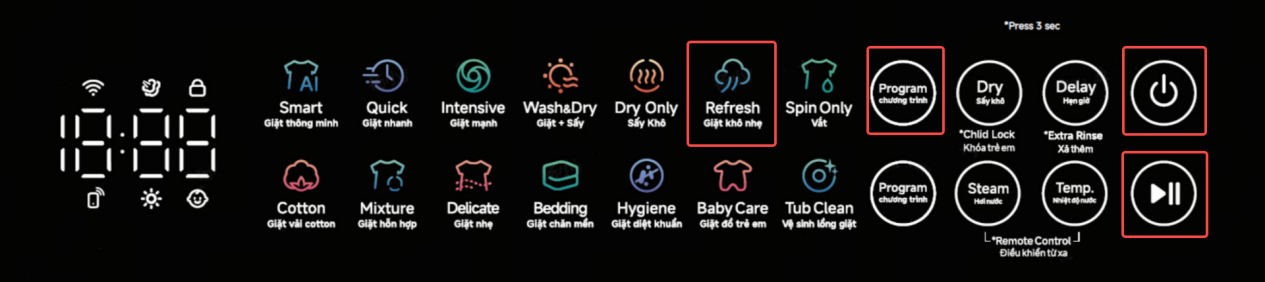
To use the Refresh program on the Mijia Front Load Washer Dryer 10.5kg, please refer to the following steps:
1. Please press and hold the Power button to turn on;
2. Put the clothes into the drum and close the door;
3. Repeatedly press the Program button on the upper side of the device’ panel;
4. Select the Refresh program;
5. Press the Start button to run the Refresh program.
Note:
The Refresh program refreshes and deodorizes small loads of fabrics using steam instead of water, with an added feature of wrinkle removal.
To use the Refresh program on the Mijia Front Load Washer Dryer 10.5kg, please refer to the following steps:
1. Please press and hold the Power button to turn on;
2. Put the clothes into the drum and close the door;
3. Repeatedly press the Program button on the upper side of the device’ panel;
4. Select the Refresh program;
5. Press the Start button to run the Refresh program.
Note:
The Refresh program refreshes and deodorizes small loads of fabrics using steam instead of water, with an added feature of wrinkle removal.
Does it help?
Yes
No