

Mijia Front Load Washer Dryer 10.5kg Error Codes FAQ
1. Q: What to do if the Mijia Front Load Washer Dryer 10.5kg displays E1?
A: If the Mijia Front Load Washer Dryer 10.5kg displays E1, it means the drainage process has timed out.
Please refer to the following steps to troubleshot:
1. Check whether the Drain Hose is installed correctly. The Drain Hose needs to be placed in an upward drainage manner. The highest point of the Drain Hose needs to be 60-90cm away from the ground. Placing the Drain Hose too high will cause poor drainage. If this happens, please lower the Drain Hose;
2. Check whether the Drain Hose is inserted too deep into the sewer. It is not recommended to insert the Drain Hose too deep into the sewer, which will cause poor drainage. Please remove the Drain Hose from the sewer;
3. Check whether the Drain Pump Filter is clogged. If the residue filter is clogged, it will cause drainage failure. Please clean the residue filter as follows:
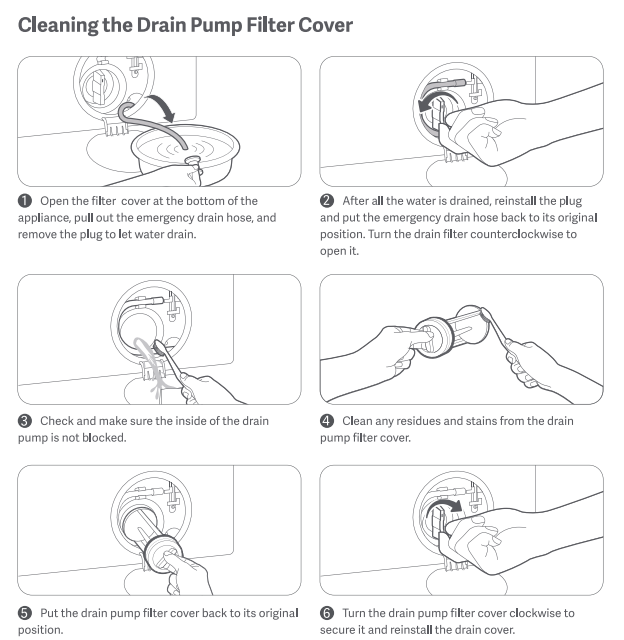
If the problem is still not solved, please contact the local official after-sales service center for further assistance.
2. Q: What to do if the Mijia Front Load Washer Dryer 10.5kg displays E2 ?
A: If the Mijia Front Load Washer Dryer 10.5kg displays E2, it means the door is not closed properly.
Please refer to the following steps to troubleshot:
1. Check if the door is not tightly closed. Please close it again;
2. Check if there is any clothing stuck in the door seal. Remove the stuck clothing and replace it;
3. Push or tap the door lock slightly to make sure it is closed.
If the problem is still not solved, please contact the local official after-sales service center for further assistance.
3. Q: What to do if the Mijia Front Load Washer Dryer 10.5kg displays E3 ?
A: Mijia Front Load Washer Dryer 10.5kg displays E3, which means that the clothes inside are unevenly distributed. During the dehydration process, the clothes inside the washing machine turn over. When the clothes inside are unbalanced, the washing machine will enter the process of automatic balance adjustment. At this time, the time will not run and it cannot rotate at high speed. When the clothes are balanced and then enter high-speed operation, the time will continue to decrease. If it is not balanced for a long time, you can try to pause the washing machine, take out the clothes, shake them loose, and then put them into the drum to continue dehydration.
Since the running track of clothes in the drum cannot be fixed, in order to reduce the occurrence of such situations, please place the clothes according to the following methods:
1. Put clothes of different sizes together, and do not put small items in the Dry program alone;
2. Place the clothes in a scattered manner. If the clothes are placed in a disorderly manner, the clothes may become tangled and cause imbalance;
3. You can run the Dry program with the machine empty to confirm whether it can be completed. If it can be completed normally, the washing machine is not faulty.
If the problem is still not solved, please contact the local official after-sales service center for further assistance.
4. Q: What to do if the Mijia Front Load Washer Dryer 10.5kg displays E4?
A: If the Mijia Front Load Washer Dryer 10.5kg displays E4, it means the water inlet process has timed out.
Please refer to the following steps to troubleshot:
1. Check whether the faucet is open. If the faucet is closed, water cannot flow in. Please turn the faucet to confirm that it is open;
2. Please confirm whether there is water outage at home;
3. Check that the water pressure is between 0.05-0.8MPa. If the water pressure is too low, it will cause water failure. Alternatively, use the water at off-peak times to avoid concentrated water use periods;
4. Check whether the Water Inlet Valve Filter of the washing machine is blocked and clean it;
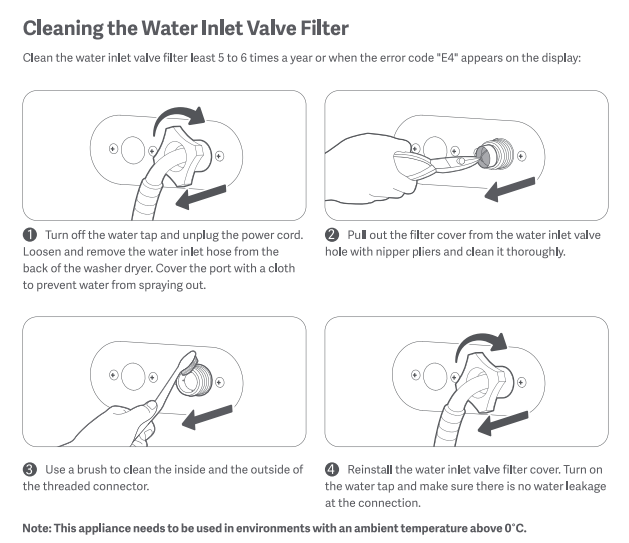
5. Please check whether the fixing device of the Drain Hose has been removed. The washing machine adopts the upper drainage method. The Drain Hose needs to be hung at a distance of 60-90cm, and there is a label prohibiting removal on the back of the washing machine. If the Drain Hose is removed and laid flat, it will cause water to enter and drain at the same time, and the washing machine will not be able to retain water. Please hang the Drain Hose higher again.
If the problem is still not solved, please contact the local official after-sales service center for further assistance.
5. Q: What to do if the Mijia Front Load Washer Dryer 10.5kg displays E6?
A: If the Mijia Front Load Washer Dryer 10.5kg displays E6, it means the water level is too high. Please turn off the power of the washing machine for 5-10 minutes and restart it. If the problem is still not solved, please contact the local official after-sales service center for further assistance.
6. Q: What to do if the Mijia Front Load Washer Dryer 10.5kg displays E8?
A: If the Mijia Front Load Washer Dryer 10.5kg displays E8, which means the temperature sensor is abnormal. Please turn off the power of the washing machine for 5-10 minutes and restart it. If the problem is still not solved, please contact the local official after-sales service center for further assistance.
7. Q: What to do if the Mijia Front Load Washer Dryer 10.5kg displays F1?
A: If the Mijia Front Load Washer Dryer 10.5kg displays F1, it means the water level is abnormal. Please turn off the power of the washing machine for 5-10 minutes and restart it. If the problem is still not solved, please contact the local official after-sales service center for further assistance.
8. Q: What to do if the Mijia Front Load Washer Dryer 10.5kg displays F2?
A: If the Mijia Front Load Washer Dryer 10.5kg displays F2, which means the drying heating tube is faulty. Please turn off the power of the washing machine for 5-10 minutes and restart it. If the problem is still not solved, please contact the local official after-sales service center for further assistance.
9. Q: What to do if the Mijia Front Load Washer Dryer 10.5kg displays F3?
A: If the Mijia Front Load Washer Dryer 10.5kg displays F3, which means the fan is abnormal. Please turn off the power of the washing machine for 5-10 minutes and restart it. If the problem is still not solved, please contact the local official after-sales service center for further assistance.
10. Q: What to do if the Mijia Front Load Washer Dryer 10.5kg displays F4?
A: If the Mijia Front Load Washer Dryer 10.5kg displays F4, it means the air inlet temperature sensor is abnormal. Please turn off the power of the washing machine for 5-10 minutes and restart it. If the problem is still not solved, please contact the local official after-sales service center for further assistance.
11. Q: What to do if the Mijia Front Load Washer Dryer 10.5kg displays F5?
A: If the Mijia Front Load Washer Dryer 10.5kg displays F5, it means the air outlet temperature sensor is abnormal. Please turn off the power of the washing machine for 5-10 minutes and restart it. If the problem is still not solved, please contact the local official after-sales service center for further assistance.
12. Q: What to do if the Mijia Front Load Washer Dryer 10.5kg displays FC2?
A: If the Mijia Front Load Washer Dryer 10.5kg displays FC2, which means the inverter communication is abnormal. Please turn off the power of the washing machine for 5-10 minutes and restart it. If the problem is still not solved, please contact the local official after-sales service center for further assistance.
13. Q: What to do if the Mijia Front Load Washer Dryer 10.5kg displays C2/C3/C4/C5/C6/C7/C8/C9/C10/C11/C12?
A: If the Mijia Front Load Washer Dryer 10.5kg displays C2-C12(C2/C3/C4/C5/C6/C7/C8/C9/C10/C11/C12), which means the motor and communication drive are abnormal. Please turn off the power of the washing machine for 5-10 minutes and restart it. If the problem is still not solved, please contact the local official after-sales service center for further assistance.
14. Q: What to do if the Mijia Front Load Washer Dryer 10.5kg displays CX?
A: If the Mijia Front Load Washer Dryer 10.5kg displays CX, which means the motor and communication drive are abnormal. Please turn off the power of the washing machine for 5-10 minutes and restart it. If the problem is still not solved, please contact the local official after-sales service center for further assistance.
A: If the Mijia Front Load Washer Dryer 10.5kg displays E1, it means the drainage process has timed out.
Please refer to the following steps to troubleshot:
1. Check whether the Drain Hose is installed correctly. The Drain Hose needs to be placed in an upward drainage manner. The highest point of the Drain Hose needs to be 60-90cm away from the ground. Placing the Drain Hose too high will cause poor drainage. If this happens, please lower the Drain Hose;
2. Check whether the Drain Hose is inserted too deep into the sewer. It is not recommended to insert the Drain Hose too deep into the sewer, which will cause poor drainage. Please remove the Drain Hose from the sewer;
3. Check whether the Drain Pump Filter is clogged. If the residue filter is clogged, it will cause drainage failure. Please clean the residue filter as follows:
If the problem is still not solved, please contact the local official after-sales service center for further assistance.
2. Q: What to do if the Mijia Front Load Washer Dryer 10.5kg displays E2 ?
A: If the Mijia Front Load Washer Dryer 10.5kg displays E2, it means the door is not closed properly.
Please refer to the following steps to troubleshot:
1. Check if the door is not tightly closed. Please close it again;
2. Check if there is any clothing stuck in the door seal. Remove the stuck clothing and replace it;
3. Push or tap the door lock slightly to make sure it is closed.
If the problem is still not solved, please contact the local official after-sales service center for further assistance.
3. Q: What to do if the Mijia Front Load Washer Dryer 10.5kg displays E3 ?
A: Mijia Front Load Washer Dryer 10.5kg displays E3, which means that the clothes inside are unevenly distributed. During the dehydration process, the clothes inside the washing machine turn over. When the clothes inside are unbalanced, the washing machine will enter the process of automatic balance adjustment. At this time, the time will not run and it cannot rotate at high speed. When the clothes are balanced and then enter high-speed operation, the time will continue to decrease. If it is not balanced for a long time, you can try to pause the washing machine, take out the clothes, shake them loose, and then put them into the drum to continue dehydration.
Since the running track of clothes in the drum cannot be fixed, in order to reduce the occurrence of such situations, please place the clothes according to the following methods:
1. Put clothes of different sizes together, and do not put small items in the Dry program alone;
2. Place the clothes in a scattered manner. If the clothes are placed in a disorderly manner, the clothes may become tangled and cause imbalance;
3. You can run the Dry program with the machine empty to confirm whether it can be completed. If it can be completed normally, the washing machine is not faulty.
If the problem is still not solved, please contact the local official after-sales service center for further assistance.
4. Q: What to do if the Mijia Front Load Washer Dryer 10.5kg displays E4?
A: If the Mijia Front Load Washer Dryer 10.5kg displays E4, it means the water inlet process has timed out.
Please refer to the following steps to troubleshot:
1. Check whether the faucet is open. If the faucet is closed, water cannot flow in. Please turn the faucet to confirm that it is open;
2. Please confirm whether there is water outage at home;
3. Check that the water pressure is between 0.05-0.8MPa. If the water pressure is too low, it will cause water failure. Alternatively, use the water at off-peak times to avoid concentrated water use periods;
4. Check whether the Water Inlet Valve Filter of the washing machine is blocked and clean it;
5. Please check whether the fixing device of the Drain Hose has been removed. The washing machine adopts the upper drainage method. The Drain Hose needs to be hung at a distance of 60-90cm, and there is a label prohibiting removal on the back of the washing machine. If the Drain Hose is removed and laid flat, it will cause water to enter and drain at the same time, and the washing machine will not be able to retain water. Please hang the Drain Hose higher again.
If the problem is still not solved, please contact the local official after-sales service center for further assistance.
5. Q: What to do if the Mijia Front Load Washer Dryer 10.5kg displays E6?
A: If the Mijia Front Load Washer Dryer 10.5kg displays E6, it means the water level is too high. Please turn off the power of the washing machine for 5-10 minutes and restart it. If the problem is still not solved, please contact the local official after-sales service center for further assistance.
6. Q: What to do if the Mijia Front Load Washer Dryer 10.5kg displays E8?
A: If the Mijia Front Load Washer Dryer 10.5kg displays E8, which means the temperature sensor is abnormal. Please turn off the power of the washing machine for 5-10 minutes and restart it. If the problem is still not solved, please contact the local official after-sales service center for further assistance.
7. Q: What to do if the Mijia Front Load Washer Dryer 10.5kg displays F1?
A: If the Mijia Front Load Washer Dryer 10.5kg displays F1, it means the water level is abnormal. Please turn off the power of the washing machine for 5-10 minutes and restart it. If the problem is still not solved, please contact the local official after-sales service center for further assistance.
8. Q: What to do if the Mijia Front Load Washer Dryer 10.5kg displays F2?
A: If the Mijia Front Load Washer Dryer 10.5kg displays F2, which means the drying heating tube is faulty. Please turn off the power of the washing machine for 5-10 minutes and restart it. If the problem is still not solved, please contact the local official after-sales service center for further assistance.
9. Q: What to do if the Mijia Front Load Washer Dryer 10.5kg displays F3?
A: If the Mijia Front Load Washer Dryer 10.5kg displays F3, which means the fan is abnormal. Please turn off the power of the washing machine for 5-10 minutes and restart it. If the problem is still not solved, please contact the local official after-sales service center for further assistance.
10. Q: What to do if the Mijia Front Load Washer Dryer 10.5kg displays F4?
A: If the Mijia Front Load Washer Dryer 10.5kg displays F4, it means the air inlet temperature sensor is abnormal. Please turn off the power of the washing machine for 5-10 minutes and restart it. If the problem is still not solved, please contact the local official after-sales service center for further assistance.
11. Q: What to do if the Mijia Front Load Washer Dryer 10.5kg displays F5?
A: If the Mijia Front Load Washer Dryer 10.5kg displays F5, it means the air outlet temperature sensor is abnormal. Please turn off the power of the washing machine for 5-10 minutes and restart it. If the problem is still not solved, please contact the local official after-sales service center for further assistance.
12. Q: What to do if the Mijia Front Load Washer Dryer 10.5kg displays FC2?
A: If the Mijia Front Load Washer Dryer 10.5kg displays FC2, which means the inverter communication is abnormal. Please turn off the power of the washing machine for 5-10 minutes and restart it. If the problem is still not solved, please contact the local official after-sales service center for further assistance.
13. Q: What to do if the Mijia Front Load Washer Dryer 10.5kg displays C2/C3/C4/C5/C6/C7/C8/C9/C10/C11/C12?
A: If the Mijia Front Load Washer Dryer 10.5kg displays C2-C12(C2/C3/C4/C5/C6/C7/C8/C9/C10/C11/C12), which means the motor and communication drive are abnormal. Please turn off the power of the washing machine for 5-10 minutes and restart it. If the problem is still not solved, please contact the local official after-sales service center for further assistance.
14. Q: What to do if the Mijia Front Load Washer Dryer 10.5kg displays CX?
A: If the Mijia Front Load Washer Dryer 10.5kg displays CX, which means the motor and communication drive are abnormal. Please turn off the power of the washing machine for 5-10 minutes and restart it. If the problem is still not solved, please contact the local official after-sales service center for further assistance.
Does it help?
Yes
No