

How to change the device name of the Mijia Air Conditioner Pro Eco A+++ 12K?
Changing the device name helps improve device management, especially in households or offices with several smart devices linked to the Mi Home/Xiaomi Home APP.
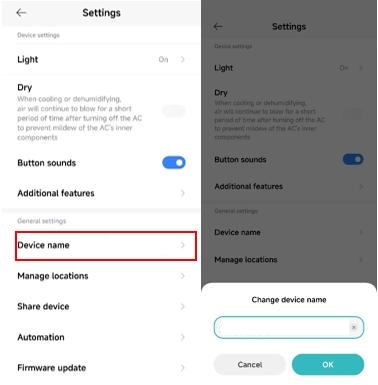
To change the name of the Mijia Air Conditioner Pro Eco A+++ 12K, please refer to the following steps:
1. Open the Mi Home/Xiaomi Home APP and find the device;
2. Tap the three-dot icon in the top right corner to enter [Settings];
3. Go to [Device name];
4. Change the device name as desired and tap [OK] to ensure the changes are saved successfully.
To change the name of the Mijia Air Conditioner Pro Eco A+++ 12K, please refer to the following steps:
1. Open the Mi Home/Xiaomi Home APP and find the device;
2. Tap the three-dot icon in the top right corner to enter [Settings];
3. Go to [Device name];
4. Change the device name as desired and tap [OK] to ensure the changes are saved successfully.
Does it help?
Yes
No