

How to add a shortcut for the Mijia Air Conditioner Pro Eco A+++ 12K?
To quickly access and control your Mijia Air Conditioner Pro Eco A+++ 12K, you can add a shortcut directly to your device’s home screen. This shortcut provides a convenient and fast way to open the air conditioner’s control panel without having to launch the Mi Home/Xiaomi Home APP and search for the device each time.
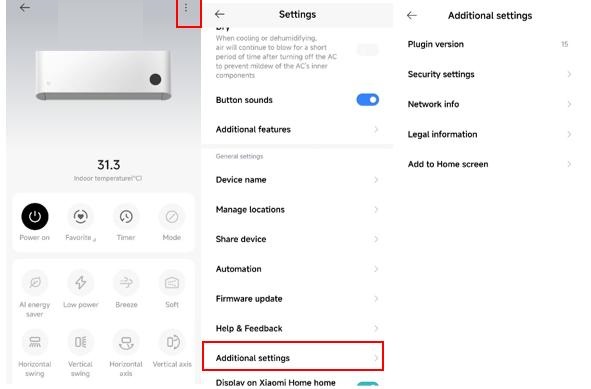
To add a shortcut for the air conditioner, please refer to the following steps:
1. Open the Mi Home/Xiaomi Home APP and locate the device;
2. Tap the three-dot icon at the top right of the device interface;
3. Go to [Additional settings];
4. Choose [Add to Home screen] to create the shortcut.
To add a shortcut for the air conditioner, please refer to the following steps:
1. Open the Mi Home/Xiaomi Home APP and locate the device;
2. Tap the three-dot icon at the top right of the device interface;
3. Go to [Additional settings];
4. Choose [Add to Home screen] to create the shortcut.
Does it help?
Yes
No