

How to use Location Sharing on the Xiaomi smartphone?
The Xiaomi smartphone supports Location Sharing. It lets you share your real-time location from your devices with people you choose. People you share your location with can see your name, photos, and real-time location across Google services, even when you’re not using Maps. Location Sharing works across Google APPs and services, including Google Maps and Family Link.
To use Location Sharing on your phone, please refer to the following steps:
1. Select the contact you want to share your location within an APP that supports Location Sharing;
2. Choose the duration for sharing and confirm.
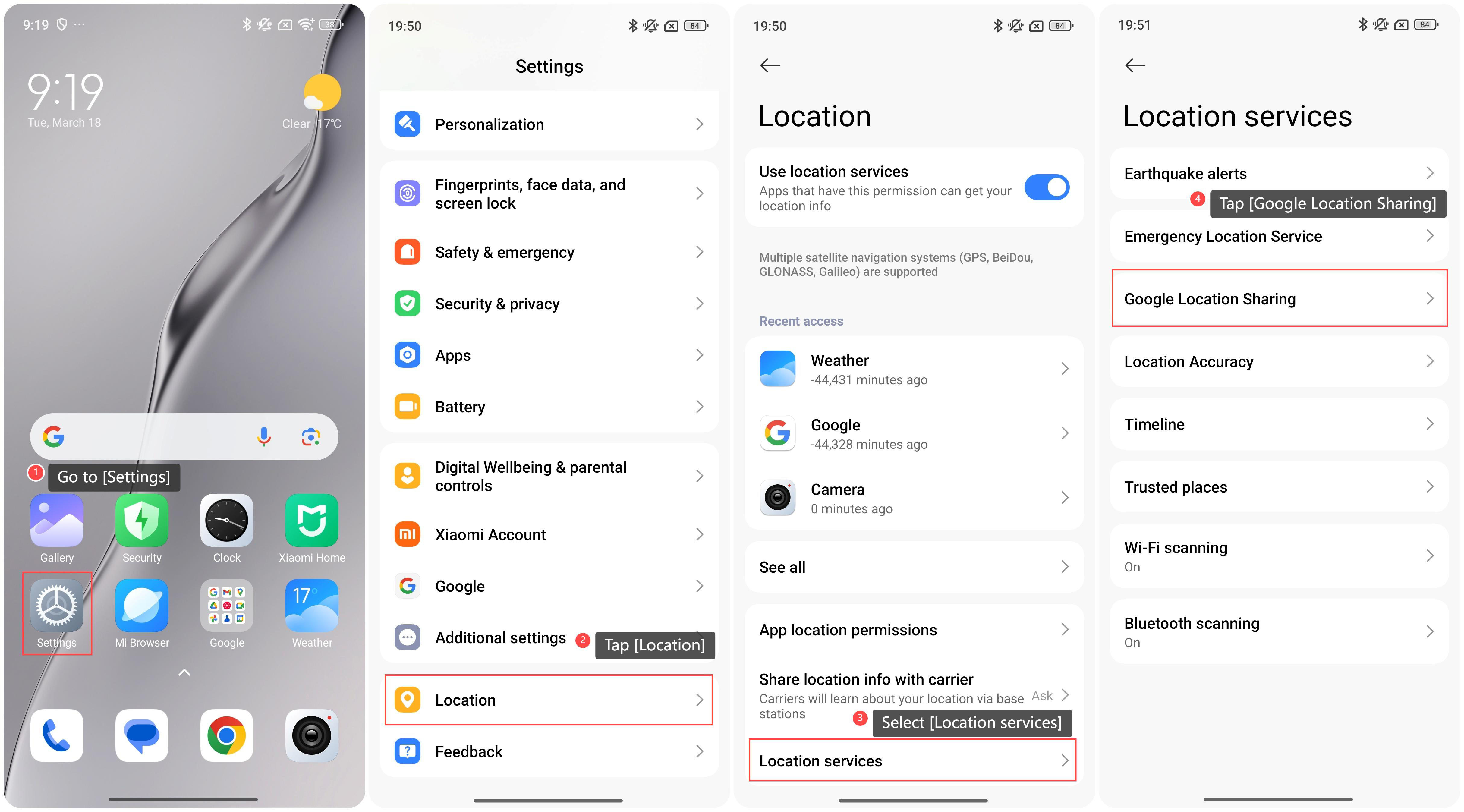
If you want to learn more about Location Sharing, you can follow this path:
1. Go to [Settings];
2. Swipe down to find and tap [Location];
To use Location Sharing on your phone, please refer to the following steps:
1. Select the contact you want to share your location within an APP that supports Location Sharing;
2. Choose the duration for sharing and confirm.
If you want to learn more about Location Sharing, you can follow this path:
1. Go to [Settings];
2. Swipe down to find and tap [Location];
3. Select [Location services];
4. Tap [Google Location Sharing] to learn more about Location Sharing.
4. Tap [Google Location Sharing] to learn more about Location Sharing.
Does it help?
Yes
No