

How to turn on/off Earthquake alerts on the Xiaomi smartphone?
The built-in Earthquake alerts feature on the Xiaomi smartphone allows your device to alert you when an earthquake is detected nearby. Once you enable this feature, your device will provide timely notifications that include the initial estimated magnitude of the quake and the distance from your location, helping you take necessary precautions.
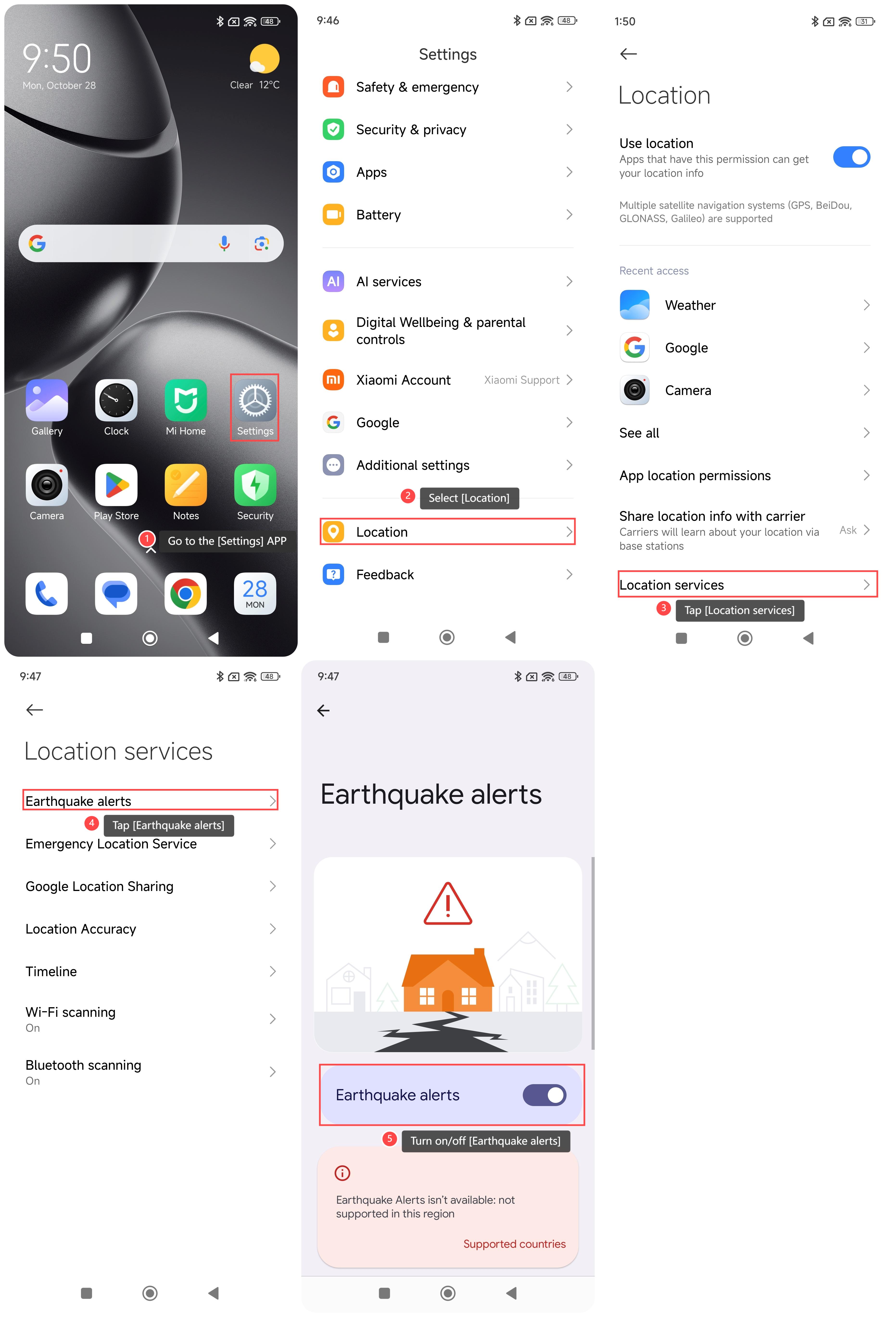
To turn on/off Earthquake alerts on your phone, please refer to the following steps:
1. Go to the [Settings] APP;
2. Scroll down and select [Location];
3. Tap [Location services];
4. Tap [Earthquake alerts];
5. Turn on/off [Earthquake alerts].
To turn on/off Earthquake alerts on your phone, please refer to the following steps:
1. Go to the [Settings] APP;
2. Scroll down and select [Location];
3. Tap [Location services];
4. Tap [Earthquake alerts];
5. Turn on/off [Earthquake alerts].
Note:
1. Earthquake alerts are not supported in all areas;
2. Not all earthquakes can be detected;
3. Magnitude and shaking intensity estimates can have errors;
4. You can receive an alert before or during shaking begins.
Does it help?
Yes
No