

How to do if the Xiaomi Buds 5 Pro doesn't charge?
The earbuds will fail to charge or charge unstably due to prolonged storage without use, poor contact between the earbuds and charging case (dirty contacts), etc.
Please troubleshoot according to the following methods:
1. First, ensure the earbuds are activated;
2. Check if the charging contacts of the earbuds are dirty, sunken, or damaged; clean dirt promptly to ensure good contact between the charging contacts and the charging case;
Note:
Insert and remove the earbuds from the case repeatedly 3 times. If the contact is normal, the LED light will illuminate for 1 second when the earbuds are placed in the case (green light if battery level is above 60%, otherwise orange).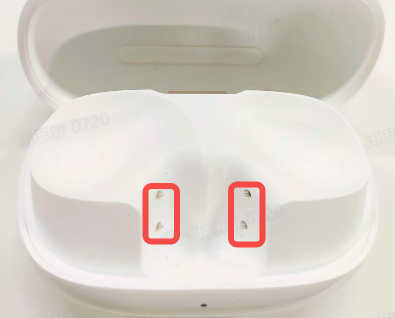
3. Place both earbuds in the charging case with the lid open, then connect using a mobile phone and check for a lightning bolt icon on the green battery icon in the Xiaomi pop-up window or Xiaomi Earbuds APP interface.
If there is no lightning bolt icon, please apply for after-sales service.
Check if the charging case has power. If not, charge the charging case before charging the earbuds, and try turning the earbuds on after charging. If the earbuds have not been used for a long time resulting in low battery, it will take some time for the indicator light to illuminate after charging.
Does it help?