

How to check the search history in Gemini?
Gemini is an AI assistant that can answer your questions, generate text, summarize texts, translate languages, and write emails, essays, and code. After you chat with Gemini, the chats will be saved. Recent chats will appear in the Gemini App, so you can pin, rename, and continue them.
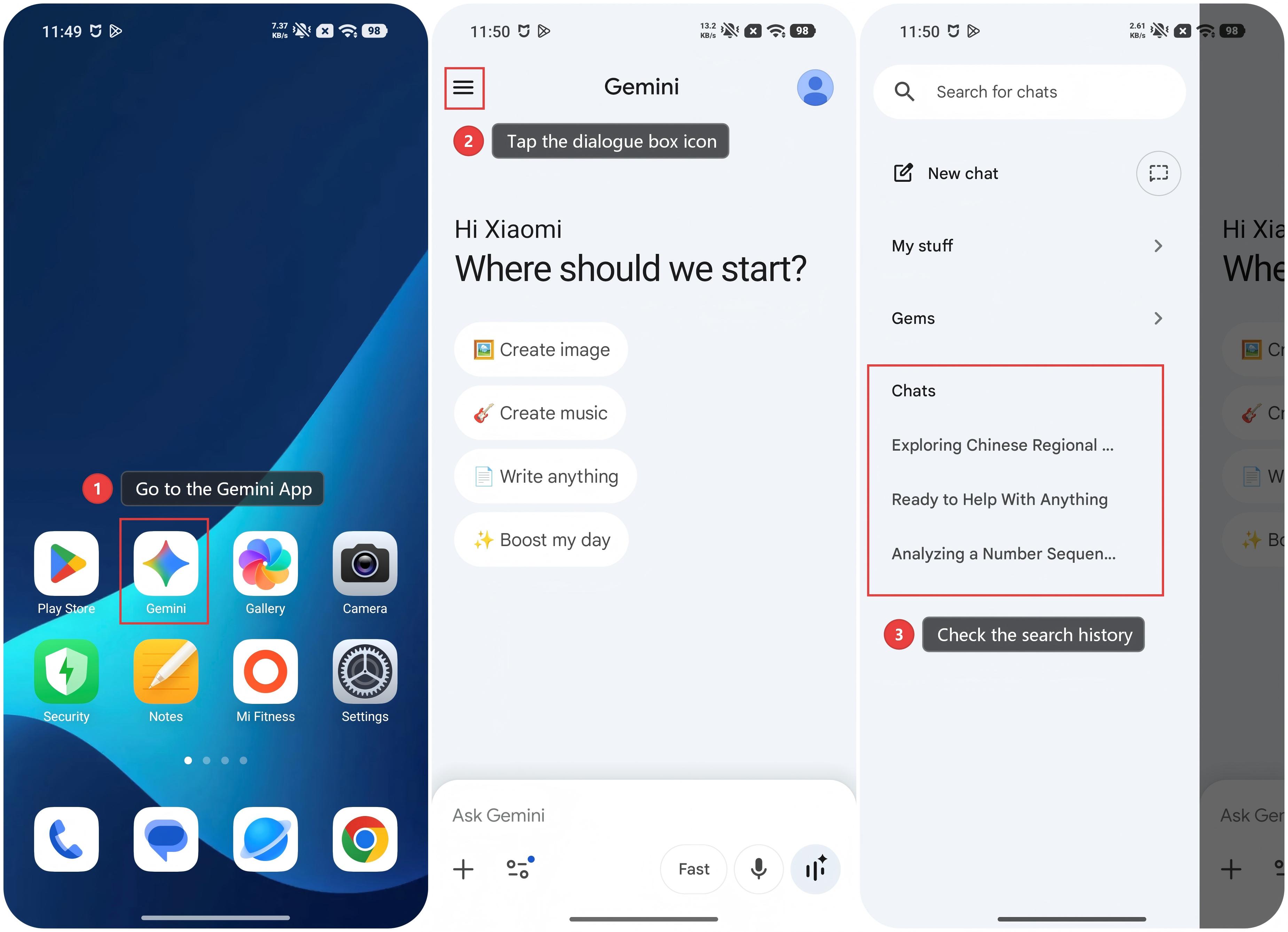
To check the search history in Gemini, please refer to the following steps:
1. Go to the Gemini App.
2. Tap the dialogue box icon at the top left of the screen.
3. You can check the search history.
To check the search history in Gemini, please refer to the following steps:
1. Go to the Gemini App.
2. Tap the dialogue box icon at the top left of the screen.
3. You can check the search history.
Note:
1. When you exit the Gemini APP, some things are also turned off, like pinned and recent chats, and extensions. Exiting the Gemini APP will not delete past data.
2. Not all of the languages support Gemini.
3. Gemini's availability varies by country or region, and Gemini must be set as the default voice assistant.
Does it help?
Yes
No