

Xiaomi Blender Pro FAQ
Overview
1. Q: What are the selling points of the Xiaomi Blender Pro?
A: The selling points are as follows:
1. The Xiaomi Blender Pro comes with a 1.75L capacity, and blend once and enjoy with the whole family;
2. It features a triple powerful blending system, ultra-fine grinding for a silky-smooth texture without the need for filtering;
3. It features segmented simmering and precision cooking, with micro-pressure stewing to enhance aroma and release nutrients;
4. It has a water-based ceramic coating, preventing sticking during long cooking and ensuring easy cleaning;
5. The Xiaomi Blender Pro offers dual self-cleaning modes for washing and sterilization, with 99.99% hot air sterilization for extra peace of mind;
6. It includes six hot and cold beverage programs, with an LED display for effortless one-touch operation;
7. It supports a 12-hour preset + 12-hour heat preservation, keeping drinks fresh, hot, and flavorful while ensuring undisturbed sleep;
8. Equipped with sixfold safety protection, it provides a secure and worry-free experience for home use.
1. The Xiaomi Blender Pro comes with a 1.75L capacity, and blend once and enjoy with the whole family;
2. It features a triple powerful blending system, ultra-fine grinding for a silky-smooth texture without the need for filtering;
3. It features segmented simmering and precision cooking, with micro-pressure stewing to enhance aroma and release nutrients;
4. It has a water-based ceramic coating, preventing sticking during long cooking and ensuring easy cleaning;
5. The Xiaomi Blender Pro offers dual self-cleaning modes for washing and sterilization, with 99.99% hot air sterilization for extra peace of mind;
6. It includes six hot and cold beverage programs, with an LED display for effortless one-touch operation;
7. It supports a 12-hour preset + 12-hour heat preservation, keeping drinks fresh, hot, and flavorful while ensuring undisturbed sleep;
8. Equipped with sixfold safety protection, it provides a secure and worry-free experience for home use.
2. Q: What are the advantages of the Xiaomi Blender Pro?
A: The advantages of the Xiaomi Blender Pro are as follows:
1. Six hot and cold beverage programs, clear at a glance: Compared to common LED digital tubes with menu indicators on the market, the Xiaomi Blender Pro features a high-definition LED display, with illuminated menu options and visible working status;
2. Power-off memory for added convenience, especially for the elderly: The Xiaomi Blender Pro has a power-off memory function. After setting the menu, even if the power cord is unplugged and then reconnected, it will resume operation based on the preset menu without resetting, making it more user-friendly for elderly family members.
1. Six hot and cold beverage programs, clear at a glance: Compared to common LED digital tubes with menu indicators on the market, the Xiaomi Blender Pro features a high-definition LED display, with illuminated menu options and visible working status;
2. Power-off memory for added convenience, especially for the elderly: The Xiaomi Blender Pro has a power-off memory function. After setting the menu, even if the power cord is unplugged and then reconnected, it will resume operation based on the preset menu without resetting, making it more user-friendly for elderly family members.
3. Q: What is the operating interface introduction of the Xiaomi Blender Pro?
A: The Xiaomi Blender Pro features an LED display and a touch control panel for easy operation.
1. It comes with an HD LED display, providing a clear view of menus and working status at a glance;
2. Touch buttons for effortless mode switching. After connecting to power, press the Mode Button to select a menu. Press the Start/Cancel Button to begin or pause cooking. During cooking, press and hold the Start/Cancel button for 3 seconds to end the process;
3. A long beep sound signals the completion of cooking or operation. After selecting the desired menu, press the Schedule Button to enter the preset adjustment mode. The maximum schedule time is 12 hours. Short presses increase time in 30-minute increments while pressing and holding increase time in 1-hour increments.
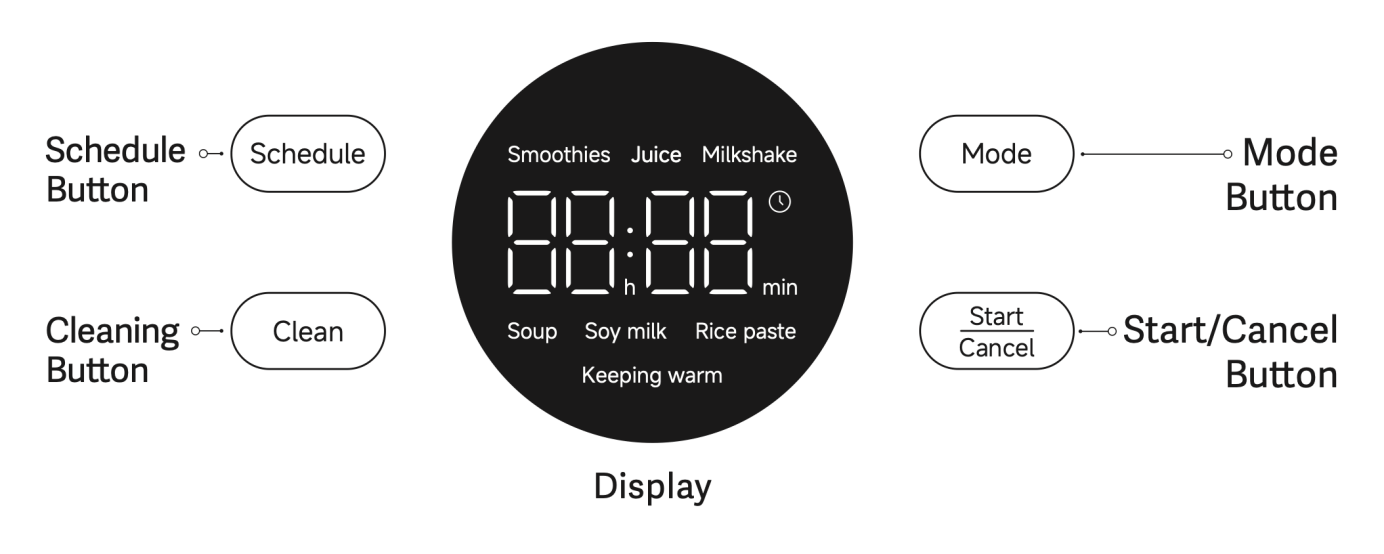
1. It comes with an HD LED display, providing a clear view of menus and working status at a glance;
2. Touch buttons for effortless mode switching. After connecting to power, press the Mode Button to select a menu. Press the Start/Cancel Button to begin or pause cooking. During cooking, press and hold the Start/Cancel button for 3 seconds to end the process;
3. A long beep sound signals the completion of cooking or operation. After selecting the desired menu, press the Schedule Button to enter the preset adjustment mode. The maximum schedule time is 12 hours. Short presses increase time in 30-minute increments while pressing and holding increase time in 1-hour increments.
FAQ
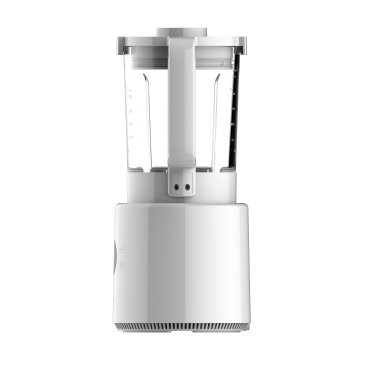
1. Q: What is the appearance of the Xiaomi Blender Pro?
A: The appearance of Xiaomi Blender Pro:
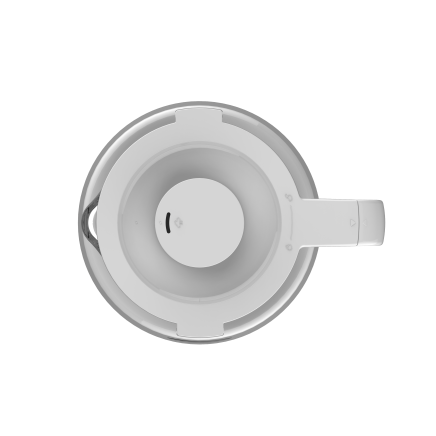 | 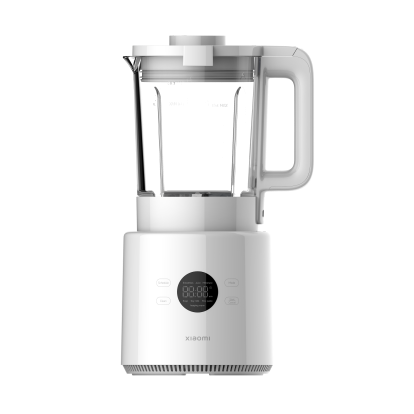 |  |
Top view | Front view | Right view |
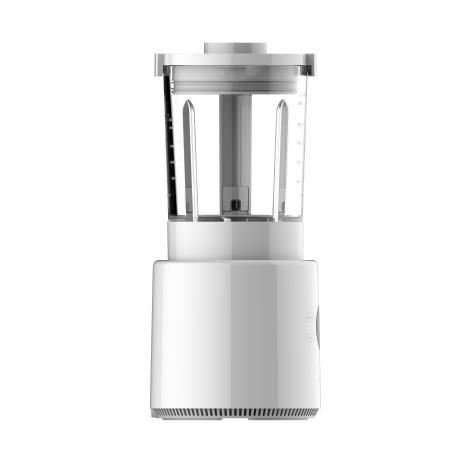 | 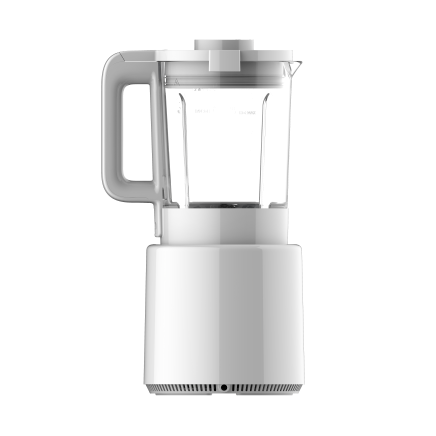 | 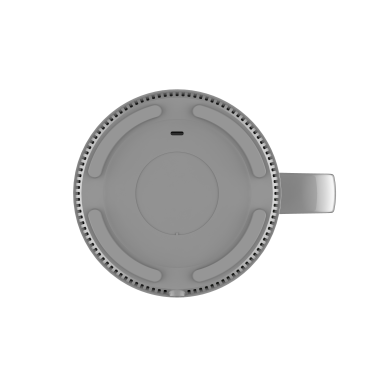 |
Left view | Rear view | Bottom view |
2. Q: What are the rated voltage and rated power of the Xiaomi Blender Pro?
A: The rated voltage of the Xiaomi Blender Pro is 220-240V~, and the rated power is 50-60Hz.
3. Q: What is the power of the Xiaomi Blender Pro?
A: The blending power is 500W, and the heating power is 800W.
4. Q: What is included in the standard package of the Xiaomi Blender Pro?
A: The standard package of the Xiaomi Blender Pro: Blender x 1, Jug x 1, Soft close lid x 1, Measuring cup x 1, Cleaning brush x 1, User manual x 1 and Warranty notice x 1.
5. Q: What are the working modes of the Xiaomi Blender Pro?
A: The Xiaomi Blender Pro is equipped with 6 recipes and 2 cleaning modes.
The recipes and cleaning modes are as follows:
1. Hot drinks (3 options): Soup, Soy milk and Rice paste. The hot drink recipe will automatically enter keeping warm mode after cooking;
2. Cold drinks (3 options): Smoothies, Juice and Milkshake. The cold drink recipe will return to standby mode after cooking;
3. 2 self-cleaning modes: Quick Clean and High temperature sterilization cleaning.
The recipes and cleaning modes are as follows:
1. Hot drinks (3 options): Soup, Soy milk and Rice paste. The hot drink recipe will automatically enter keeping warm mode after cooking;
2. Cold drinks (3 options): Smoothies, Juice and Milkshake. The cold drink recipe will return to standby mode after cooking;
3. 2 self-cleaning modes: Quick Clean and High temperature sterilization cleaning.
6. Q: What are the recipes for the Xiaomi Blender Pro?
A: You can refer to the following recipes to make delicious drinks:
Mode | Time | Ingredient Amount |
Smoothies | 45s | 100g banana (about one piece), 100g mango, 350g ice (2cm³), 30mL water |
Juice | 2min | 400g red dragon fruit, 300mL milk, a small amount of honey |
Milkshake | 2min | 350g mango, 300g yogurt, 5 ice cubes (2 cm³), 120mL water |
Soup | 28min | 2 potatoes (about 400g), 20g cashew nuts, 80g mushrooms, 2g salt, water added to the 800mL mark |
Soy milk | 38min | About 100g dried soybeans (at the 1400mL mark of the soymilk measuring cup), water added to the 1400mL mark |
Rice paste | 35min | 30g rice, 30g millet, 300g pumpkin, water added to the 1200mL mark |
Notes:
1. The provided measuring cup shall be used to accurately measure ingredients according to the recipe. It is important to ensure that the ingredients and water do not exceed the maximum water level. Please add the ingredients first, followed by adding water up to the corresponding water level mark;
2. Please cut the large ingredients into 15 × 15 × 15mm pieces and remove the core/seeds before preparing the drink; grapes shall be peeled prior to making the drink;
3. When preparing hot drinks, the combined volume of ingredients and liquids shall not exceed 1400mL, which is the maximum water level mark for hot drinks;
4. When preparing cold drinks, the combined volume of ingredients and liquids shall not exceed 1750mL, which is the maximum water level mark for cold drinks.
1. The provided measuring cup shall be used to accurately measure ingredients according to the recipe. It is important to ensure that the ingredients and water do not exceed the maximum water level. Please add the ingredients first, followed by adding water up to the corresponding water level mark;
2. Please cut the large ingredients into 15 × 15 × 15mm pieces and remove the core/seeds before preparing the drink; grapes shall be peeled prior to making the drink;
3. When preparing hot drinks, the combined volume of ingredients and liquids shall not exceed 1400mL, which is the maximum water level mark for hot drinks;
4. When preparing cold drinks, the combined volume of ingredients and liquids shall not exceed 1750mL, which is the maximum water level mark for cold drinks.
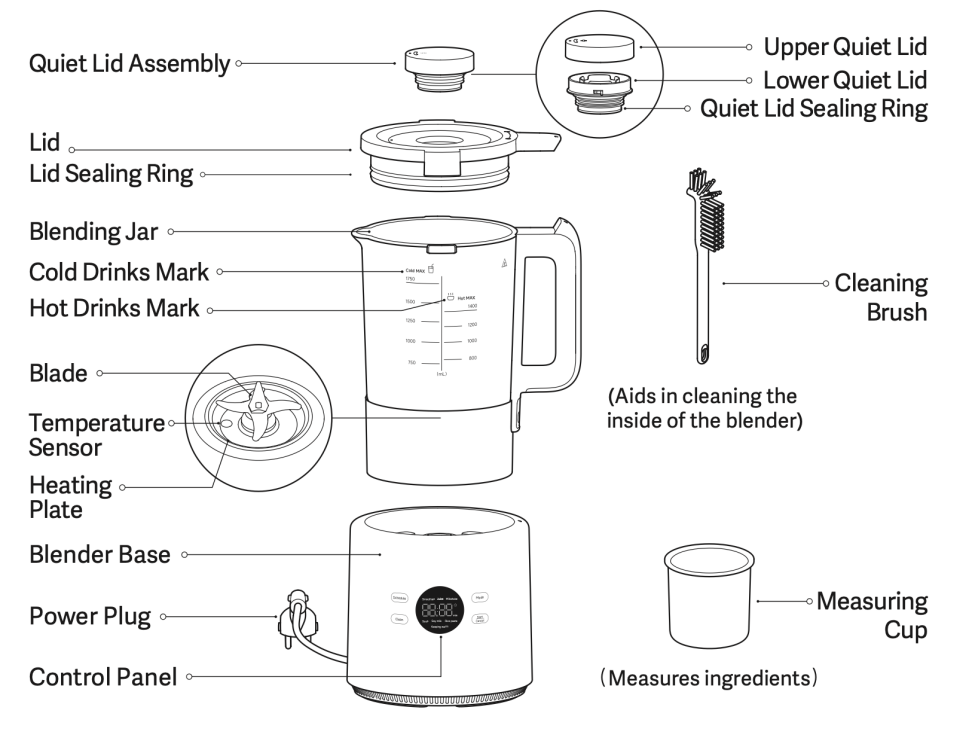
7. Q: What are the components of the Xiaomi Blender Pro?
A: Here is an introduction to the components of the Xiaomi Blender Pro:
There are Quiet Lid Assembly (Upper Quiet Lid, Lower Quiet Lid and Quiet Lid Sealing Ring) on the upper part of the lid. It has a Lid Sealing Ring.
The product has a Blending Jar, with Cold Drinks Mark and Hot Drinks Mark. In the inner of the blending Jar, there are a Blade, Temperature Sensor and Heating Plate. It also comes with a blender base, which has a control panel on it. The product also has a Power Plug, a Cleaning Brush and a Measuring Cup.
Note:
Illustrations of product, accessories, and user interfaces in the user manual are for reference purposes only. Actual product and functions will vary due to product enhancements.
There are Quiet Lid Assembly (Upper Quiet Lid, Lower Quiet Lid and Quiet Lid Sealing Ring) on the upper part of the lid. It has a Lid Sealing Ring.
The product has a Blending Jar, with Cold Drinks Mark and Hot Drinks Mark. In the inner of the blending Jar, there are a Blade, Temperature Sensor and Heating Plate. It also comes with a blender base, which has a control panel on it. The product also has a Power Plug, a Cleaning Brush and a Measuring Cup.
Note:
Illustrations of product, accessories, and user interfaces in the user manual are for reference purposes only. Actual product and functions will vary due to product enhancements.
8. Q: What is the length of the power cord for the Xiaomi Blender Pro?
A: The total length of the power cord is approximately 0.9 meters, with about 0.8 meters exposed.
9. Q: What type of power plug does the Xiaomi Blender Pro use?
A: 1. The power plug of the Xiaomi Blender Pro European version is a Type E plug;
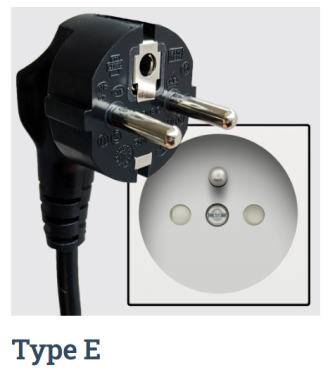
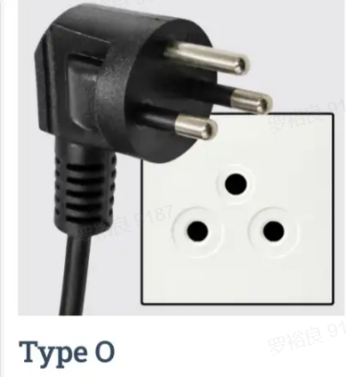
2. The power plug of the Xiaomi Blender Pro Thailand version is a Type O plug;
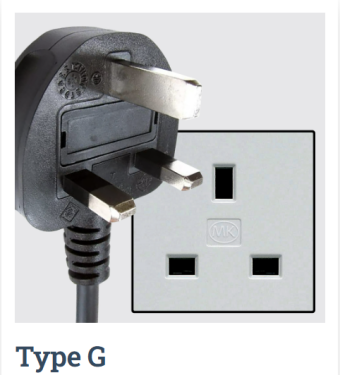
3. The power plug of the Xiaomi Blender Pro British version is a Type G plug;
2. The power plug of the Xiaomi Blender Pro Thailand version is a Type O plug;
3. The power plug of the Xiaomi Blender Pro British version is a Type G plug;
10. Q: What are the dimensions of the Xiaomi Blender Pro?
A: The dimensions of the Xiaomi Blender Pro are 176 × 223 × 383mm. The package dimensions of the Xiaomi Blender Pro European version are 400 × 226 × 290mm. The package dimensions of the Xiaomi Blender Pro British and Thailand versions are 388 × 220 × 290mm.
11. Q: What is the weight of the Xiaomi Blender Pro?
A: 1. The gross weight of the Xiaomi Blender Pro European version is 5.69kg, and the net weight is 4.24kg;
2. The gross weight of the Xiaomi Blender Pro Thailand version is 5.05kg, and the net weight is 4.28kg;
3. The gross weight of the Xiaomi Blender Pro British version is 5.05kg, and the net weight is 4.28kg.
2. The gross weight of the Xiaomi Blender Pro Thailand version is 5.05kg, and the net weight is 4.28kg;
3. The gross weight of the Xiaomi Blender Pro British version is 5.05kg, and the net weight is 4.28kg.
12. Q: How to operate the Xiaomi Blender Pro for the first time?
A: For first-time use, we recommend thoroughly cleaning all food-contact components. Remove all packaging and clean the blender main unit, blending jar, quiet lid, cleaning brush, and measuring cup.
The cleaning steps are as follows:
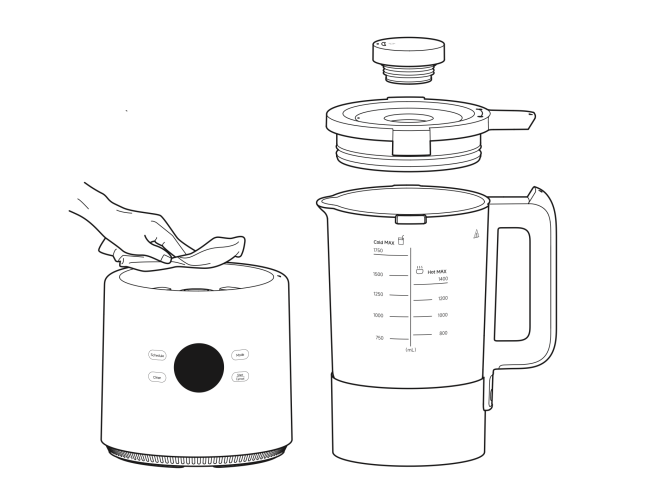
1. Remove the blender, turn the jar lid handle counterclockwise to open the jar lid, lift the quiet lid assembly directly upwards for removal. Clean the quiet lid assembly, jar lid, and blending jar respectively.
Note:
The blending jar can be cleaned using water, while the blender can be wiped with a dry cloth. Avoid immersing any electrical components, such as the blending jar and the blender, and don't directly rinse the electrical components like the blender and the bottom of the blending jar.
2. Please add water up to the maximum water level of hot drinks before initial use. Press and hold the Clean button for three seconds to complete the altitude self-adaption process.
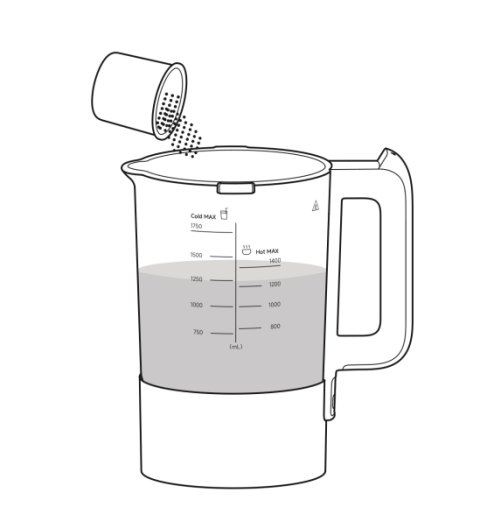
The cleaning steps are as follows:
1. Remove the blender, turn the jar lid handle counterclockwise to open the jar lid, lift the quiet lid assembly directly upwards for removal. Clean the quiet lid assembly, jar lid, and blending jar respectively.
Note:
The blending jar can be cleaned using water, while the blender can be wiped with a dry cloth. Avoid immersing any electrical components, such as the blending jar and the blender, and don't directly rinse the electrical components like the blender and the bottom of the blending jar.
2. Please add water up to the maximum water level of hot drinks before initial use. Press and hold the Clean button for three seconds to complete the altitude self-adaption process.
13. Q: What is the altitude adaptation feature of the Xiaomi Blender Pro, and how to set it?
A: Due to varying altitudes in different regions, the altitude adaptation feature adjusts the cooking curve based on the local altitude. After completing the altitude adaptation, issues such as overflowing when making soy milk or undercooking can be avoided.
The specific steps for altitude adaptation are as follows:
For first-time use, fill the blender with water up to the maximum water level line, press and hold the Clean button for 3 seconds, and the blender will automatically enter the sterilization cleaning mode. After completing the sterilization cleaning mode, the altitude adaptation is complete.
The specific steps for altitude adaptation are as follows:
For first-time use, fill the blender with water up to the maximum water level line, press and hold the Clean button for 3 seconds, and the blender will automatically enter the sterilization cleaning mode. After completing the sterilization cleaning mode, the altitude adaptation is complete.
14. Q: What is the heating power of the Xiaomi Blender Pro?
A: It uses a 800W heating power.
15. Q: Does the shell of the Xiaomi Blender Pro get hot? Is it safe to touch?
A: The Xiaomi Blender Pro is a heating appliance. When making hot drinks or performing high-temperature sterilization cleaning, the surface of the blending jar, lid, and quiet lid will get hot. Do not touch them during operation to avoid burns.
Note:
During operation, avoid touching the blending jar or opening the lid and quiet lid to prevent burns from the high temperature. Wait until the temperature decreases after the process is finished before removing the lid and quiet lid.
Note:
During operation, avoid touching the blending jar or opening the lid and quiet lid to prevent burns from the high temperature. Wait until the temperature decreases after the process is finished before removing the lid and quiet lid.
16. Q: What is the capacity of the Xiaomi Blender Pro?
A: The maximum capacity of the Xiaomi Blender Pro is 1.75L.
17. Q: What is the water level line of the Xiaomi Blender Pro?
A: 1. For hot drinks: the upper water level is 1.4L, and the lower water level is 0.8L;
2. For cold drinks: the upper water level is 1.75L, and the lower water level is 0.75L.
2. For cold drinks: the upper water level is 1.75L, and the lower water level is 0.75L.
18. Q: Is the Xiaomi Blender Pro waterproof?
A: It is not waterproof. Do not rinse the blending jar or the base directly with water, and do not immerse the blender in water.
19. Q: What is the material of the panel on the Xiaomi Blender Pro?
A: The panel of the Xiaomi Blender Pro is made of PC (polycarbonate) material.
20. Q: What are the features of the control panel on the Xiaomi Blender Pro
A: It had an LED screen with touch controls (touch buttons). It displays menu names and cooking status in real-time, making operations simple, intuitive, and easy to understand.
21. Q: What heating principle does the Xiaomi Blender Pro use?
A: The Xiaomi Blender Pro uses a die-cast aluminum heating plate for heating. When powered on and a hot drink menu or high-temperature sterilization cleaning is selected, the heating plate transfers heat to the blending cup, warming the ingredients.
22. Q: Does the Xiaomi Blender Pro have voice prompts?
A: The Xiaomi Blender Pro provides beep sound alerts during operation but does not have voice prompts.
23. Q: What is the standby power of the Xiaomi Blender Pro?
A: The standby power is approximately 1W.
23. Q: What is the standby power of the Xiaomi Blender Pro?
A: The standby power is approximately 1W.
24. Q: How to turn on or off the Xiaomi Blender Pro?
A: It does not support an independent power switch. Please unplug the power cord to turn it off.
25. Q: Does the Xiaomi Blender Pro automatically power off after completing a task?
A: The Xiaomi Blender Pro does not power off automatically after cooking. Instead, it enters either standby mode or a keep-warm state.
1. After the hot drink preparation: It enters keep-warm mode;
2. After cold drink preparation, quick cleaning, or high-temperature sterilization cleaning: It enters standby mode.
1. After the hot drink preparation: It enters keep-warm mode;
2. After cold drink preparation, quick cleaning, or high-temperature sterilization cleaning: It enters standby mode.
26. Q: How many recipes does the Xiaomi Blender Pro have and how to use it?
A: It offers six recipes:
1. Hot drinks (3 options): Soup, Soy milk and Rice paste. The hot drink recipe will automatically enter keeping warm mode after cooking;
2. Cold drinks (3 options): Smoothies, Juice and Milkshake. The cold drink recipe will return to standby mode after cooking.
The operation methods are as follows:
1. Remove the blender, turn the jar lid handle counterclockwise to open the jar lid, lift the quiet lid assembly directly upwards for removal. Clean the quiet lid assembly, jar lid, and blending jar respectively.
Note:
The blending jar can be cleaned using water, while the blender can be wiped with a dry cloth. Avoid immersing any electrical components, such as the blending jar and the blender, and don't directly rinse the electrical components like the blender and the bottom of the blending jar.
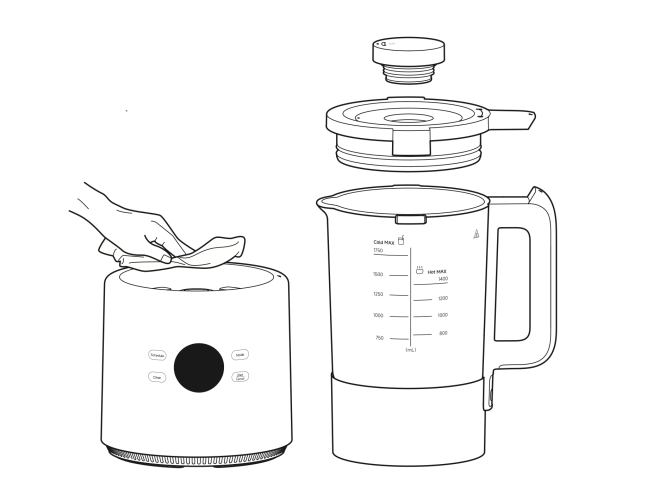
2. A long "beep" sound will be heard after the cooking is finished.
After selecting the desired recipe, press the Schedule button to enter the reservation adjustment mode. The maximum schedule time is 12 hours. Pressing the button increases the time in 30-minute increments, Pressing and holding the button increases the time in 1-hour increments.
3. Install the jar lid back into the jar, and turn the jar lid handle clockwise until the inverted triangle icon on the jar lid is aligned with the inverted triangle icon on the handle. Install the quiet lid assembly to the jar lid, with the dot icon of the quiet lid assembly aligned with the dot icon of the jar lid.
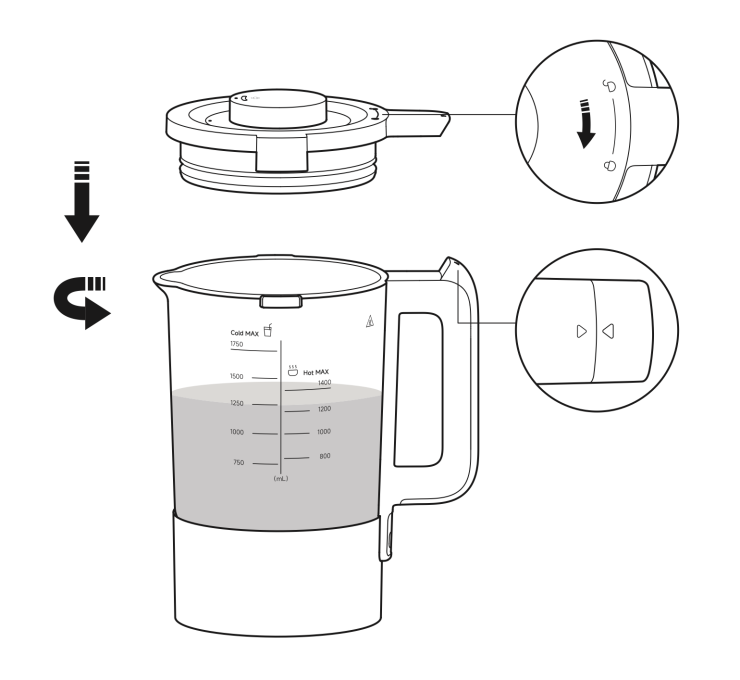
1. Hot drinks (3 options): Soup, Soy milk and Rice paste. The hot drink recipe will automatically enter keeping warm mode after cooking;
2. Cold drinks (3 options): Smoothies, Juice and Milkshake. The cold drink recipe will return to standby mode after cooking.
The operation methods are as follows:
1. Remove the blender, turn the jar lid handle counterclockwise to open the jar lid, lift the quiet lid assembly directly upwards for removal. Clean the quiet lid assembly, jar lid, and blending jar respectively.
Note:
The blending jar can be cleaned using water, while the blender can be wiped with a dry cloth. Avoid immersing any electrical components, such as the blending jar and the blender, and don't directly rinse the electrical components like the blender and the bottom of the blending jar.
2. A long "beep" sound will be heard after the cooking is finished.
After selecting the desired recipe, press the Schedule button to enter the reservation adjustment mode. The maximum schedule time is 12 hours. Pressing the button increases the time in 30-minute increments, Pressing and holding the button increases the time in 1-hour increments.
3. Install the jar lid back into the jar, and turn the jar lid handle clockwise until the inverted triangle icon on the jar lid is aligned with the inverted triangle icon on the handle. Install the quiet lid assembly to the jar lid, with the dot icon of the quiet lid assembly aligned with the dot icon of the jar lid.
27. Q: How to start cooking after selecting the menu/cleaning mode on the Xiaomi Blender Pro?
A: In standby mode, press the Mode button to switch between recipe options. The recipe functions cycle in the following order: Smoothies, Juice, Milkshake, Soup, Soy Milk, and Rice Paste. Once the desired recipe is selected, press the Start/Cancel button to begin cooking.
28. Q: Can the Xiaomi Blender Pro be paused during operation?
A: Yes. During operation, you can pause the device by rotating open the lid or pressing the Start/Cancel button. To resume, press the Start/Cancel button again.
If paused for more than 3 minutes, the current operation will be canceled. To end the operation, press and hold the Start/Cancel button for 3 seconds.
If paused for more than 3 minutes, the current operation will be canceled. To end the operation, press and hold the Start/Cancel button for 3 seconds.
29. Q: Can the Xiaomi Blender Pro adjust the keep-warm duration and temperature?
A: After cooking hot beverages, the blender automatically enters keep-warm mode. The default keep-warm duration is 12 hours and the default keep-warm temperature is 55℃. The duration and temperature cannot be adjusted.
30. Q: How to adjust the reservation time on the Xiaomi Blender Pro?
A: 1. In standby mode, select the desired recipe, then press the Schedule button to enter reservation mode. The display will show the cooking duration for the selected mode, flashing;
2. Press the Schedule button again to adjust the reservation time;
3. Press the Start/Cancel button to confirm the reservation, and the display will show the countdown timer.
Note:
1. The selected menu will automatically start cooking once the reservation timer ends;
2. The maximum reservation time is 12 hours. Pressing the button increases the time in 30-minute increments, Pressing and holding the button increases the time in 1-hour increments.
3. To cancel the reservation, press and hold the Start/Cancel button for 3 seconds.
2. Press the Schedule button again to adjust the reservation time;
3. Press the Start/Cancel button to confirm the reservation, and the display will show the countdown timer.
Note:
1. The selected menu will automatically start cooking once the reservation timer ends;
2. The maximum reservation time is 12 hours. Pressing the button increases the time in 30-minute increments, Pressing and holding the button increases the time in 1-hour increments.
3. To cancel the reservation, press and hold the Start/Cancel button for 3 seconds.
31. Q: Does the Xiaomi Blender Pro have a screen-off function?
A: Yes. In standby mode, the screen will automatically turn off after three minutes of inactivity. The screen can be awakened from the off state by pressing any button, and it will enter the corresponding working state.
32. Q: What does it mean when the Xiaomi Blender Pro screen displays “-- --”? How to fix it?
A: If the screen displays “-- --”, it indicates that the lid is not properly secured according to the instructions or the blending jar is not correctly placed.
To resolve this issue, follow the illustrated instructions to properly place the blending jar and secure the lid, then the blender will return to normal operation.
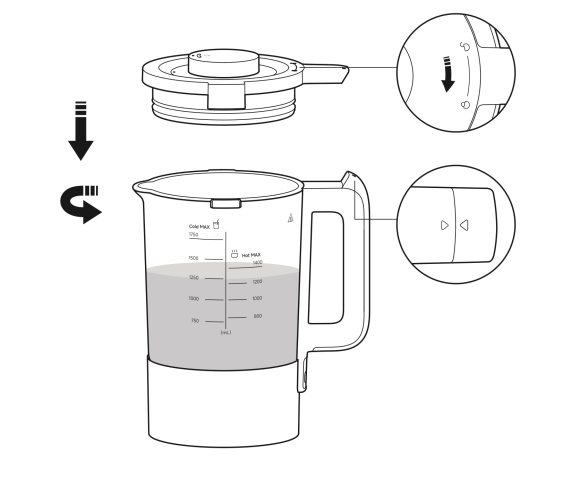
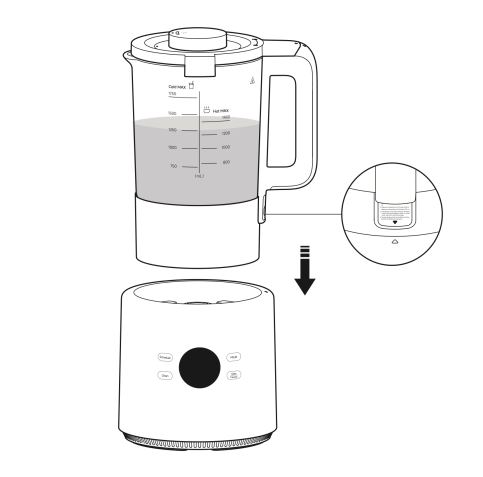
To resolve this issue, follow the illustrated instructions to properly place the blending jar and secure the lid, then the blender will return to normal operation.
33. Q: Will the Xiaomi Blender Pro dry burn?
A: No, it will not. When the blender heats up without water, the dry-burning protection function will activate, stopping the heating process to prevent damage. If this happens, unplug the power cord from the socket and wait for the blender to fully cool down before using it again.
Note:
Do not use cold water to cool it down directly, as this will shorten the lifespan of the heating plate.
Note:
Do not use cold water to cool it down directly, as this will shorten the lifespan of the heating plate.
34. Q: What are the precautions for using the Xiaomi Blender Pro
1. This product is only applicable to household use. Please do not use it for
commercial purposes;
2. The normal operating altitude range of the blender is 0–2000 meters;
3. Do not place the blender on unstable or wet surfaces. Keep it away from fire or heat sources (such as stoves), preferably a distance of 30cm or more from heat sources;
4. Do not place the blender near devices that are susceptible to electromagnetic interference;
5. Do not allow people who lack the physical, sensory, or intellectual ability, or those without the necessary experience or common sense, to use the blender without supervision or guidance;
6. Never let children play with this product; keep the product out of the reach of
children and prohibit unsupervised use by children;
7. Do not hang the charging cable on sharp objects;
8. Don’t use other accessories that didn’t come with this product to avoid personal injury;
9. Do not modify, disassemble, or repair this product on your own;
10. Infants, individuals with renal insufficiency, and those with compromised gastrointestinal function shall opt for soymilk with lower concentration or reduce their consumption;
11. Do not use this product to heat milk, soymilk, cold rice paste, and other viscous liquids directly. Otherwise, bottom scorching will occur, resulting in an unpleasant odor;
12. It is forbidden to use power other than AC 220V~ to avoid fire and electric shock;
13. Always unplug the blender by holding the power plug, so as to avoid electric shocks or fire by short-circuit;
14. Don’t plug or unplug the power plug with wet hands to avoid electric shocks or injury;
15. If the power cord is damaged, it should be replaced by professionals from the manufacturer, its maintenance department or similar departments to avoid danger;
16. Do not use other power cord extenders or parts not approved by the manufacturer when repairing;
17. To avoid the risk of fire, don't use below-standard power strips with this product;
18. Always unplug the blender before it is not in use and before cleaning, assembly and disassembly;
19. Turn off this product and disconnect the power before replacing accessories or touching movable parts;
20. Unplug the charging cable before cleaning and wait until the blending jar has cooled Down;
21. Clean the jar, blade and temperature sensor immediately;
22. Do not immerse the blender and the bottom of the blending jar into water or rinse them with water;
23. Do not use steel wool balls or other hard objects to clean or scrub the heating plate;
24. Please use soft cloth for cleaning;
25. When the blender is not in use for an extended period, unplug the charging cable from the socket and take measures to protect it from moisture, dust, and insects;
26. Regularly clean the surface where the blender is placed and remove any oil stains;
27. When cleaning, please rinse the inside of the blender with clean water and wipe dry. The blender blade is very sharp, so be careful when removing the blade, emptying the blender and cleaning it;
28. Please do not open the lid while the blender is working;
29. Do not add water above the maximum water level mark. Otherwise, the water will overflow or spray out and cause scalds and other hazards;
30. Idling or overloading is strictly prohibited;
31. Do not move the blender or touch its moving parts while it is in operation to avoid accidental injury;
32. When the blender is in use, dry grinding, meat grinding and dry frying are prohibited;
33. Don't move the jar lid and quiet lid assembly;
34. When the blender is boiling milk, the temperature of the blending jar, jar lid, quiet lid assembly, blade and other components is high. Do not touch them to avoid scalds;
35. During the milk production process, refrain from lifting the lid or moving this product to prevent scalding caused by steam or accidents such as scalding and electric shock resulting from ingredient overflow;
36. Do not lift the blender with the lid, so as to avoid the jar slipping off;
37. The addition of hot water above 70°C to milk shall be avoided, as it can adversely affect the taste and result in issues such as inadequate grinding, milk overflow, or alarm;
38. Please do not drink before the milk production is finished. Drinking uncooked soymilk will cause harm to human body;
39. Please do not make milk twice or heat it twice to avoid serious overflow;
40. The temperature of the finished drinks is high, please use heat-resistant utensils and exercise caution in order to prevent spillage and potential scalds;
41. The milk production process of the blender is characterized by intermittent fast and slow sounds, which is normal;
42. Please avoid prolonged continuous milk production to prevent the motor from activating its automatic protection function, resulting in temporary cessation of motor operation;
43. After the completion of production, there shall be an interval of more than 20 minutes for motor cooling, before proceeding to the next production to prevent any adverse impact on the product's service life;
44. Please do not add excessively tough ingredients to avoid potential damage to the blender;
45. The countdown of the production process will vary due to fluctuations in water temperature and volume, which is normal;
46. Steam and heat can damage, discolor, or deform your walls and furniture. Keep the blender at least 30cm away from them during use;
47. When planning to use the blender in places like cabinets or similar locations, ensure proper ventilation;
48. The blending jar shall not be exposed to high temperatures or placed in a high-temperature disinfection cabinet (above 110°C), as this can result in damage;
49. The blender base, blending jar, and lid shall not be placed in the dishwasher or submerged in water for cleaning purposes.
commercial purposes;
2. The normal operating altitude range of the blender is 0–2000 meters;
3. Do not place the blender on unstable or wet surfaces. Keep it away from fire or heat sources (such as stoves), preferably a distance of 30cm or more from heat sources;
4. Do not place the blender near devices that are susceptible to electromagnetic interference;
5. Do not allow people who lack the physical, sensory, or intellectual ability, or those without the necessary experience or common sense, to use the blender without supervision or guidance;
6. Never let children play with this product; keep the product out of the reach of
children and prohibit unsupervised use by children;
7. Do not hang the charging cable on sharp objects;
8. Don’t use other accessories that didn’t come with this product to avoid personal injury;
9. Do not modify, disassemble, or repair this product on your own;
10. Infants, individuals with renal insufficiency, and those with compromised gastrointestinal function shall opt for soymilk with lower concentration or reduce their consumption;
11. Do not use this product to heat milk, soymilk, cold rice paste, and other viscous liquids directly. Otherwise, bottom scorching will occur, resulting in an unpleasant odor;
12. It is forbidden to use power other than AC 220V~ to avoid fire and electric shock;
13. Always unplug the blender by holding the power plug, so as to avoid electric shocks or fire by short-circuit;
14. Don’t plug or unplug the power plug with wet hands to avoid electric shocks or injury;
15. If the power cord is damaged, it should be replaced by professionals from the manufacturer, its maintenance department or similar departments to avoid danger;
16. Do not use other power cord extenders or parts not approved by the manufacturer when repairing;
17. To avoid the risk of fire, don't use below-standard power strips with this product;
18. Always unplug the blender before it is not in use and before cleaning, assembly and disassembly;
19. Turn off this product and disconnect the power before replacing accessories or touching movable parts;
20. Unplug the charging cable before cleaning and wait until the blending jar has cooled Down;
21. Clean the jar, blade and temperature sensor immediately;
22. Do not immerse the blender and the bottom of the blending jar into water or rinse them with water;
23. Do not use steel wool balls or other hard objects to clean or scrub the heating plate;
24. Please use soft cloth for cleaning;
25. When the blender is not in use for an extended period, unplug the charging cable from the socket and take measures to protect it from moisture, dust, and insects;
26. Regularly clean the surface where the blender is placed and remove any oil stains;
27. When cleaning, please rinse the inside of the blender with clean water and wipe dry. The blender blade is very sharp, so be careful when removing the blade, emptying the blender and cleaning it;
28. Please do not open the lid while the blender is working;
29. Do not add water above the maximum water level mark. Otherwise, the water will overflow or spray out and cause scalds and other hazards;
30. Idling or overloading is strictly prohibited;
31. Do not move the blender or touch its moving parts while it is in operation to avoid accidental injury;
32. When the blender is in use, dry grinding, meat grinding and dry frying are prohibited;
33. Don't move the jar lid and quiet lid assembly;
34. When the blender is boiling milk, the temperature of the blending jar, jar lid, quiet lid assembly, blade and other components is high. Do not touch them to avoid scalds;
35. During the milk production process, refrain from lifting the lid or moving this product to prevent scalding caused by steam or accidents such as scalding and electric shock resulting from ingredient overflow;
36. Do not lift the blender with the lid, so as to avoid the jar slipping off;
37. The addition of hot water above 70°C to milk shall be avoided, as it can adversely affect the taste and result in issues such as inadequate grinding, milk overflow, or alarm;
38. Please do not drink before the milk production is finished. Drinking uncooked soymilk will cause harm to human body;
39. Please do not make milk twice or heat it twice to avoid serious overflow;
40. The temperature of the finished drinks is high, please use heat-resistant utensils and exercise caution in order to prevent spillage and potential scalds;
41. The milk production process of the blender is characterized by intermittent fast and slow sounds, which is normal;
42. Please avoid prolonged continuous milk production to prevent the motor from activating its automatic protection function, resulting in temporary cessation of motor operation;
43. After the completion of production, there shall be an interval of more than 20 minutes for motor cooling, before proceeding to the next production to prevent any adverse impact on the product's service life;
44. Please do not add excessively tough ingredients to avoid potential damage to the blender;
45. The countdown of the production process will vary due to fluctuations in water temperature and volume, which is normal;
46. Steam and heat can damage, discolor, or deform your walls and furniture. Keep the blender at least 30cm away from them during use;
47. When planning to use the blender in places like cabinets or similar locations, ensure proper ventilation;
48. The blending jar shall not be exposed to high temperatures or placed in a high-temperature disinfection cabinet (above 110°C), as this can result in damage;
49. The blender base, blending jar, and lid shall not be placed in the dishwasher or submerged in water for cleaning purposes.
35. Q: What environmental considerations should be taken into account when using the Xiaomi Blender Pro?
A: Steam and heat can cause damage, discoloration, or deformation to walls and furniture. Therefore, when using the blender, ensure it is placed at least 30cm away from walls and furniture. If using it inside a kitchen cabinet, ensure proper ventilation.
36. Q: What should be noted after cooking with the Xiaomi Blender Pro?
A: After cooking, promptly clean the lid, lid sealing ring, quiet lid, quiet lid sealing ring, and the blending jar to prevent staining, mold growth, or residue solidification.
37. Q: How to clean the Xiaomi Blender Pro?
A: To clean the blender, please refer to the following steps:
1. After pouring out the beverage, add water up to the maximum water level of cold drinks and utilize the clean function for a quick interior cleaning of the blending jar;
2. After the blender has cooled down, unplug the power cord. Open the lid and quiet lid, then rinse the inner walls of the blending jar, lid, and quiet lid with clean water. Use a cleaning brush for thorough cleaning. The lid seal ring and quiet lid seal ring can be removed for separate cleaning;
3. The quiet lid assembly can be removed for cleaning as follows: Hold the upper quiet lid and lower quiet lid with both hands, gently rotate the lower quiet lid in a clockwise direction, remove it and then detach its sealing ring. Clean the upper quiet lid, lower quiet lid, and the quiet lid sealing ring separately. Once cleaning is complete, reassemble them for further use;
4. After cleaning, reinstall the lid seal ring and quiet lid seal ring into their respective slots on the lid. It is recommended to wipe dry or air-dry the parts before reassembling and storing them;
5. If hard residue forms inside the blending jar and it is difficult to remove, soak it in a moderate amount of water until softened, then wash and dry thoroughly. A cleaning brush can be used to scrub the inside of the blending jar;
6. When the heating plate is not cleaned thoroughly multiple times, or if there is a stubborn layer of residue at the bottom, soak it in water for a period of time. Then, use a cleaning brush to wipe it clean. Exercise caution when wiping near the blades to avoid cuts;
7. When some parts are stained by the juice, wiping these parts with several drops of cooking oil before cleaning can help remove the stains more easily. Rinse the parts with clean water and wipe them dry thoroughly.
Note:
During operation, depending on the ingredients, the lid and lid seal ring can become stained to varying degrees, which is a normal occurrence.
1. After pouring out the beverage, add water up to the maximum water level of cold drinks and utilize the clean function for a quick interior cleaning of the blending jar;
2. After the blender has cooled down, unplug the power cord. Open the lid and quiet lid, then rinse the inner walls of the blending jar, lid, and quiet lid with clean water. Use a cleaning brush for thorough cleaning. The lid seal ring and quiet lid seal ring can be removed for separate cleaning;
3. The quiet lid assembly can be removed for cleaning as follows: Hold the upper quiet lid and lower quiet lid with both hands, gently rotate the lower quiet lid in a clockwise direction, remove it and then detach its sealing ring. Clean the upper quiet lid, lower quiet lid, and the quiet lid sealing ring separately. Once cleaning is complete, reassemble them for further use;
4. After cleaning, reinstall the lid seal ring and quiet lid seal ring into their respective slots on the lid. It is recommended to wipe dry or air-dry the parts before reassembling and storing them;
5. If hard residue forms inside the blending jar and it is difficult to remove, soak it in a moderate amount of water until softened, then wash and dry thoroughly. A cleaning brush can be used to scrub the inside of the blending jar;
6. When the heating plate is not cleaned thoroughly multiple times, or if there is a stubborn layer of residue at the bottom, soak it in water for a period of time. Then, use a cleaning brush to wipe it clean. Exercise caution when wiping near the blades to avoid cuts;
7. When some parts are stained by the juice, wiping these parts with several drops of cooking oil before cleaning can help remove the stains more easily. Rinse the parts with clean water and wipe them dry thoroughly.
Note:
During operation, depending on the ingredients, the lid and lid seal ring can become stained to varying degrees, which is a normal occurrence.
38. Q: What are the precautions for cleaning the Xiaomi Blender Pro?
1. The blending blades are very sharp, please be cautious when cleaning to avoid injury;
2. Do not use abrasive cleaners or corrosive liquids (such as gasoline or acetone) to clean the blender;
3. Do not place the blender in a dishwasher, sterilizer, or dryer for cleaning, sterilizing, or drying;
4. The lid and quiet lid can be rinsed directly, but do not rinse the exterior of the blender.
2. Do not use abrasive cleaners or corrosive liquids (such as gasoline or acetone) to clean the blender;
3. Do not place the blender in a dishwasher, sterilizer, or dryer for cleaning, sterilizing, or drying;
4. The lid and quiet lid can be rinsed directly, but do not rinse the exterior of the blender.
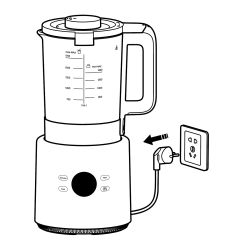 | 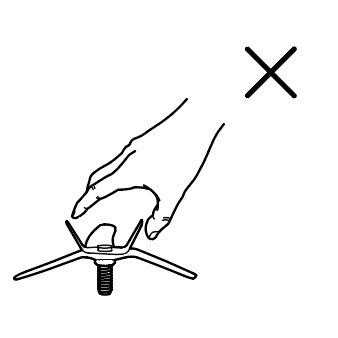 | 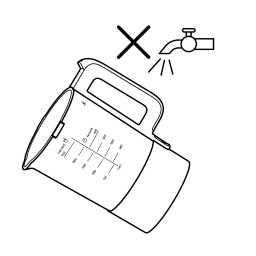 | 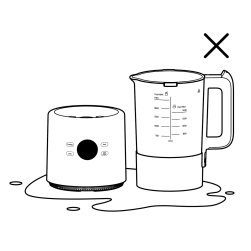 |
| Before cleaning, please unplug the power cord. | The blending blades are very sharp, so do not touch them directly with your hands. | Do not rinse the outer wall and bottom of the blending jar with water. | Do not soak the main unit and the bottom of the blending jar. |
39. Q: How to maintain the Xiaomi Blender Pro?
A: When the blender is not used for a long time, please store it in a dry and ventilated place to prevent the motor from getting wet and affecting its future use.
40. Q: What to do if there are still ice chunks after using the Smoothies mode on the Xiaomi Blender Pro?
A: Due to differences in ambient temperature, the blending effect of smoothies will vary. If there are still ice chunks after blending, you can repeat the smoothie function multiple times to achieve a better blending result.
Troubleshooting
1. Q: What to do if the Xiaomi Blender Pro does not turn on or light up after connecting to power?
A: If the blender does not turn on after connecting to power, please check the following:
1. Ensure the power cable is properly connected;
2. Check if the power socket is properly connected and supplying power.
If the above steps do not resolve the issue, please contact the after-sales service center.
1. Ensure the power cable is properly connected;
2. Check if the power socket is properly connected and supplying power.
If the above steps do not resolve the issue, please contact the after-sales service center.
2. Q: What to do if the Xiaomi Blender Pro does not blend?
A: If the blender is not blending, please follow these troubleshooting steps:
1. Check if the product is correctly powered on. If not, please refer to the instructions to correctly connect the power;
2. After long-term use, the blender could become unresponsive. In this case, try disconnecting the power, letting the device cool down for a while, and then try turning it on again.
If the above steps do not resolve the issue, please contact the after-sales service center.
1. Check if the product is correctly powered on. If not, please refer to the instructions to correctly connect the power;
2. After long-term use, the blender could become unresponsive. In this case, try disconnecting the power, letting the device cool down for a while, and then try turning it on again.
If the above steps do not resolve the issue, please contact the after-sales service center.
3. Q: Why does the Xiaomi Blender Pro's timer function not complete on time?
A: Please confirm whether the timer function was correctly set:
1. In standby mode, select the desired mode, then press the Schedule button. The mode indicator will stay on, and the screen will display the timer and blink;
Note:
Cold drink modes (Milkshake, juice) and cleaning functions do not support the timer function.
2. Press the timer button again to select the desired time;
Note:
While adjusting the timer, pressing the button increases the time in 30-minute increments, Pressing and holding the button increases the time in 1-hour increments.
3. Once the timer is set, the screen will display a countdown, and the cooking will finish when the timer reaches zero.
If the timer function still doesn't complete on time despite following these steps, please contact customer support.
1. In standby mode, select the desired mode, then press the Schedule button. The mode indicator will stay on, and the screen will display the timer and blink;
Note:
Cold drink modes (Milkshake, juice) and cleaning functions do not support the timer function.
2. Press the timer button again to select the desired time;
Note:
While adjusting the timer, pressing the button increases the time in 30-minute increments, Pressing and holding the button increases the time in 1-hour increments.
3. Once the timer is set, the screen will display a countdown, and the cooking will finish when the timer reaches zero.
If the timer function still doesn't complete on time despite following these steps, please contact customer support.
4. Q: What to do if the Xiaomi Blender Pro displays an error code?
A: The error codes and solution for the Xiaomi Blender Pro are as follows:
Error Codes | Possible Causes | Solution |
E0 | Boil-dry protection | Cut off the power. The blender will automatically resume working when the temperature goes down. |
E1 | Temperature sensor is open-circuited. | Contact the after-sales service team. |
E2 | Temperature sensor is short-circuited. | Contact the after-sales service team. |
A1 | Motor error | Cut off the power, and allow the motor to cool down completely before being powered on for use. If the blender is still unable to recover according to the operation prompts, please contact our after-sales service team. |
-- -- | The jar lid is not properly fastened. | Please refer to User Manual and securely attach the jar lid as indicated to resume functionality. |
5. Q: What to do if the food overflows when using the Xiaomi Blender Pro?
A: The possible causes are as follows:
1. More ingredients added than the rated capacity;
2. More water added than the rated capacity;
3. The ingredients do not match with the function.
The solutions are as follows:
1. Add an appropriate amount of ingredients;
2. Add water up to the correct water level line;
3. Select the desired function mode according to the user manual.
1. More ingredients added than the rated capacity;
2. More water added than the rated capacity;
3. The ingredients do not match with the function.
The solutions are as follows:
1. Add an appropriate amount of ingredients;
2. Add water up to the correct water level line;
3. Select the desired function mode according to the user manual.
6. Q: What to do if the bottom scorches when using the Xiaomi Blender Pro?
A: The possible causes are as follows:
1. More ingredients added than the rated capacity;
2. Ingredients are too sticky;
3. More water added than the rated capacity;
4. Residual ingredients inside the jar;
5. The ingredients do not match with the function.
The solutions are as follows:
1. Add an appropriate amount of ingredients;
2. Do not put in flour or other ingredients that are too sticky;
3. Add water up to the correct water level line;
4. Clean well before use;
5. Select the desired function mode according to the user manual.
1. More ingredients added than the rated capacity;
2. Ingredients are too sticky;
3. More water added than the rated capacity;
4. Residual ingredients inside the jar;
5. The ingredients do not match with the function.
The solutions are as follows:
1. Add an appropriate amount of ingredients;
2. Do not put in flour or other ingredients that are too sticky;
3. Add water up to the correct water level line;
4. Clean well before use;
5. Select the desired function mode according to the user manual.
7. Q: What to do if Ingredients cannot be blended properly in the Xiaomi Blender Pro?
A: The possible causes are as follows:
1. Too few or too many ingredients;
2. Too little or too much water;
3. The ingredients do not match with the function.
The solutions are as follows:
1. Add an appropriate amount of ingredients;
2. Add water up to the correct water level line;
3. Select the desired function mode according to the user manual.
1. Too few or too many ingredients;
2. Too little or too much water;
3. The ingredients do not match with the function.
The solutions are as follows:
1. Add an appropriate amount of ingredients;
2. Add water up to the correct water level line;
3. Select the desired function mode according to the user manual.
8. Q: What to do if ingredients are not heated at the end of operation when using the Xiaomi Blender Pro?
A: The possible causes are as follows:
1. The ingredients do not match with the function;
2. Faulty thermostat.
The solutions are as follows:
1. Select the desired function mode according to the user manual;
2. Contact the after-sales service team.
1. The ingredients do not match with the function;
2. Faulty thermostat.
The solutions are as follows:
1. Select the desired function mode according to the user manual;
2. Contact the after-sales service team.
9. Q: What to do if the display does not light up on the Xiaomi Blender Pro?
A: The possible causes are as follows:
1. The power plug is not inserted properly;
2. The internal wire is loose or damaged.
The solutions are as follows:
1. The power cord shall be checked to ensure it is properly connected and energized;
2. Contact the after-sales service team.
1. The power plug is not inserted properly;
2. The internal wire is loose or damaged.
The solutions are as follows:
1. The power cord shall be checked to ensure it is properly connected and energized;
2. Contact the after-sales service team.
10. Q: What to do if the display is illuminated, however, the blender is non-functional on the Xiaomi Blender Pro?
A: The possible causes are as follows:
1. Function not selected or Start/Cancel button not pressed;
2. The blender overheated;
3. Motor jam;
4. The internal wire is loose or damaged.
The solutions are as follows:
1. Follow the instructions to select the function, confirm the function
and then initiate the operation by pressing the Start/Cancel button;
2. Unplug the power cord before proceeding to turn on the power
and operate it in accordance with normal procedures;
3. Unplug the power cord, wait for the temperature to decrease, and
clean up the food stuck in the blades;
4. Contact the after-sales service team.
1. Function not selected or Start/Cancel button not pressed;
2. The blender overheated;
3. Motor jam;
4. The internal wire is loose or damaged.
The solutions are as follows:
1. Follow the instructions to select the function, confirm the function
and then initiate the operation by pressing the Start/Cancel button;
2. Unplug the power cord before proceeding to turn on the power
and operate it in accordance with normal procedures;
3. Unplug the power cord, wait for the temperature to decrease, and
clean up the food stuck in the blades;
4. Contact the after-sales service team.
11. Q: Why is there operating noise when using the Xiaomi Blender Pro?
A: The blender will generate some noises while stirring the ingredients, which is normal.
Does it help?
Yes
No