

How to keep the Redmi Watch 5 and the Mi Fitness APP connected?
Please set the Mi Fitness APP to the application whitelist and lock the APP to run in the background. Do not turn off the Bluetooth of the mobile phone. Keep the connection within the Bluetooth connection distance between the watch and the mobile phone.
The setting methods are different for different mobile phone models.
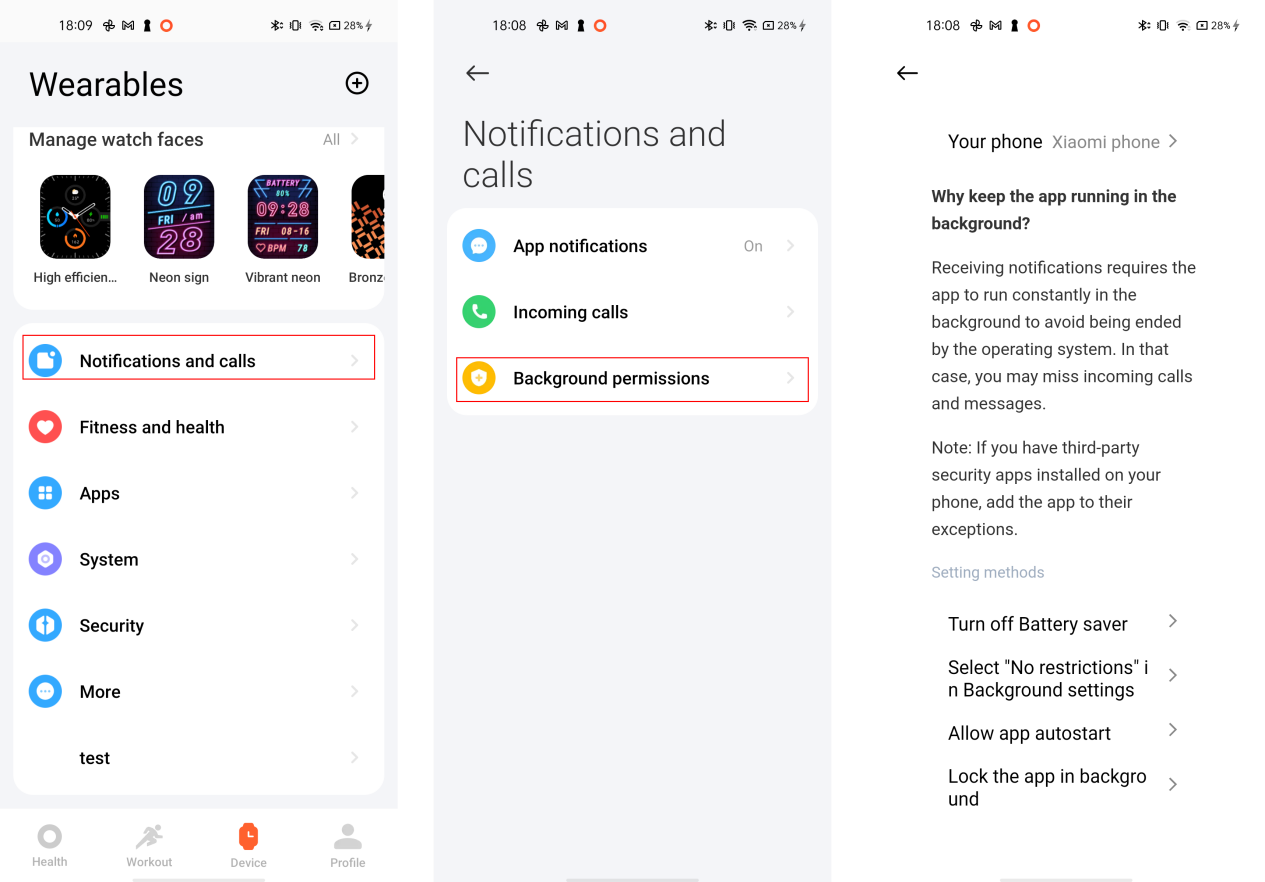
To keep the Redmi Watch 5 and the Mi Fitness APP connected, please refer to the following steps:
1. Go to the Mi Fitness APP
2. Tap [Device];
3. Tap [Notifications and calls];
4. Tap [Background permissions] and follow the prompts according to the specific setting method.
The setting methods are different for different mobile phone models.
To keep the Redmi Watch 5 and the Mi Fitness APP connected, please refer to the following steps:
1. Go to the Mi Fitness APP
2. Tap [Device];
3. Tap [Notifications and calls];
4. Tap [Background permissions] and follow the prompts according to the specific setting method.
Does it help?
Yes
No