

What to do if the app crashes on the Xiaomi TV A2 55?
If an app on your Xiaomi TV A2 55 is crashing, please refer to the following troubleshooting steps:
1. Sometimes, weak or unstable internet connections can cause apps to crash or shut down. Ensure your TV is connected to a stable and strong Wi-Fi or wired internet connection;
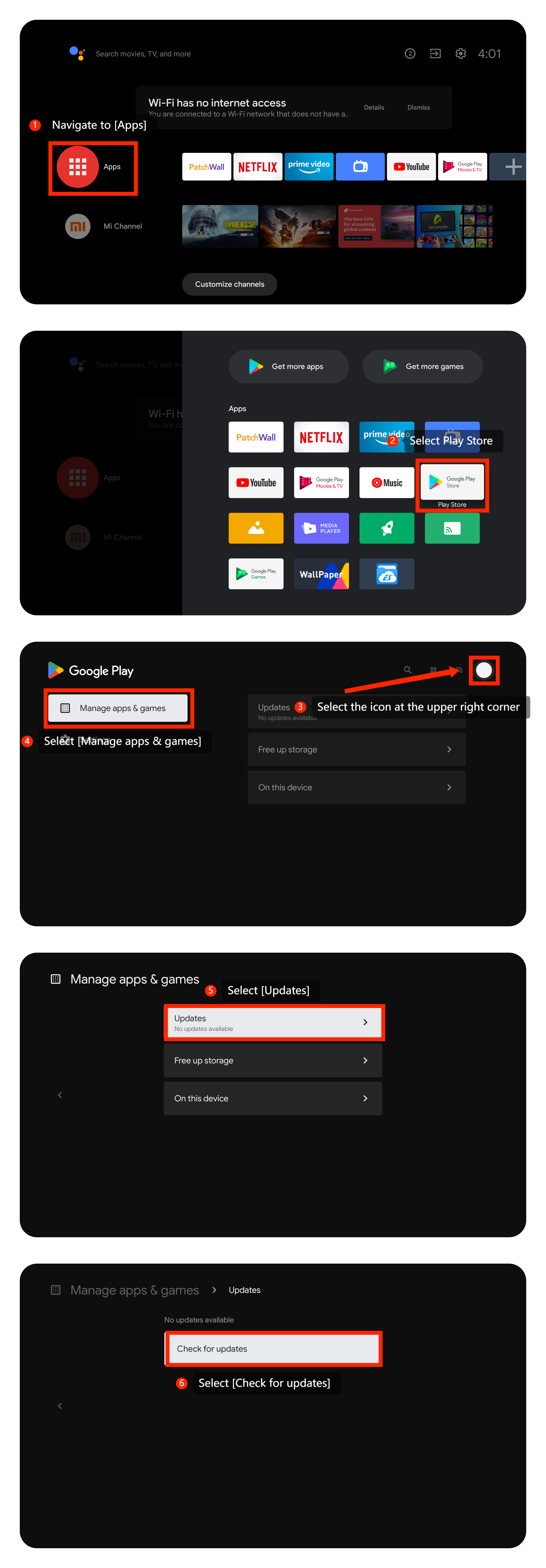
2. Install any available updates and see if that resolves the issue. Please navigate to [Apps] >> select Play Store >> select the icon at the upper right corner >> [Manage apps & games] >> [Updates] >> [Check for updates];
3. Clear app cache and data might reset the app and resolve the issue. You can go to [Settings] >> [Apps] >> select the specific app for which you want to clear the cache and data >> select [Clear cache] or [Clear data] (Please save or back up the data in advance);

4. If clearing the app’s cache and data doesn’t work, you can uninstall the app and reinstall it from the Play Store;
Note:
Uninstalling and reinstalling may affect the data. Please save or back up the data in advance.
5. Turn off the TV, unplug it from the power source, wait for a minute, and then plug it back in;
6. Make sure your TV’s operating system is up-to-date. Please navigate to [Settings] >> [Device Preferences] >> [About] >> [System update] >> search for an available update and then select the download and install option to update the system;
7. If the issue persists, you can try factory resetting your TV. Please perform a factory reset by going to [Settings] >> [Device Preferences] >> scroll down and select [Reset]. After the reset, set up the TV again and check if the issue persists.
We hope the above methods can resolve the issue. If the issue still persists, you could submit your feedback on your TV by going to [Settings] >> [Device Preferences] >> [Home screen] >> [Send feedback].
1. Sometimes, weak or unstable internet connections can cause apps to crash or shut down. Ensure your TV is connected to a stable and strong Wi-Fi or wired internet connection;
2. Install any available updates and see if that resolves the issue. Please navigate to [Apps] >> select Play Store >> select the icon at the upper right corner >> [Manage apps & games] >> [Updates] >> [Check for updates];
3. Clear app cache and data might reset the app and resolve the issue. You can go to [Settings] >> [Apps] >> select the specific app for which you want to clear the cache and data >> select [Clear cache] or [Clear data] (Please save or back up the data in advance);
4. If clearing the app’s cache and data doesn’t work, you can uninstall the app and reinstall it from the Play Store;
Note:
Uninstalling and reinstalling may affect the data. Please save or back up the data in advance.
5. Turn off the TV, unplug it from the power source, wait for a minute, and then plug it back in;
6. Make sure your TV’s operating system is up-to-date. Please navigate to [Settings] >> [Device Preferences] >> [About] >> [System update] >> search for an available update and then select the download and install option to update the system;
7. If the issue persists, you can try factory resetting your TV. Please perform a factory reset by going to [Settings] >> [Device Preferences] >> scroll down and select [Reset]. After the reset, set up the TV again and check if the issue persists.
We hope the above methods can resolve the issue. If the issue still persists, you could submit your feedback on your TV by going to [Settings] >> [Device Preferences] >> [Home screen] >> [Send feedback].
Does it help?
Yes
No