

How to enable workout modes on the Xiaomi Smart Band 9 Active?
The Xiaomi Smart Band 9 Active supports 50 workout modes, including common workouts, indoor and outdoor workouts, training, ball games, ice and snow workouts, and recreational workouts, which can meet various needs of daily exercise.
To enable workout modes on your band, please refer to the following steps (take outdoor running as an example):
1. Turn on the band;
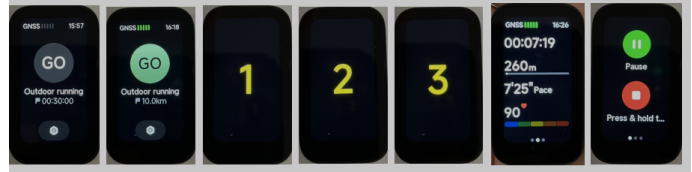
2. When you tap on outdoor running on the band, it will prompt that positioning is in progress. If positioning fails, the exercise trajectory will not be recorded;
3. Tap [GO] to start the countdown, and then the band starts recording data after 3, 2, 1;
4. Slide the band to the right on the exercise interface to pause and end the exercise. Tap the pause icon above to pause the exercise. Press and hold the end icon to end the exercise. Slide to the left to control the phone's music playback during exercise;
5. After finishing the exercise, you can immediately view the overview data of this exercise on the band. You can also view the historical exercise records in the exercise records on the band;
6. After finishing the exercise, connect to the Mi Fitness APP to synchronize exercise data, and then you can view all historical exercise data in the exercise record on the APP home interface. Tap on a piece of exercise data to view detailed exercise data, such as the heart rate chart during exercise.
To enable workout modes on your band, please refer to the following steps (take outdoor running as an example):
1. Turn on the band;
2. When you tap on outdoor running on the band, it will prompt that positioning is in progress. If positioning fails, the exercise trajectory will not be recorded;
3. Tap [GO] to start the countdown, and then the band starts recording data after 3, 2, 1;
4. Slide the band to the right on the exercise interface to pause and end the exercise. Tap the pause icon above to pause the exercise. Press and hold the end icon to end the exercise. Slide to the left to control the phone's music playback during exercise;
5. After finishing the exercise, you can immediately view the overview data of this exercise on the band. You can also view the historical exercise records in the exercise records on the band;
6. After finishing the exercise, connect to the Mi Fitness APP to synchronize exercise data, and then you can view all historical exercise data in the exercise record on the APP home interface. Tap on a piece of exercise data to view detailed exercise data, such as the heart rate chart during exercise.
Does it help?
Yes
No