

What to do if there is a touch failure on the right side of the front camera hole on the Xiaomi MIX Flip?
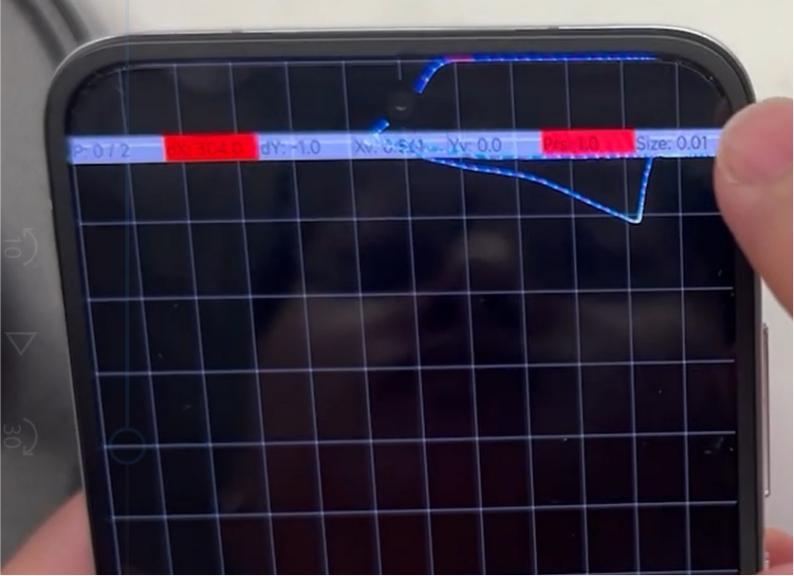
The right side of the front camera hole on the Xiaomi MIX Flip main screen is experiencing touch failure. After investigation, it is initially determined that the issue is caused by damage to the area around the front camera hole.
Please refer to the following possible causes and solutions:
1. The issue can be caused by removing the protective film from the front camera hole or by cleaning the area, which can lead to screen damage in the hole region. Alternatively, leftover adhesive or foreign substances after cleaning can cause damage to the screen in that area;
2. When removing the protective film from the front camera hole of the Xiaomi MIX Flip main screen, use a suction pen to gently lift it off or use a cotton swab wrapped with 3M tape to peel it off. Avoid touching the screen directly, and do not use metal tools to peel or clean the film to prevent damaging the screen around the front camera hole. For dust removal, it is recommended to use blowing air to clear it out;
3. After replacing the screen, focus on adding line protection to avoid the need for a second repair;
4. Use the line test method.
For your reference, the method is instructed below:
(1). Go to the dialer and input *#*#6484#*#*;
(2). Tap the three dots in the top-right corner and select [Additional tools];
(3). Select [Touch sensor];
(4). Draw lines to test.
Please refer to the following possible causes and solutions:
1. The issue can be caused by removing the protective film from the front camera hole or by cleaning the area, which can lead to screen damage in the hole region. Alternatively, leftover adhesive or foreign substances after cleaning can cause damage to the screen in that area;
2. When removing the protective film from the front camera hole of the Xiaomi MIX Flip main screen, use a suction pen to gently lift it off or use a cotton swab wrapped with 3M tape to peel it off. Avoid touching the screen directly, and do not use metal tools to peel or clean the film to prevent damaging the screen around the front camera hole. For dust removal, it is recommended to use blowing air to clear it out;
3. After replacing the screen, focus on adding line protection to avoid the need for a second repair;
4. Use the line test method.
For your reference, the method is instructed below:
(1). Go to the dialer and input *#*#6484#*#*;
(2). Tap the three dots in the top-right corner and select [Additional tools];
(3). Select [Touch sensor];
(4). Draw lines to test.
Does it help?
Yes
No