

How to create an additional floating shutter on the Xiaomi 14T?
The additional floating shutter function on the Xiaomi 14T allows you to place a movable shutter button anywhere on the screen, making it easier to capture photos from various angles or in one-handed scenarios. This feature is especially convenient for taking selfies or group photos, as it provides flexibility and ease, ensuring you can comfortably capture the perfect shot.
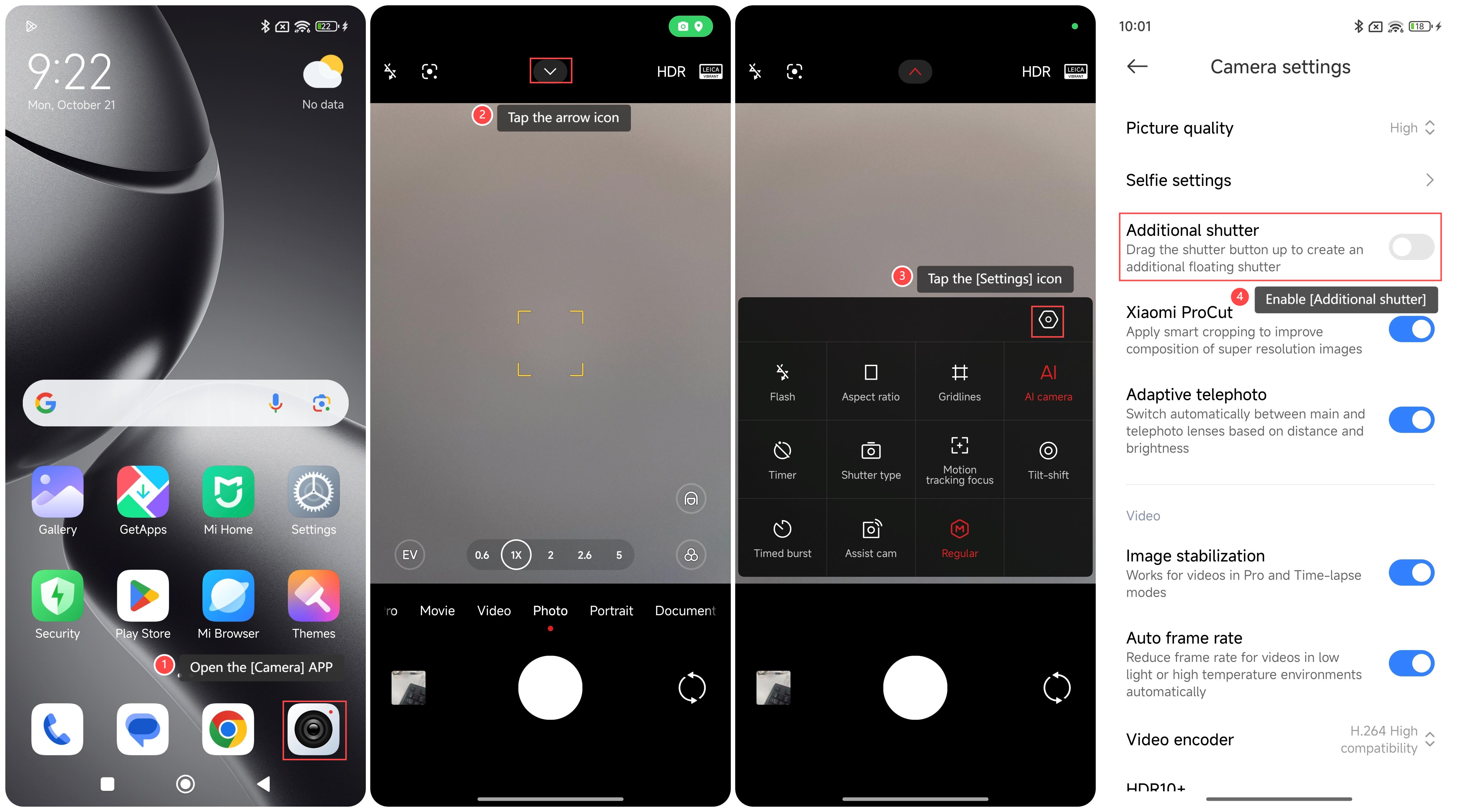
To create an additional floating shutter on your phone, please refer to the following steps:
1. Open the [Camera] APP on your phone;
2. Tap the arrow icon on the top of the screen;
3. Tap the [Settings] icon;
4. Enable [Additional shutter].
Note:
When using the floating shutter, you can drag and position the button as needed to ensure that it is easy to reach when shooting and avoid blocking important content in the picture.
To create an additional floating shutter on your phone, please refer to the following steps:
1. Open the [Camera] APP on your phone;
2. Tap the arrow icon on the top of the screen;
3. Tap the [Settings] icon;
4. Enable [Additional shutter].
Note:
When using the floating shutter, you can drag and position the button as needed to ensure that it is easy to reach when shooting and avoid blocking important content in the picture.
Does it help?
Yes
No