

Why does music automatically pause or voice assistant activate when taking off or wearing the Redmi Buds 6?
The Redmi Buds 6 uses an in-ear detection sensor to detect the wearing status. If the sensor fails to correctly detect the wearing status, it will cause the audio to automatically pause or the voice assistant to activate.
For your reference, there are two primary reasons that can cause this issue:
1. When holding the earbuds, if you cover the sensor, it will cause the earbuds to mistakenly identify as being worn. If you don't need the wearing detection feature, you can enable/disable it in the additional settings in the Xiaomi Earbuds APP;
2. This issue also happens if the earbuds become loose during use, causing them not to detect the wearing status, so the music pauses automatically. Please reinsert the earbuds and restart your music.
Note:
1. When holding the earbuds, avoid covering the sensor location indicated by the red arrow in the image;
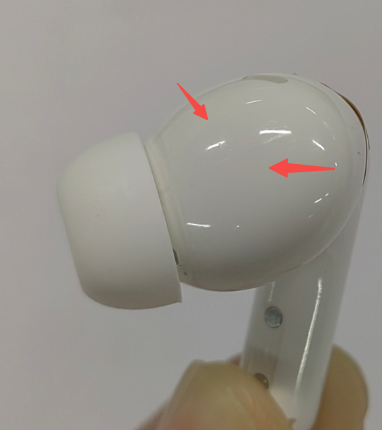
2. The in-ear detection sensor of the Redmi Buds 6 is located on the same surface, so rotating the earbuds will lead to a situation where the sensor is not touching the ear, which can cause playback to pause;
3. The vibrations in the subway can cause the earbuds to loosen, resulting in a pause in playback. At this time, simply re-adjusting the earbuds can resolve this issue;
4. During cycling, the earbuds can be loose, leading to a decreased detection signal that triggers a disconnection. Just re-adjust the earbuds or tighten the fit;
5. When you take off the earbuds, the music will pause after 1-2 seconds to avoid a sudden interruption. Please place them on a desktop or in the charging case during this time;
6. When placing the earbuds, it is recommended to lay the stems flat, ensuring they make full contact with the desktop while keeping the ear tips facing up and not touching any objects.
For your reference, there are two primary reasons that can cause this issue:
1. When holding the earbuds, if you cover the sensor, it will cause the earbuds to mistakenly identify as being worn. If you don't need the wearing detection feature, you can enable/disable it in the additional settings in the Xiaomi Earbuds APP;
2. This issue also happens if the earbuds become loose during use, causing them not to detect the wearing status, so the music pauses automatically. Please reinsert the earbuds and restart your music.
Note:
1. When holding the earbuds, avoid covering the sensor location indicated by the red arrow in the image;
2. The in-ear detection sensor of the Redmi Buds 6 is located on the same surface, so rotating the earbuds will lead to a situation where the sensor is not touching the ear, which can cause playback to pause;
3. The vibrations in the subway can cause the earbuds to loosen, resulting in a pause in playback. At this time, simply re-adjusting the earbuds can resolve this issue;
4. During cycling, the earbuds can be loose, leading to a decreased detection signal that triggers a disconnection. Just re-adjust the earbuds or tighten the fit;
5. When you take off the earbuds, the music will pause after 1-2 seconds to avoid a sudden interruption. Please place them on a desktop or in the charging case during this time;
6. When placing the earbuds, it is recommended to lay the stems flat, ensuring they make full contact with the desktop while keeping the ear tips facing up and not touching any objects.
Does it help?
Yes
No