

What are the icon functions on the real-time surveillance interface of the Xiaomi Smart Camera C500 Dual?
The icon introduction of the real-time surveillance interface of the Xiaomi Smart Camera C500 Dual is listed below:
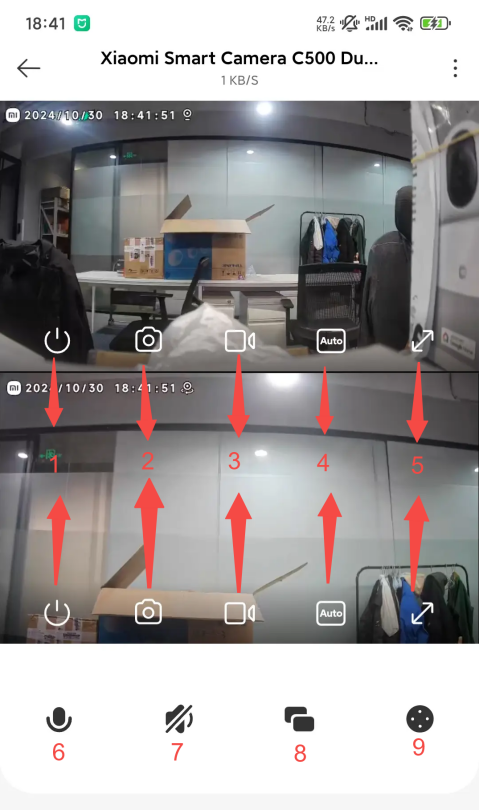
1. Sleep: The camera will directly enter the sleep mode when you tap this icon. After the camera enters sleep mode, you can no longer perform any monitoring or recording operations;
2. Shoot: You can tap this icon to shoot the surveillance image at any time. The image will be stored to the local;
3. Record: You can tap this icon to record the surveillance image at any time, and tap this icon again to end the recording. The recorded videos will be stored to the local(You need to stay at the recording interface when you start to record, otherwise, the recording will be ended);
4. Clarity: You can tap the icon to adjust the clarity to Auto, 480 smooth and, 2.5K HD (Auto means the camera will automatically adjust the clarity according to the network environment);
5. Full screen: Tap the icon and the surveillance image will become horizontal;
6. Voice call: Tap the icon and you can have two-way real-time calls through the Mi Home/Xiaomi Home APP;
7. Sound: Tap the icon to monitor the sound of the selected image, and you need to adjust the phone volume;
8. Image selection: Tap the icon to select the preview image from the dual image, fixed image and PTZ image;
9. PTZ: Tap this icon and you can see the PTZ control interface and control the movement of the camera.
1. Sleep: The camera will directly enter the sleep mode when you tap this icon. After the camera enters sleep mode, you can no longer perform any monitoring or recording operations;
2. Shoot: You can tap this icon to shoot the surveillance image at any time. The image will be stored to the local;
3. Record: You can tap this icon to record the surveillance image at any time, and tap this icon again to end the recording. The recorded videos will be stored to the local(You need to stay at the recording interface when you start to record, otherwise, the recording will be ended);
4. Clarity: You can tap the icon to adjust the clarity to Auto, 480 smooth and, 2.5K HD (Auto means the camera will automatically adjust the clarity according to the network environment);
5. Full screen: Tap the icon and the surveillance image will become horizontal;
6. Voice call: Tap the icon and you can have two-way real-time calls through the Mi Home/Xiaomi Home APP;
7. Sound: Tap the icon to monitor the sound of the selected image, and you need to adjust the phone volume;
8. Image selection: Tap the icon to select the preview image from the dual image, fixed image and PTZ image;
9. PTZ: Tap this icon and you can see the PTZ control interface and control the movement of the camera.
Does it help?
Yes
No