

How to take a selfie with removing moles on the Xiaomi 14T?
The Xiaomi 14T supports removing moles when taking a selfie, which can help create a smoother, more polished look in selfies, aligning with personal beauty standards. By removing certain facial marks, the focus can shift to other facial features, such as eyes or smile, helping to bring out the parts of your face you want to emphasize. Besides, enhanced selfies can increase confidence by presenting an idealized version of yourself.
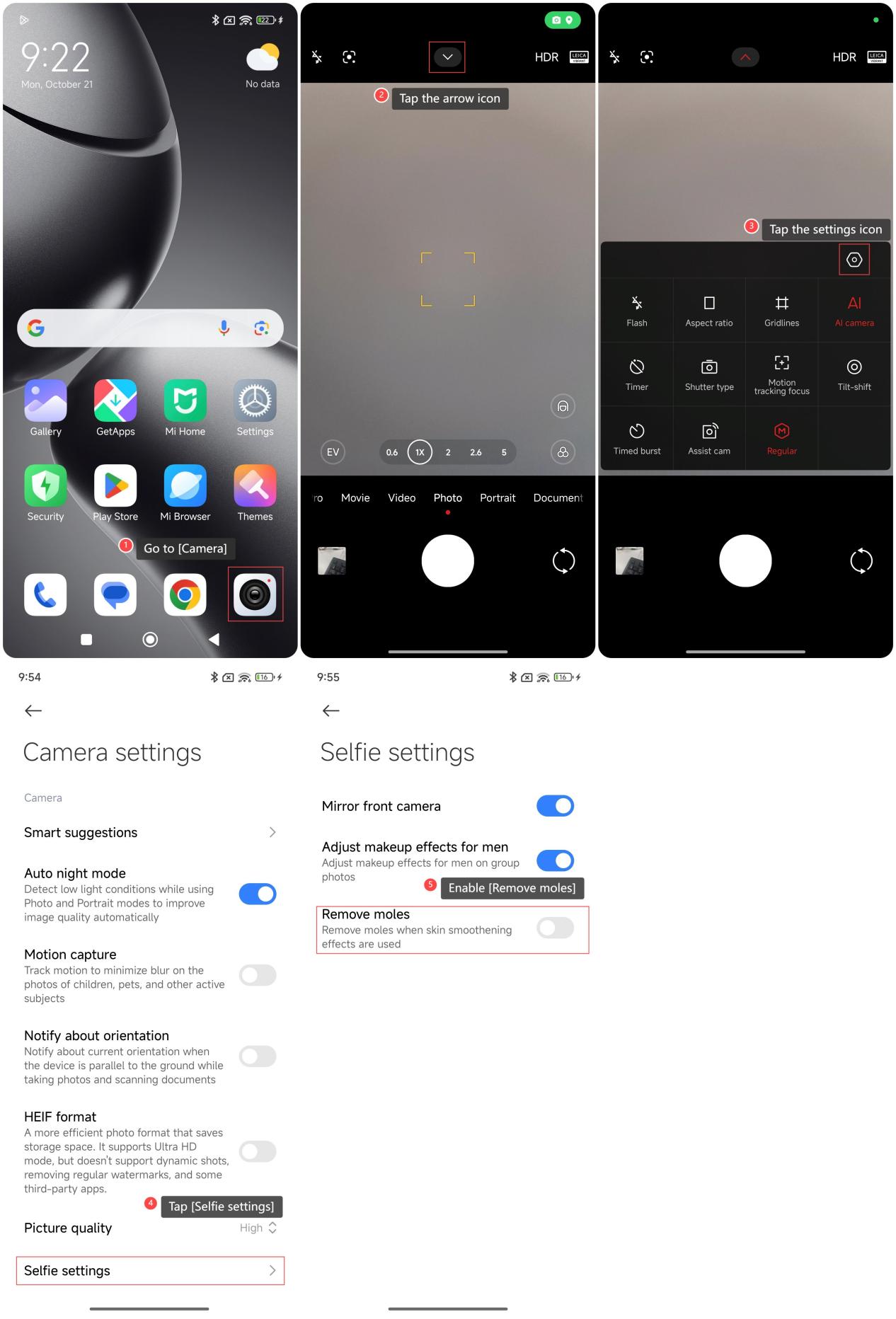
To take a selfie with removing moles on your phone, please refer to the following steps:
1. Go to [Camera];
2. Tap the arrow icon;
3. Tap the settings icon;
4. Tap [Selfie settings];
5. Enable [Remove moles].
To take a selfie with removing moles on your phone, please refer to the following steps:
1. Go to [Camera];
2. Tap the arrow icon;
3. Tap the settings icon;
4. Tap [Selfie settings];
5. Enable [Remove moles].
Does it help?
Yes
No