

How to save the passwords and accounts on the Xiaomi 14T?
The Xiaomi 14T supports saving passwords and accounts, which can protect the privacy data and sensitive information effectively by allowing automatic login to APPs and websites, enhancing security through encrypted storage, and minimizing the need to remember multiple credentials.
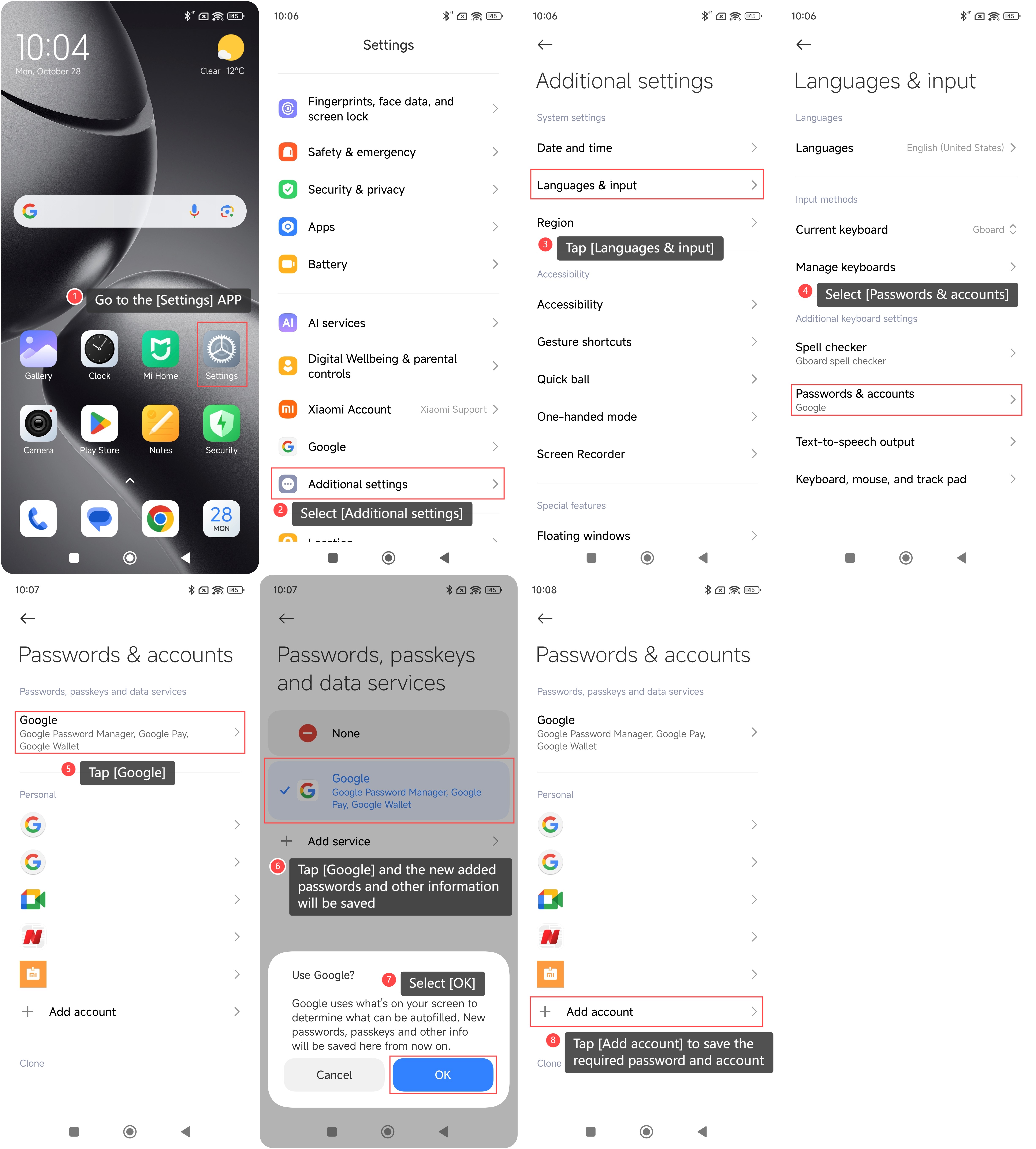
To save the password and accounts on your phone, please refer to the following steps:
1. Go to the [Settings] APP on your phone;
2. Scroll down and select [Additional settings];
3. Tap [Languages & input];
4. Select [Passwords & accounts];
5. Tap [Google];
6. Tap [Google] and the new added passwords and other information will be saved;
7. Select [OK];
8. Go back to the previous screen to tap [Add account] to save the required password and account.
To save the password and accounts on your phone, please refer to the following steps:
1. Go to the [Settings] APP on your phone;
2. Scroll down and select [Additional settings];
3. Tap [Languages & input];
4. Select [Passwords & accounts];
5. Tap [Google];
6. Tap [Google] and the new added passwords and other information will be saved;
7. Select [OK];
8. Go back to the previous screen to tap [Add account] to save the required password and account.
Does it help?
Yes
No