

How to use AI Recorder on the Xiaomi 14T Pro?
The Xiaomi 14T Pro supports the AI Recorder function, which offers advanced features such as translating speech-to-text transcriptions into other languages, identifying different participants in a recorded conversation, and summarizing key points.
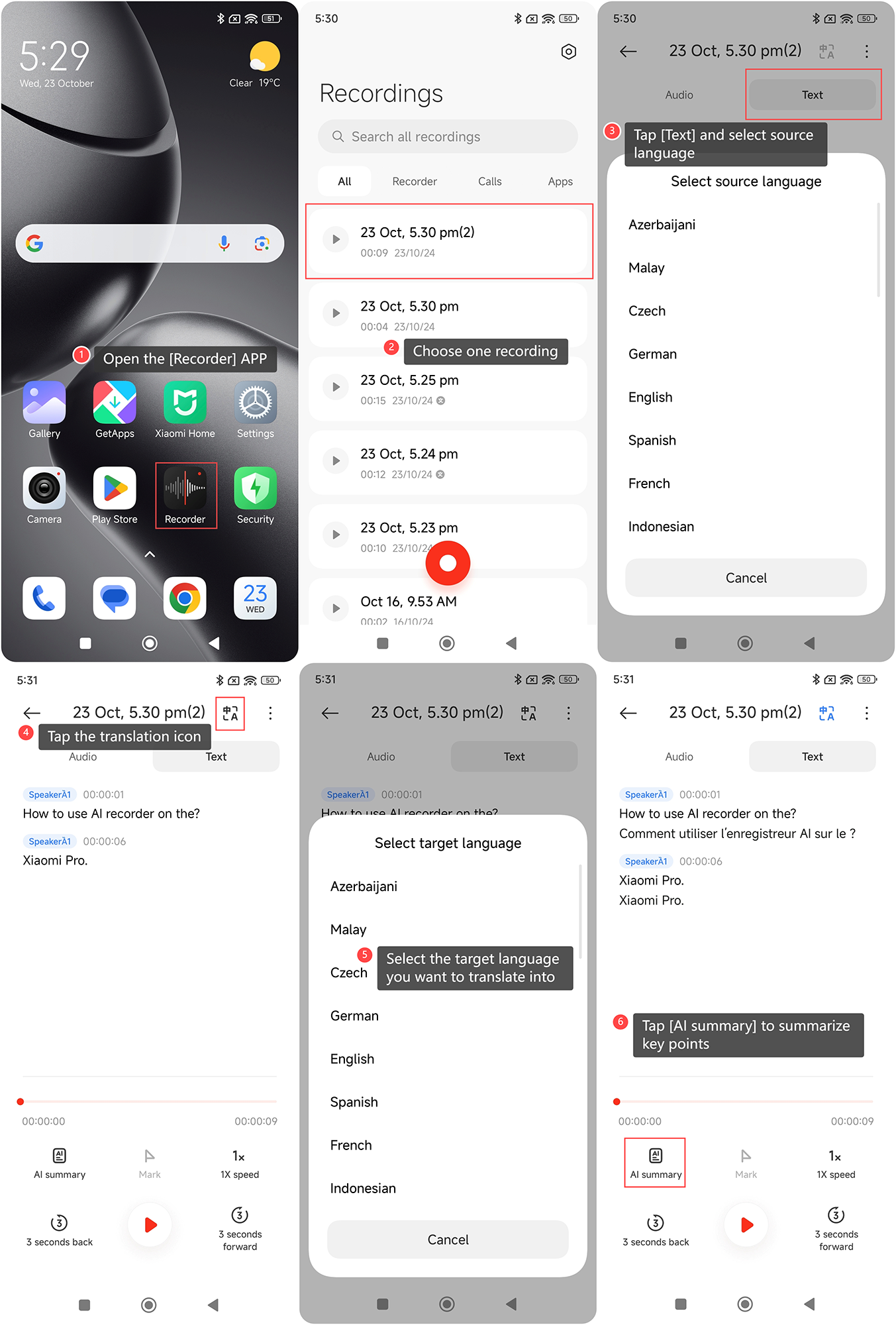
To use the AI Recorder function on the Xiaomi 14T Pro, please refer to the following steps:
1. Open the [Recorder] APP on your phone;
2. Choose one recording;
3. Tap [Text] and select source language. It will automatically classify speakers;
4. Tap the translation icon;
5. Select the target language you want to translate into;
6. Additionally, you can also tap [AI summary] to summarize key points.
To use the AI Recorder function on the Xiaomi 14T Pro, please refer to the following steps:
1. Open the [Recorder] APP on your phone;
2. Choose one recording;
3. Tap [Text] and select source language. It will automatically classify speakers;
4. Tap the translation icon;
5. Select the target language you want to translate into;
6. Additionally, you can also tap [AI summary] to summarize key points.
Does it help?
Yes
No