

How to unlock all applications by entering App lock password once on the Xiaomi 14T Pro?
The Xiaomi 14T Pro features unlocking all applications by entering the APP lock password one time, instead of entering the password for each APP individually. This feature simplifies access to multiple locked applications and makes it more convenient for you to frequently switch between APPs while still maintaining security.
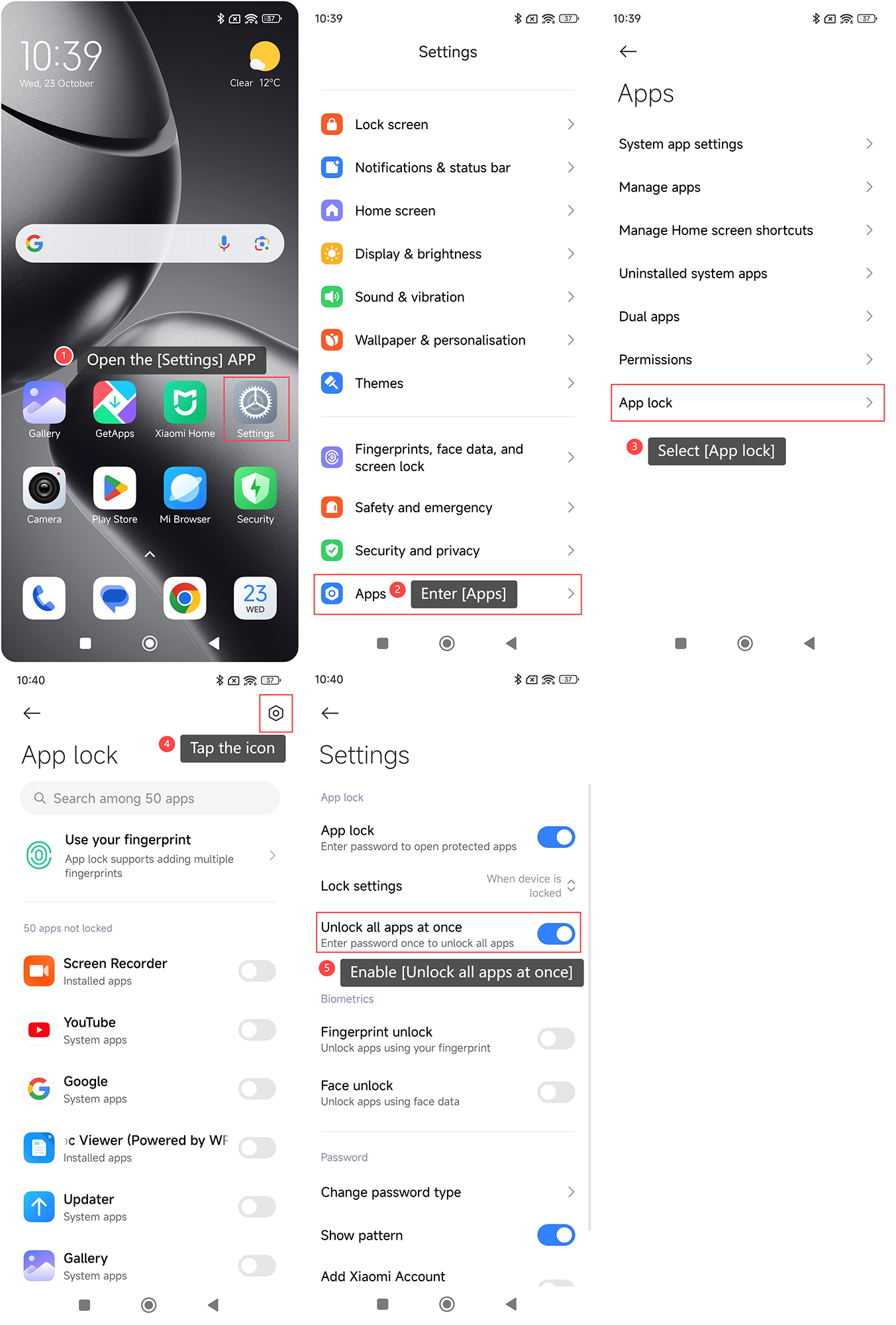
To unlock all applications by entering the APP lock password once on your phone, please refer to the following steps:
1. Open the [Settings] APP on your device. You can find the gear icon on your home screen or in your APP drawer;
2. Enter [Apps];
3. Select [App lock];
4. Tap the icon in the upper right corner;
5. Enable [Unlock all apps at once].
To unlock all applications by entering the APP lock password once on your phone, please refer to the following steps:
1. Open the [Settings] APP on your device. You can find the gear icon on your home screen or in your APP drawer;
2. Enter [Apps];
3. Select [App lock];
4. Tap the icon in the upper right corner;
5. Enable [Unlock all apps at once].
Does it help?
Yes
No