

How to set the code for the Xiaomi Expandable Luggage?
The initial code of the lock is set to 0-0-0. It is recommended to set a personal code.
The illustration of the TSA lock is as follows:
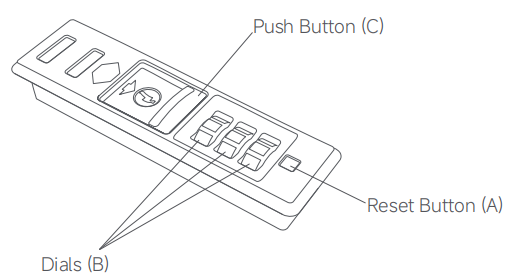
To set the code for your Xiaomi Expandable Luggage, please refer to the following steps:
1. Set the dials (B) to 0-0-0 to unlock the lock;
2. Use the tip of a pen or a tool to press the reset button (A) until you hear a click;
3. Turn the dials (B) to set your code (such as 8-8-8);
4. Push the push button (C) along the direction indicated by the arrow until you hear a click, to make the reset button (A) pop out. The lock is unlocked now.
Your code has been set successfully. If you need to reset the code again, repeat steps 1 to 4.
Note:
If you forget your code, you cannot reset it, open the lock, or open the luggage. Therefore, be sure to remember your code.
The illustration of the TSA lock is as follows:
To set the code for your Xiaomi Expandable Luggage, please refer to the following steps:
1. Set the dials (B) to 0-0-0 to unlock the lock;
2. Use the tip of a pen or a tool to press the reset button (A) until you hear a click;
3. Turn the dials (B) to set your code (such as 8-8-8);
4. Push the push button (C) along the direction indicated by the arrow until you hear a click, to make the reset button (A) pop out. The lock is unlocked now.
Your code has been set successfully. If you need to reset the code again, repeat steps 1 to 4.
Note:
If you forget your code, you cannot reset it, open the lock, or open the luggage. Therefore, be sure to remember your code.
Does it help?
Yes
No