

How to launch Google Gemini on the Xiaomi 14T?
The Xiaomi 14T supports launching Google Gemini, which allows you to make calls, send texts, and perform searches without touching the phone, making it ideal for multitasking and safe use while driving. It can answer questions, provide news updates, check the weather, and offer real-time information by connecting to the internet and databases. Google Gemini can give directions, locate nearby businesses, and provide traffic updates, making travel easier and safer.
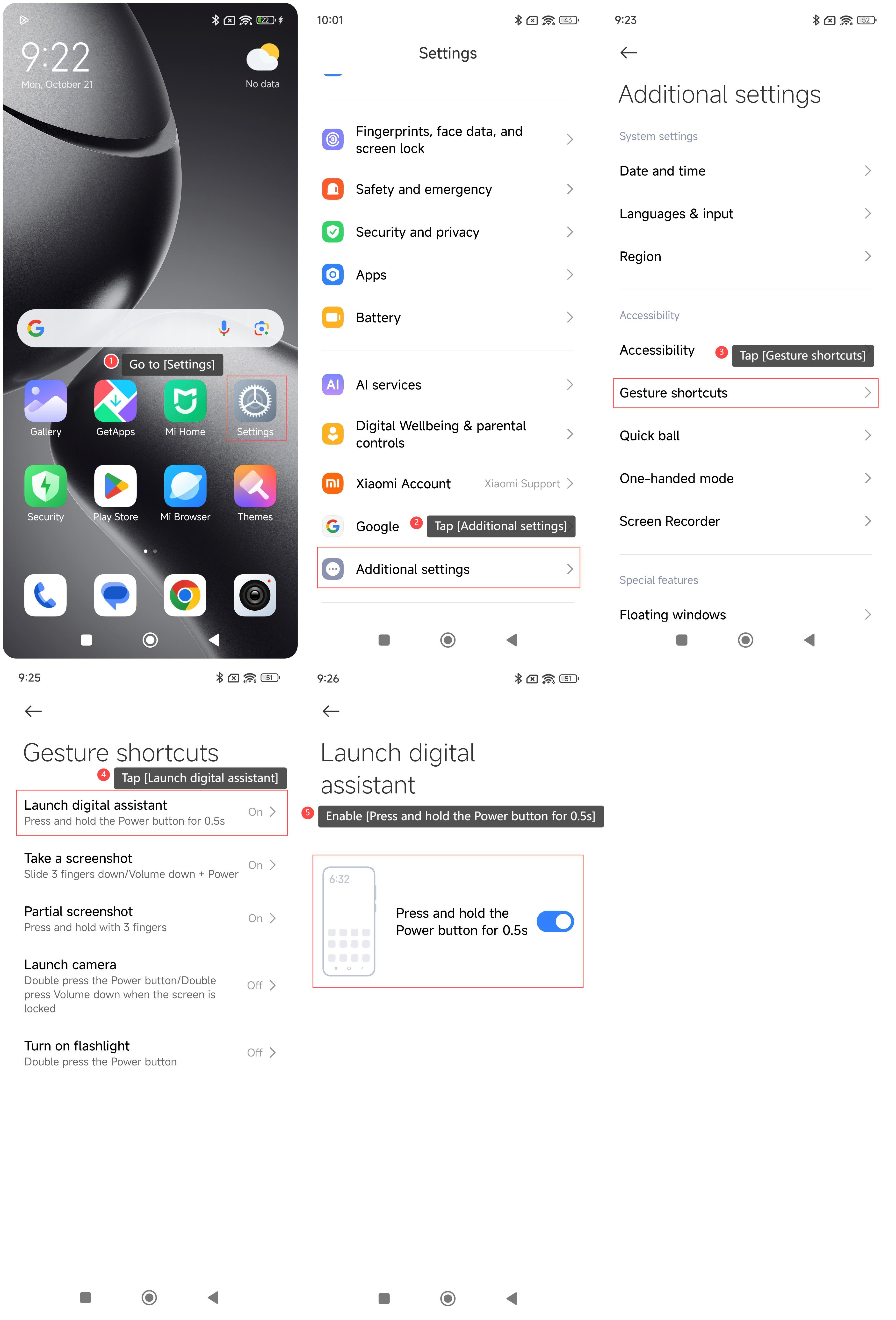
To launch Google Gemini on your phone, please refer to the following steps:
1. Go to [Settings];
2. Tap [Additional settings];
3. Tap [Gesture shortcuts];
4. Tap [Launch digital assistant];
5. Enable [Press and hold the Power button for 0.5s] to launch Google Gemini when pressing and holding the power button for 0.5s.
To launch Google Gemini on your phone, please refer to the following steps:
1. Go to [Settings];
2. Tap [Additional settings];
3. Tap [Gesture shortcuts];
4. Tap [Launch digital assistant];
5. Enable [Press and hold the Power button for 0.5s] to launch Google Gemini when pressing and holding the power button for 0.5s.
Does it help?
Yes
No