

How to turn on the feature on the -1 screen of the Xiaomi 14T Pro?
The Xiaomi 14T Pro supports the -1 screen, which refers to the screen you see when you swipe right from the home screen. It's called the -1 screen because it is positioned before the first (0) home screen. On this phone, you can swipe right on the home screen to open Google Discover.
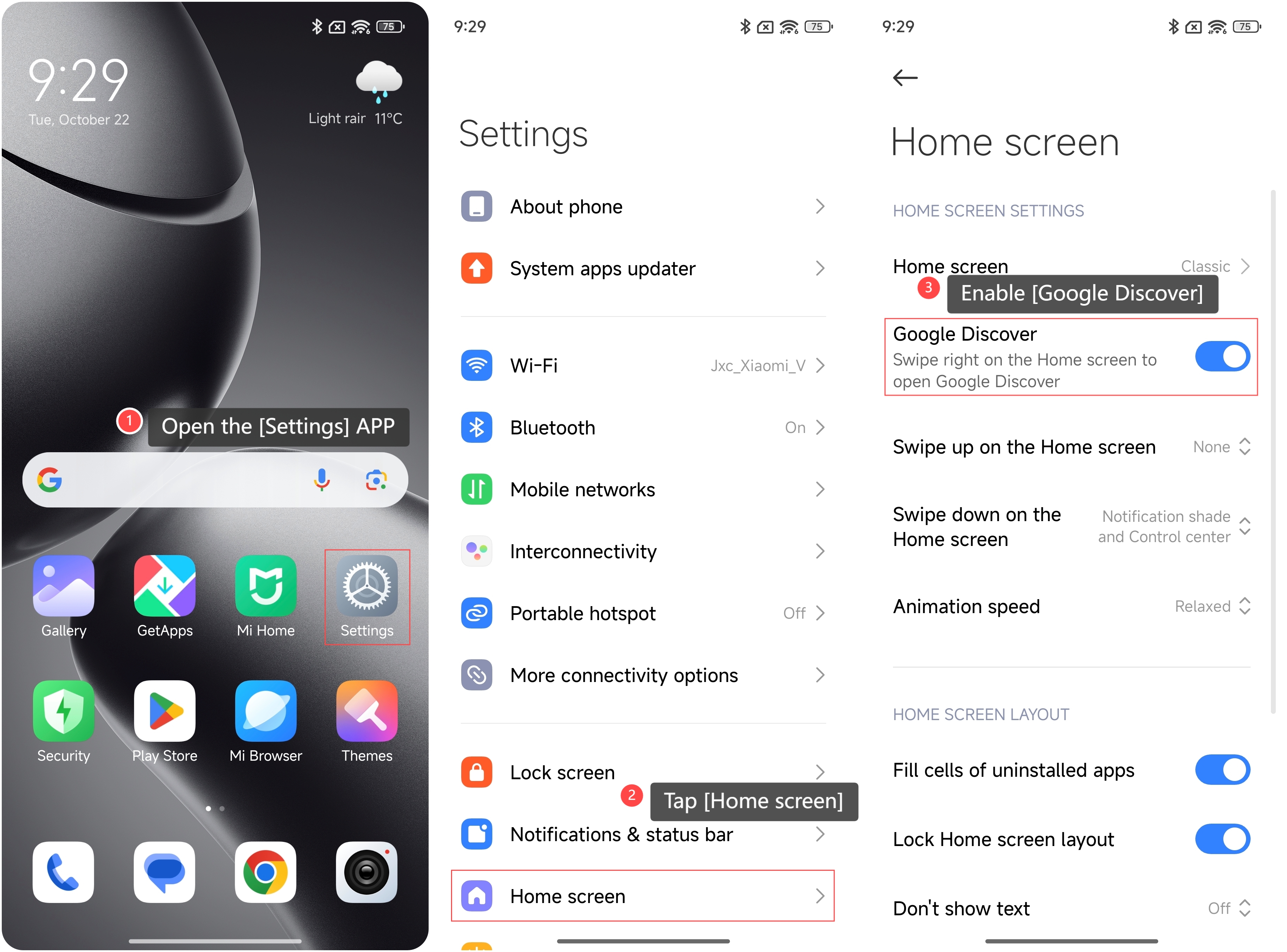
To turn on Google Discover on the -1 screen, please refer to the following steps:
1. Open the [Settings] APP on your phone;
2. Scroll down and tap [Home screen];
3. Enable [Google Discover].
To turn on Google Discover on the -1 screen, please refer to the following steps:
1. Open the [Settings] APP on your phone;
2. Scroll down and tap [Home screen];
3. Enable [Google Discover].
Note:
Google Discover is a personalized news feed that curates content based on your interests, search history, and location.
Google Discover is a personalized news feed that curates content based on your interests, search history, and location.
Does it help?
Yes
No