

How to manage notifications on the lock screen on the Xiaomi 14T Pro?
Managing lock screen notifications helps protect privacy by controlling what information is displayed, reduces distractions by filtering unnecessary alerts, and quickly views important notifications without unlocking the Xiaomi 14T Pro.
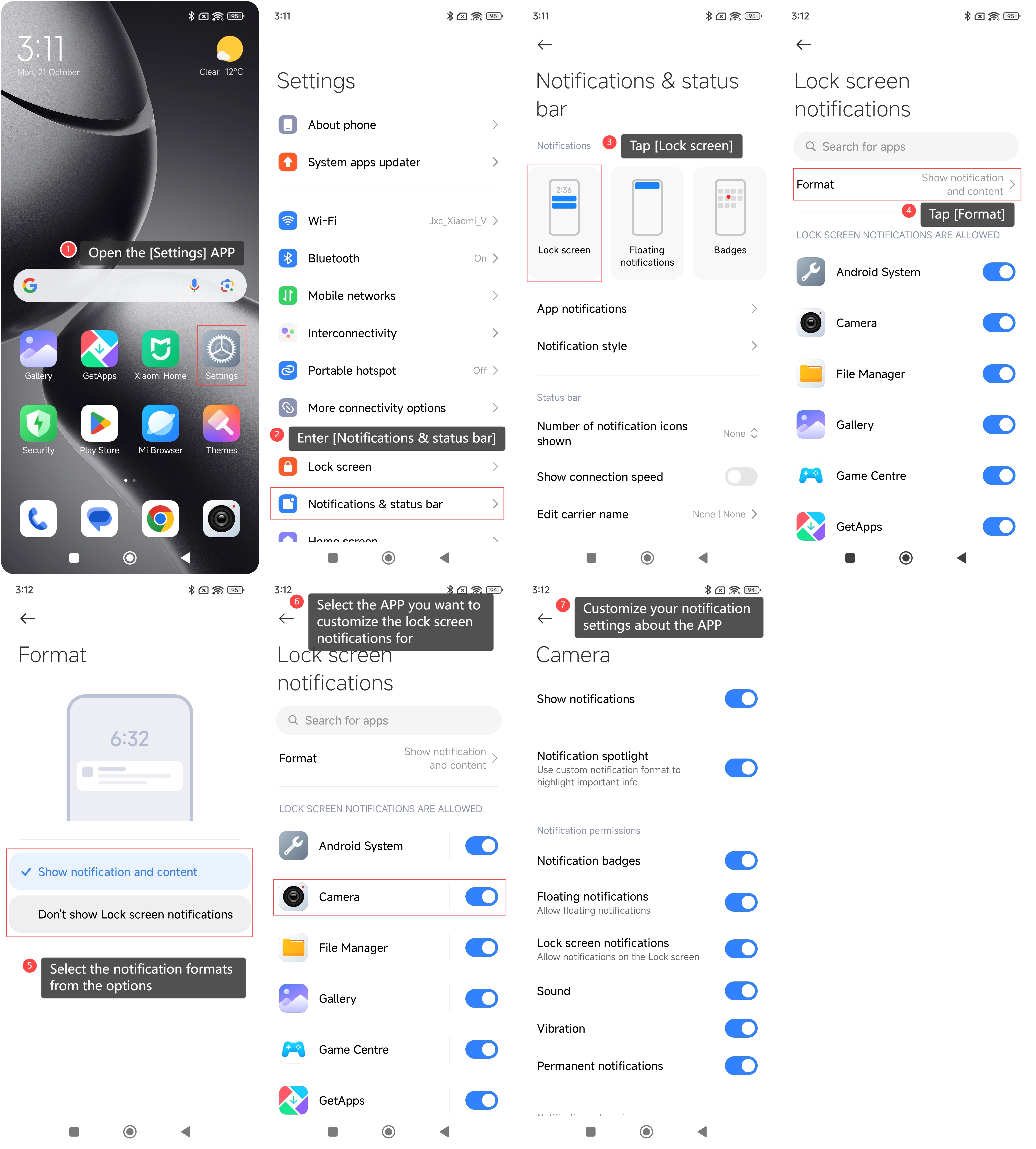
To manage notifications on the lock screen of your phone, please refer to the following steps:
1. Open the [Settings] APP on your phone;
2. Enter [Notifications & status bar];
3. Tap [Lock screen];
4. Tap [Format];
5. Select the notification formats from the options;
6. Go back to the previous screen and select the APP you want to customize the lock screen notifications for;
7. You can customize your notification settings about the APP that you selected.
To manage notifications on the lock screen of your phone, please refer to the following steps:
1. Open the [Settings] APP on your phone;
2. Enter [Notifications & status bar];
3. Tap [Lock screen];
4. Tap [Format];
5. Select the notification formats from the options;
6. Go back to the previous screen and select the APP you want to customize the lock screen notifications for;
7. You can customize your notification settings about the APP that you selected.
Does it help?
Yes
No