

How to measure Heart rate on the Xiaomi 14T Pro?
The Xiaomi 14T Pro, equipped with a built-in fingerprint sensor, enables real-time heart rate monitoring directly through your phone. It reads pulse data and displays your heart rate in beats per minute (BPM). For important health monitoring, it is recommended to consult a medical professional.
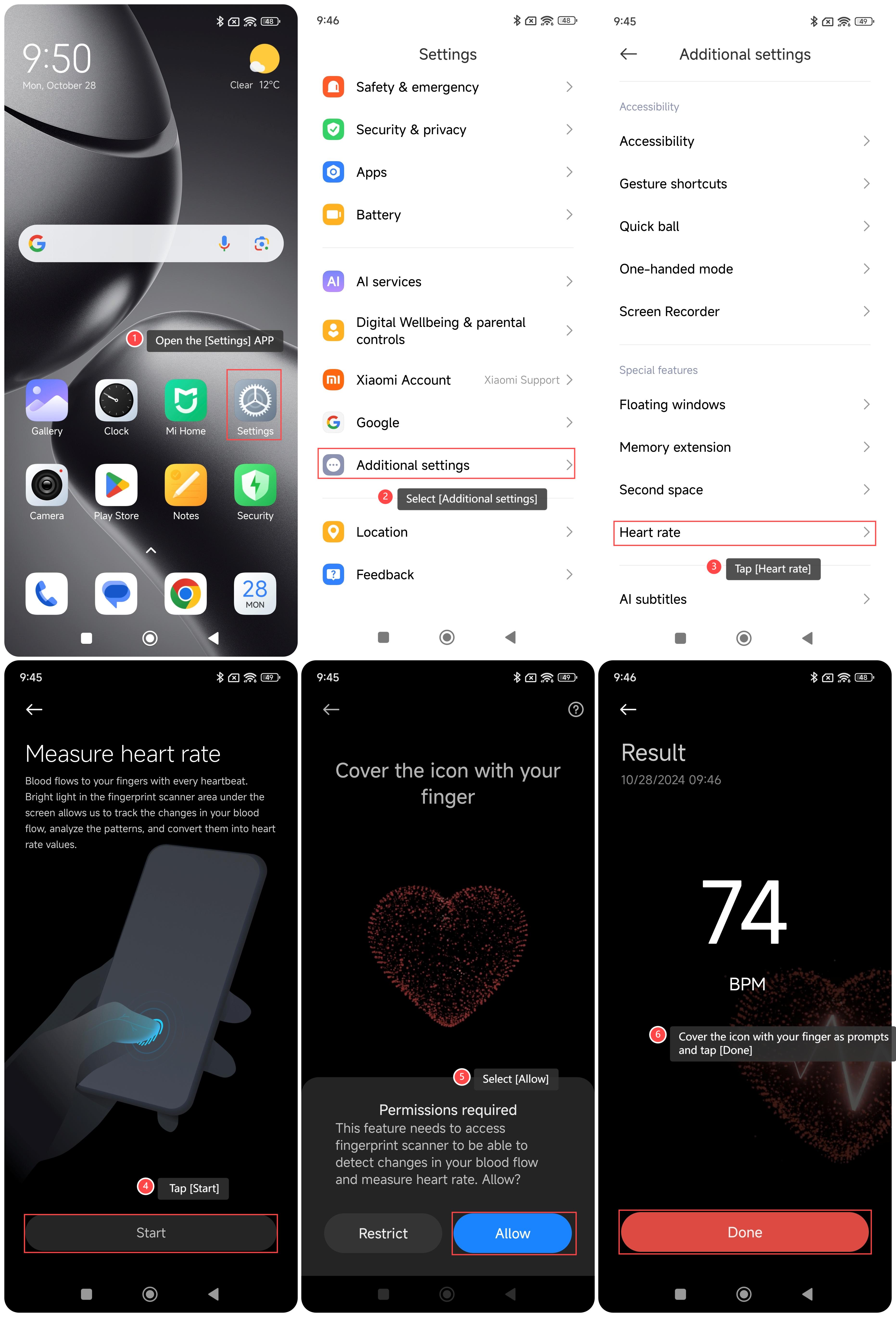
To measure Heart rate on your phone, you can refer to the following steps:
1. Open the [Settings] APP on your phone;
2. Select [Additional settings];
3. Tap [Heart rate];
4. Tap [Start];
5. Select [Allow];
6. Cover the icon with your finger as prompts and tap [Done].
Note:
The measurement results are for reference only and are not intended for professional diagnosis. If you feel any discomfort, please seek professional medical help in time.
To measure Heart rate on your phone, you can refer to the following steps:
1. Open the [Settings] APP on your phone;
2. Select [Additional settings];
3. Tap [Heart rate];
4. Tap [Start];
5. Select [Allow];
6. Cover the icon with your finger as prompts and tap [Done].
Note:
The measurement results are for reference only and are not intended for professional diagnosis. If you feel any discomfort, please seek professional medical help in time.
Does it help?
Yes
No