

How to enable accessibility on the Xiaomi 14T?
The Xiaomi 14T supports the function of accessibility, which can enhance communication, empower you to perform tasks independently, and make you access and enjoy a wide range of content on your phone. The function of accessibility can be tailored to enhance productivity if you have special requirements. Besides, it can also be utilized to offer a high degree of customization, satisfying your unique needs.
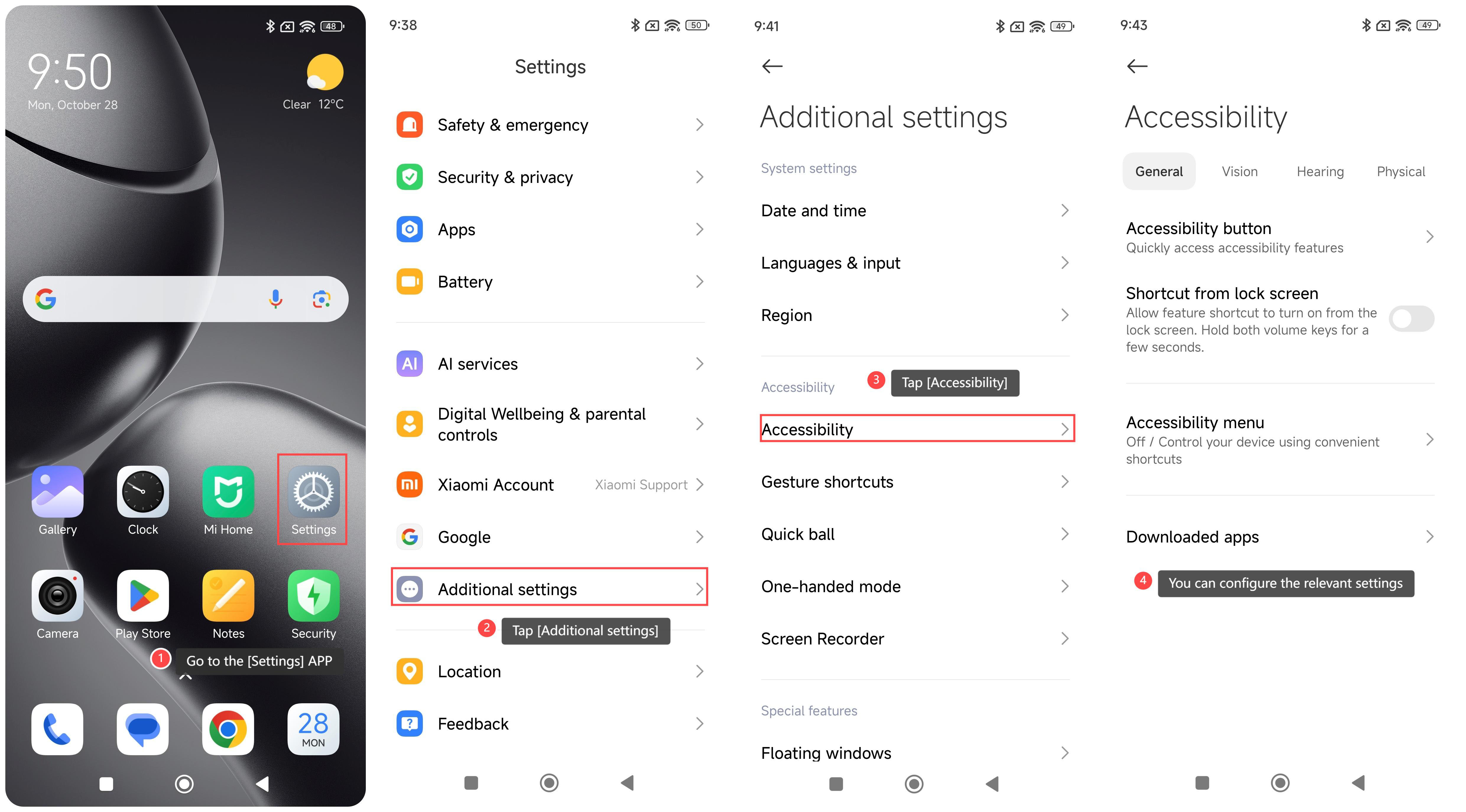
To enable accessibility on your phone, please refer to the following steps:
1. Go to the [Settings] APP on your phone;
2. Swipe down to find and tap [Additional settings];
3. Tap [Accessibility];
4. You can configure the relevant settings below [General], [Vision], [Hearing], and [Physical].
Note:
Make sure that the system version supports the required accessibility features. Sometimes system updates will optimize or add new accessibility features. It is recommended to update the system in time to obtain the best support.
To enable accessibility on your phone, please refer to the following steps:
1. Go to the [Settings] APP on your phone;
2. Swipe down to find and tap [Additional settings];
3. Tap [Accessibility];
4. You can configure the relevant settings below [General], [Vision], [Hearing], and [Physical].
Note:
Make sure that the system version supports the required accessibility features. Sometimes system updates will optimize or add new accessibility features. It is recommended to update the system in time to obtain the best support.
Does it help?
Yes
No