

How to update the system of the Xiaomi 14T Pro automatically?
The Xiaomi 14T Pro can update the system automatically, saving you time and ensuring that you have access to the latest features without needing to go into settings or download the latest version manually. This makes the updating process more convenient and efficient, keeping your device up-to-date to meet your needs.
To update the system of your phone automatically, please refer to the following steps:
1. Open the [Settings] APP on your phone;
2. Tap [About phone];
3. Tap the [Xiaomi HyperOS] icon;
4. Tap the three-dot icon at the upper right corner;
5. Tap [Update settings];
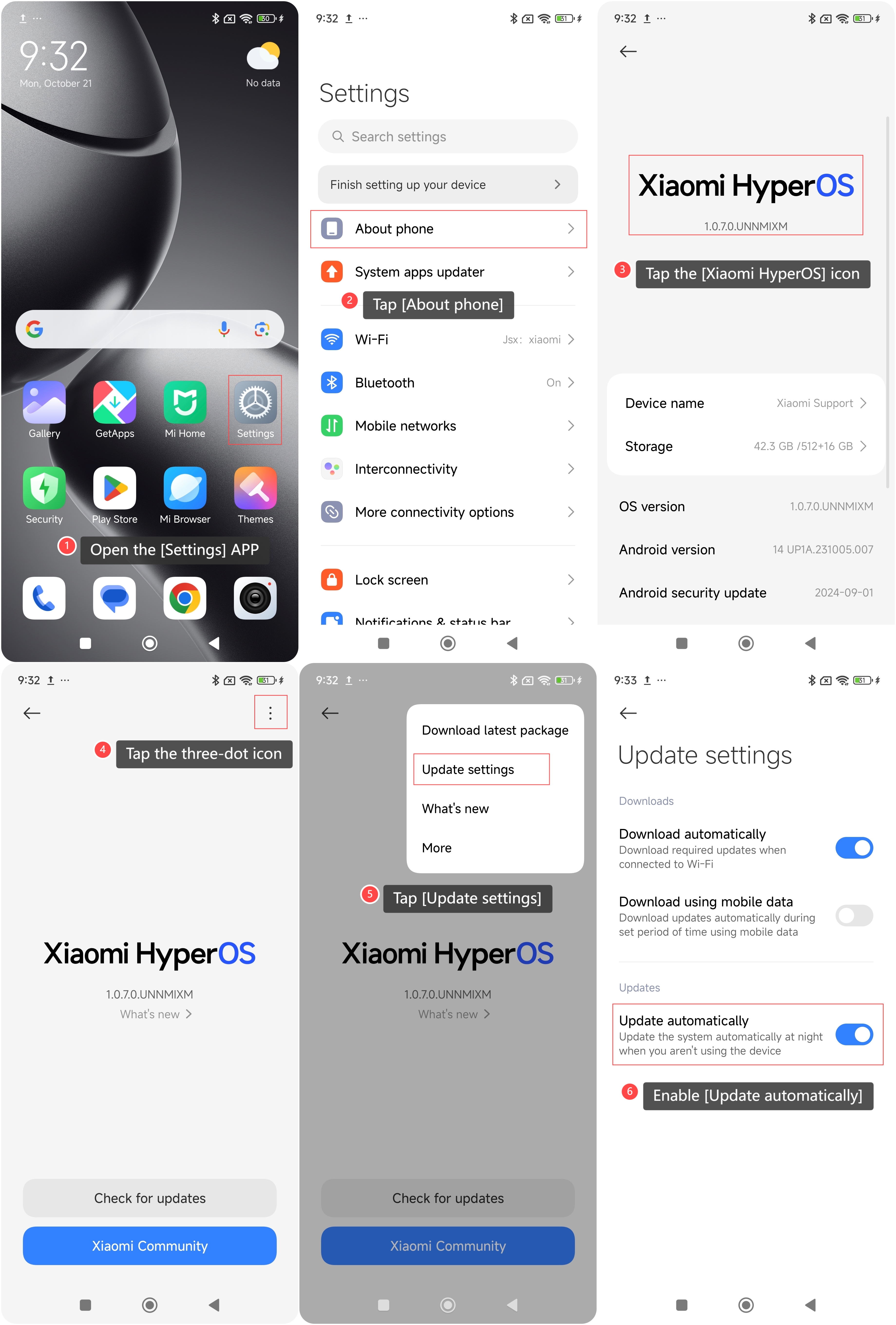
6. Enable [Update automatically] and the phone will be updated automatically at night when it isn’t being used.
To update the system of your phone automatically, please refer to the following steps:
1. Open the [Settings] APP on your phone;
2. Tap [About phone];
3. Tap the [Xiaomi HyperOS] icon;
4. Tap the three-dot icon at the upper right corner;
5. Tap [Update settings];
6. Enable [Update automatically] and the phone will be updated automatically at night when it isn’t being used.
Does it help?
Yes
No