

How to use Find My Device on the Xiaomi 14T Pro?
Find My Device is a feature on the Xiaomi 14T Pro that helps you locate your phone if it's lost or stolen. By using your Google account, you can track the device's location on a map, remotely ring it, lock it, or even erase its data to protect your privacy. To use this feature, you'll need to ensure that location services and Find My Device are enabled in the settings.
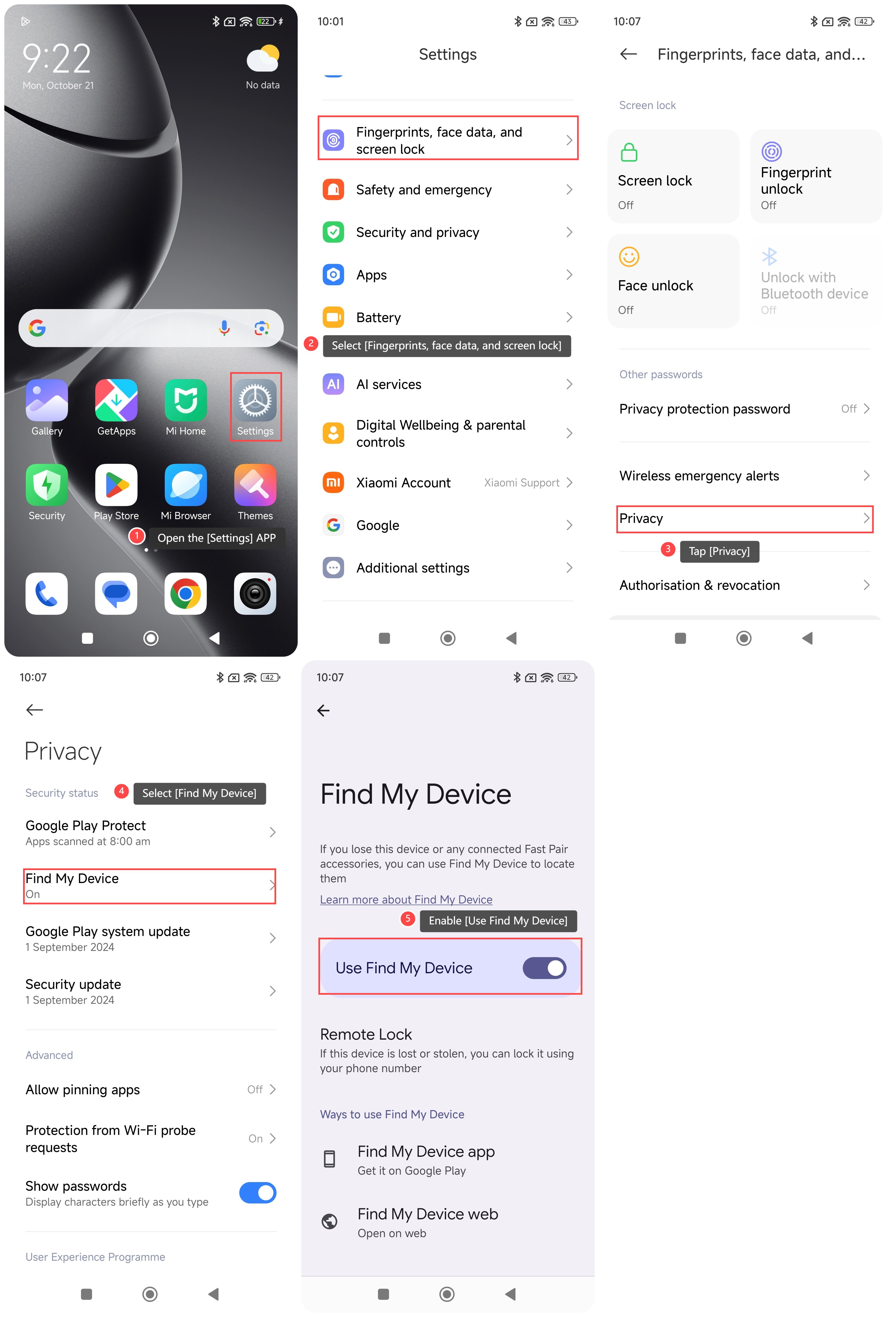
To use Find My Device on your phone, please refer to the following steps:
1. Open the [Settings] APP on your phone;
2. Select [Fingerprints, face data, and screen lock];
3. Tap [Privacy];
4. Select [Find My Device];
5. Enable [Use Find My Device].
Note:
After opening, you can find your device through the Find My Device web or the Google Find My Device APP.
To use Find My Device on your phone, please refer to the following steps:
1. Open the [Settings] APP on your phone;
2. Select [Fingerprints, face data, and screen lock];
3. Tap [Privacy];
4. Select [Find My Device];
5. Enable [Use Find My Device].
Note:
After opening, you can find your device through the Find My Device web or the Google Find My Device APP.
Does it help?
Yes
No