

How to add a Leica filter for a photo on the Xiaomi 14T Pro?
The Leica filter on the Xiaomi 14T Pro is a special photo filter that mimics the color profiles and style of Leica cameras. These filters allow you to enhance your photos with distinct color tones, contrast, and depth, offering a professional photography feel.
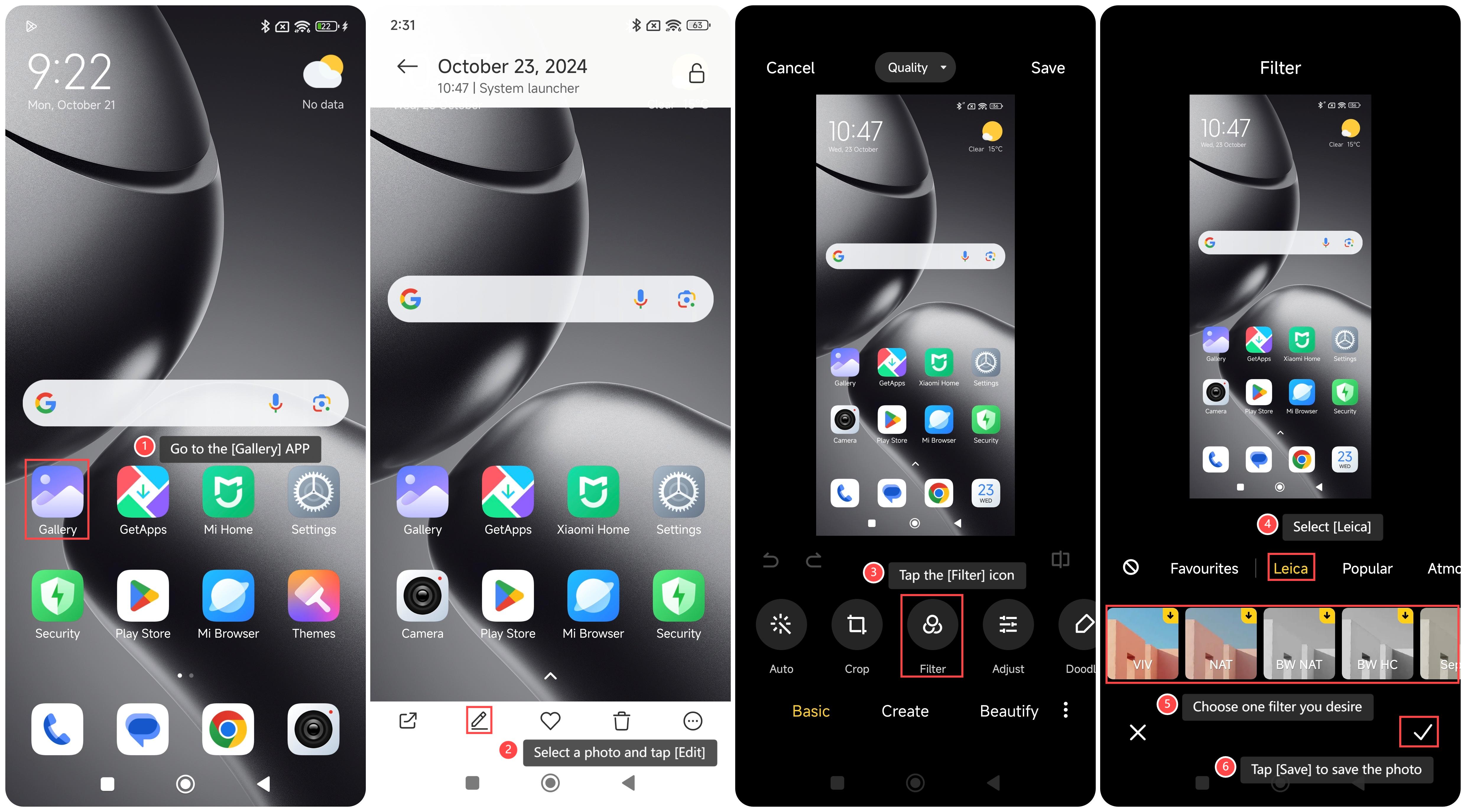
To add a Leica filter for a photo on your phone, please refer to the following steps:
1. Go to the [Gallery] APP on your phone;
2. Select a photo and tap [Edit];
3. Tap the [Filter] icon;
4. Select [Leica];
5. Choose one filter you desire;
6. Tap [Save] to save the photo.
Note:
1. Check available storage, as higher-quality images with filters can consume more space;
2. It's advisable to pay attention to lighting, as filters can influence brightness and color balance, which can lead to unintended results.
To add a Leica filter for a photo on your phone, please refer to the following steps:
1. Go to the [Gallery] APP on your phone;
2. Select a photo and tap [Edit];
3. Tap the [Filter] icon;
4. Select [Leica];
5. Choose one filter you desire;
6. Tap [Save] to save the photo.
Note:
1. Check available storage, as higher-quality images with filters can consume more space;
2. It's advisable to pay attention to lighting, as filters can influence brightness and color balance, which can lead to unintended results.
Does it help?
Yes
No