

How to check the IP address on the Xiaomi 14T?
IP stands for Internet Protocol, which is the set of rules governing the format of data sent via the internet or local network. The IP address uniquely identifies your phone on a network. It acts as a label for your Xiaomi 14T, allowing it to send and receive data to and from other devices on the same network, whether it's a local Wi-Fi network or a cellular network.
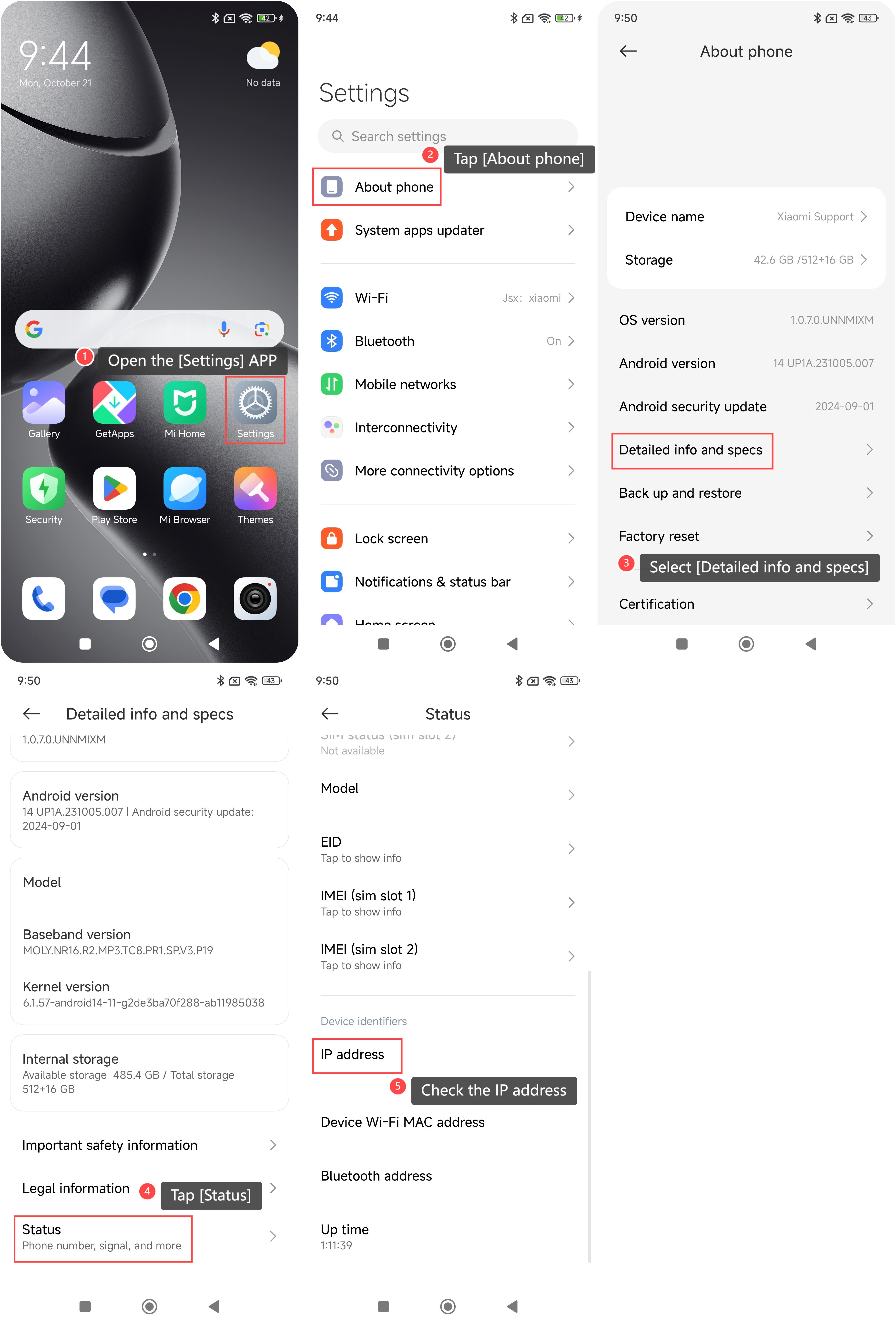
To check the IP address on your phone, please refer to the following steps:
1. Open the [Settings] APP on your phone;
2. Tap [About phone] located at the top of the settings menu;
3. Select [Detailed info and specs];
4. Scroll down and tap [Status];
5. Then you can check the IP address here.
To check the IP address on your phone, please refer to the following steps:
1. Open the [Settings] APP on your phone;
2. Tap [About phone] located at the top of the settings menu;
3. Select [Detailed info and specs];
4. Scroll down and tap [Status];
5. Then you can check the IP address here.
Does it help?
Yes
No