

How to enable the Unknown tracker alerts on the Xiaomi 14T?
Trackers are small Bluetooth devices that you can attach to items, like your keys or backpack, to locate them. When the Unknown tracker alerts are on, you’ll receive a notification on your Xiaomi 14T if an unknown tracker is detected to be traveling with you. Alerts are deleted after 48 hours.
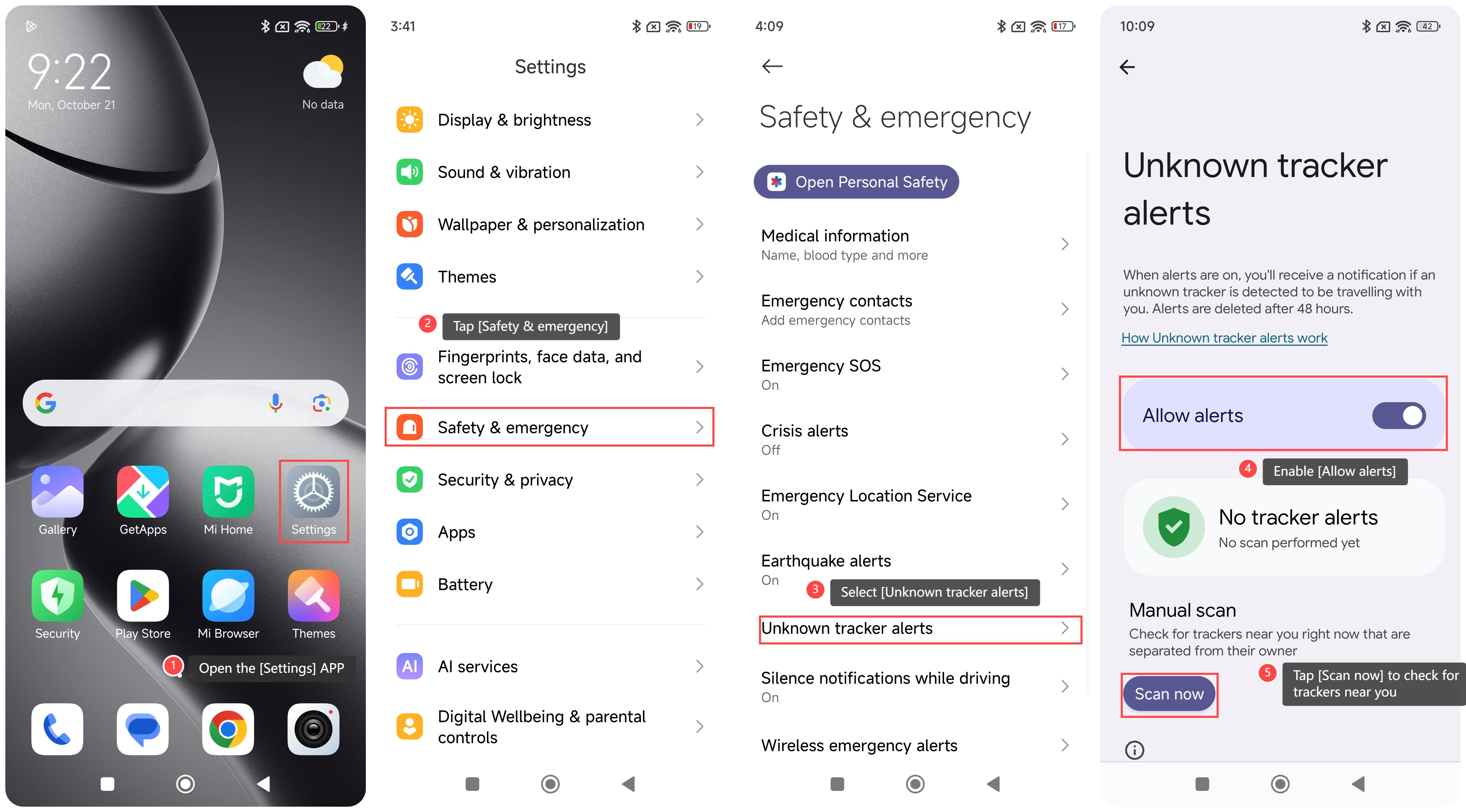
To enable the Unknown tracker alerts on the phone, please refer to the following steps:
1. Open the [Settings] APP on your phone;
2. Scroll down and tap [Safety & emergency];
3. Select [Unknown tracker alerts];
4. Enable [Allow alerts];
5. Additionally, you can tap [Scan now] to check for trackers near you.
Note:
1. In some cases, the trackers can be misused to track you without your consent;
2. Unknown tracker alerts currently work with Find My Device network compatible tags, headphones, and Apple AirTags;
3. If you turn off Bluetooth or location services, or turn on Airplane mode, your phone won’t prevent the owner of the tracker or device from finding the location of the tracker. It is recommended to find out the tracker by tapping the tracker notification and following the on-screen prompts.
To enable the Unknown tracker alerts on the phone, please refer to the following steps:
1. Open the [Settings] APP on your phone;
2. Scroll down and tap [Safety & emergency];
3. Select [Unknown tracker alerts];
4. Enable [Allow alerts];
5. Additionally, you can tap [Scan now] to check for trackers near you.
Note:
1. In some cases, the trackers can be misused to track you without your consent;
2. Unknown tracker alerts currently work with Find My Device network compatible tags, headphones, and Apple AirTags;
3. If you turn off Bluetooth or location services, or turn on Airplane mode, your phone won’t prevent the owner of the tracker or device from finding the location of the tracker. It is recommended to find out the tracker by tapping the tracker notification and following the on-screen prompts.
Does it help?
Yes
No