

How to use Scanner on the Redmi 13C?
The Redmi 13C comes with a built-in Scanner feature, which will launch the camera of your phone to quickly scan QR codes, barcodes, or documents and process the images you take.
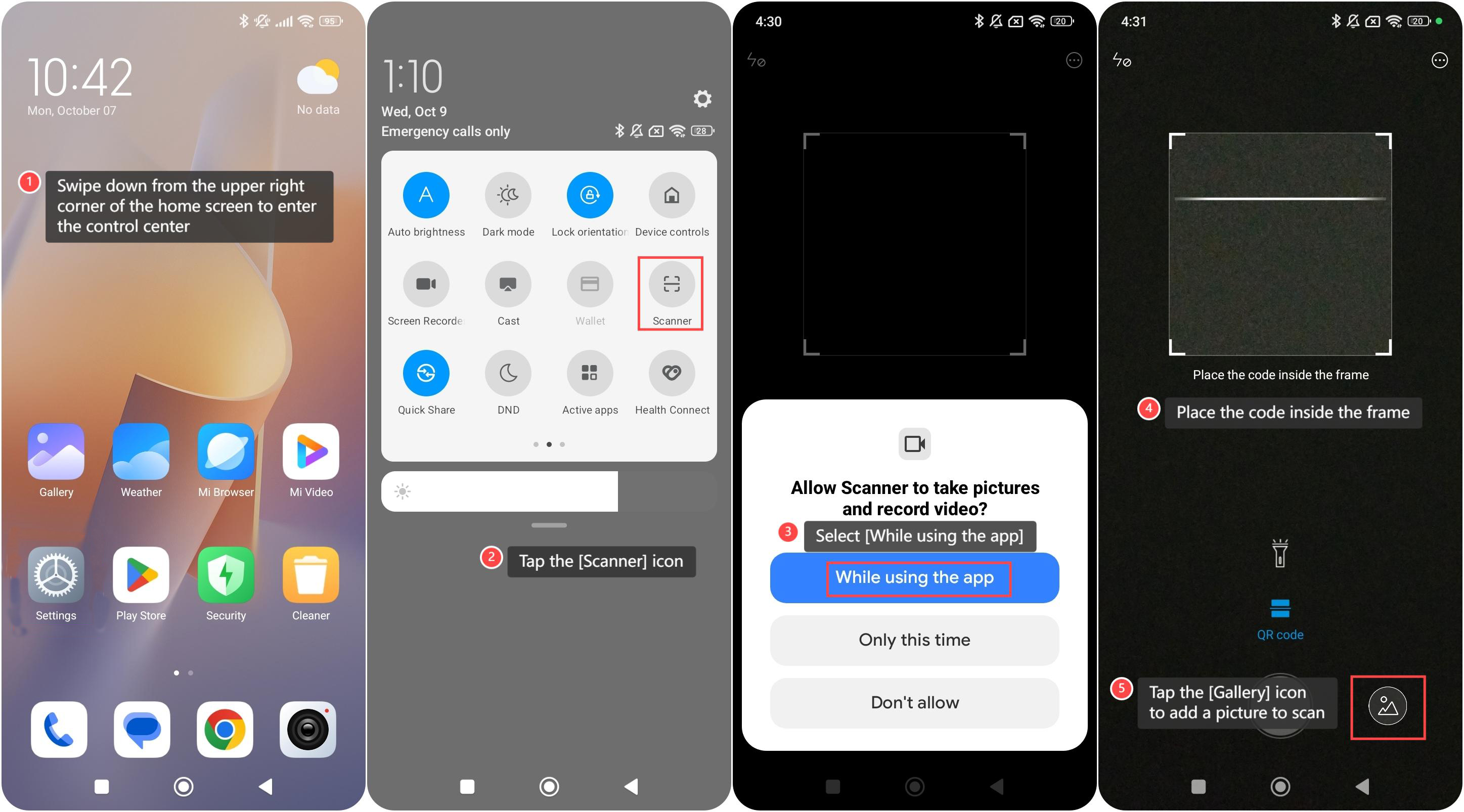
To use the Scanner on your phone, please refer to the following steps:
1. Swipe down from the upper right corner of the home screen to enter the control center;
2. Tap the [Scanner] icon;
3. Select [While using the app] to allow the permissions if you use this feature for the first time;
4. Place the code inside the frame and it will automatically display the recognized content;
5. Additionally, you can tap the [Gallery] icon to add a picture to scan.
Note:
1. Ensure you have adequate lighting when using the Scanner;
2. Don’t use the Scanner to take photos of the objects containing your personal information.
To use the Scanner on your phone, please refer to the following steps:
1. Swipe down from the upper right corner of the home screen to enter the control center;
2. Tap the [Scanner] icon;
3. Select [While using the app] to allow the permissions if you use this feature for the first time;
4. Place the code inside the frame and it will automatically display the recognized content;
5. Additionally, you can tap the [Gallery] icon to add a picture to scan.
Note:
1. Ensure you have adequate lighting when using the Scanner;
2. Don’t use the Scanner to take photos of the objects containing your personal information.
Does it help?
Yes
No