

How to set hotspot data limitations on the Xiaomi 14T Pro?
When you use the Xiaomi 14T Pro, setting a hotspot data limit helps prevent exceeding data caps, avoid extra charges, and manage usage effectively. It can provide notifications when exceeds limits, ensuring controlled and efficient data consumption.
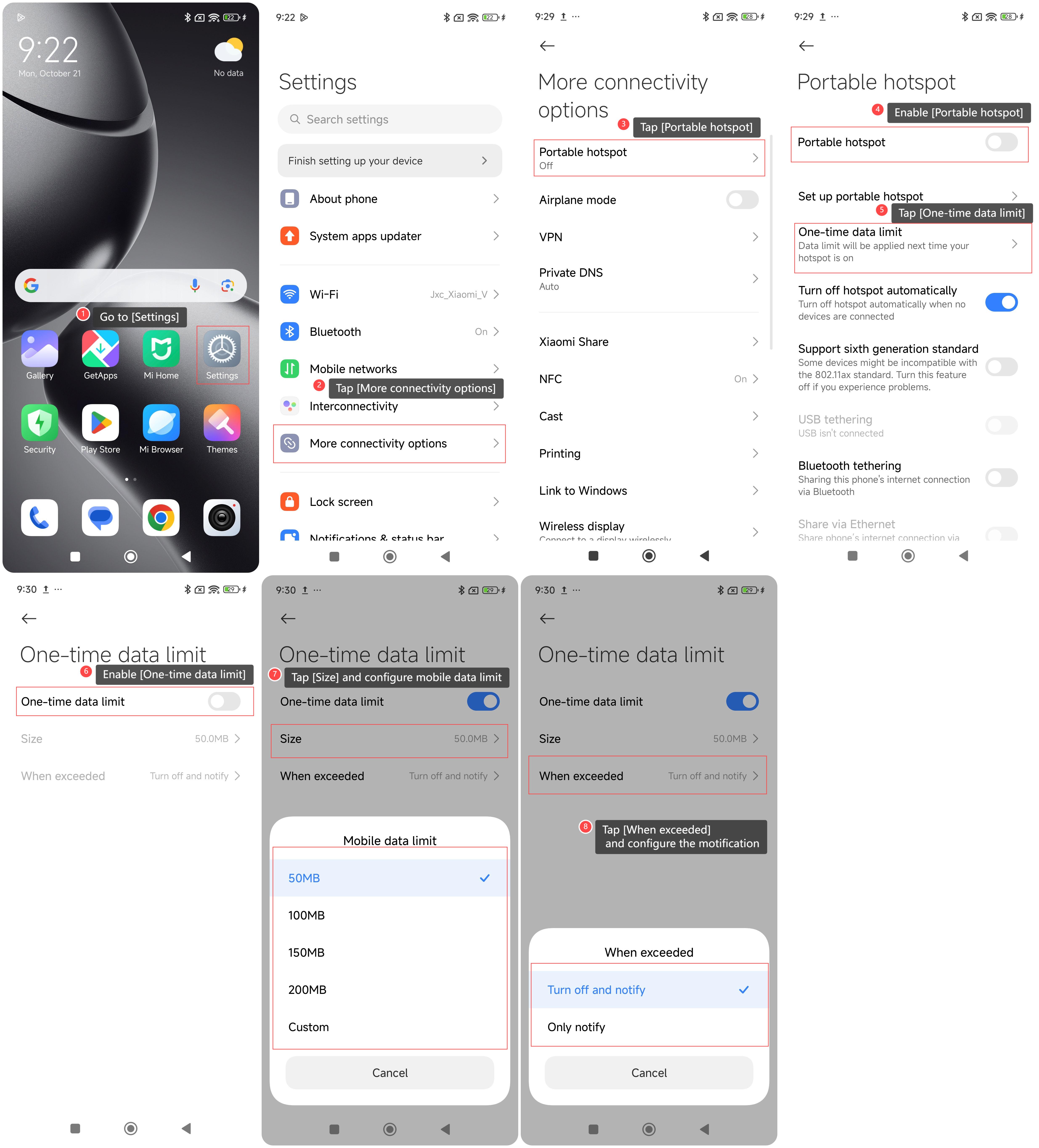
To set hotspot data limitations on your phone, please refer to the following steps:
1. Go to [Settings];
2. Tap [More connectivity options];
3. Tap [Portable hotspot];
5. Enable [Portable hotspot];
5. Tap [One-time data limit];
6. Enable [One-time data limit];
7. Tap [Size] and you can configure mobile data limit;
8. Tap [When exceeded] and choose the options according to your needs, and then you can receive a notification when the limit is exceeded.
Note:
1. Turning on the hotspot can cause the device to heat up and consume more power;
2. After the hotspot data limit is set, it will apply the next time your hotspot is turned on.
To set hotspot data limitations on your phone, please refer to the following steps:
1. Go to [Settings];
2. Tap [More connectivity options];
3. Tap [Portable hotspot];
5. Enable [Portable hotspot];
5. Tap [One-time data limit];
6. Enable [One-time data limit];
7. Tap [Size] and you can configure mobile data limit;
8. Tap [When exceeded] and choose the options according to your needs, and then you can receive a notification when the limit is exceeded.
Note:
1. Turning on the hotspot can cause the device to heat up and consume more power;
2. After the hotspot data limit is set, it will apply the next time your hotspot is turned on.
Does it help?
Yes
No