

How to get a notify about orientation on the Redmi 13C?
The Redmi 13C supports Notify about orientation feature. It ensures optimal usage of the camera. When your phone is parallel to the ground, you will get a directional prompt.
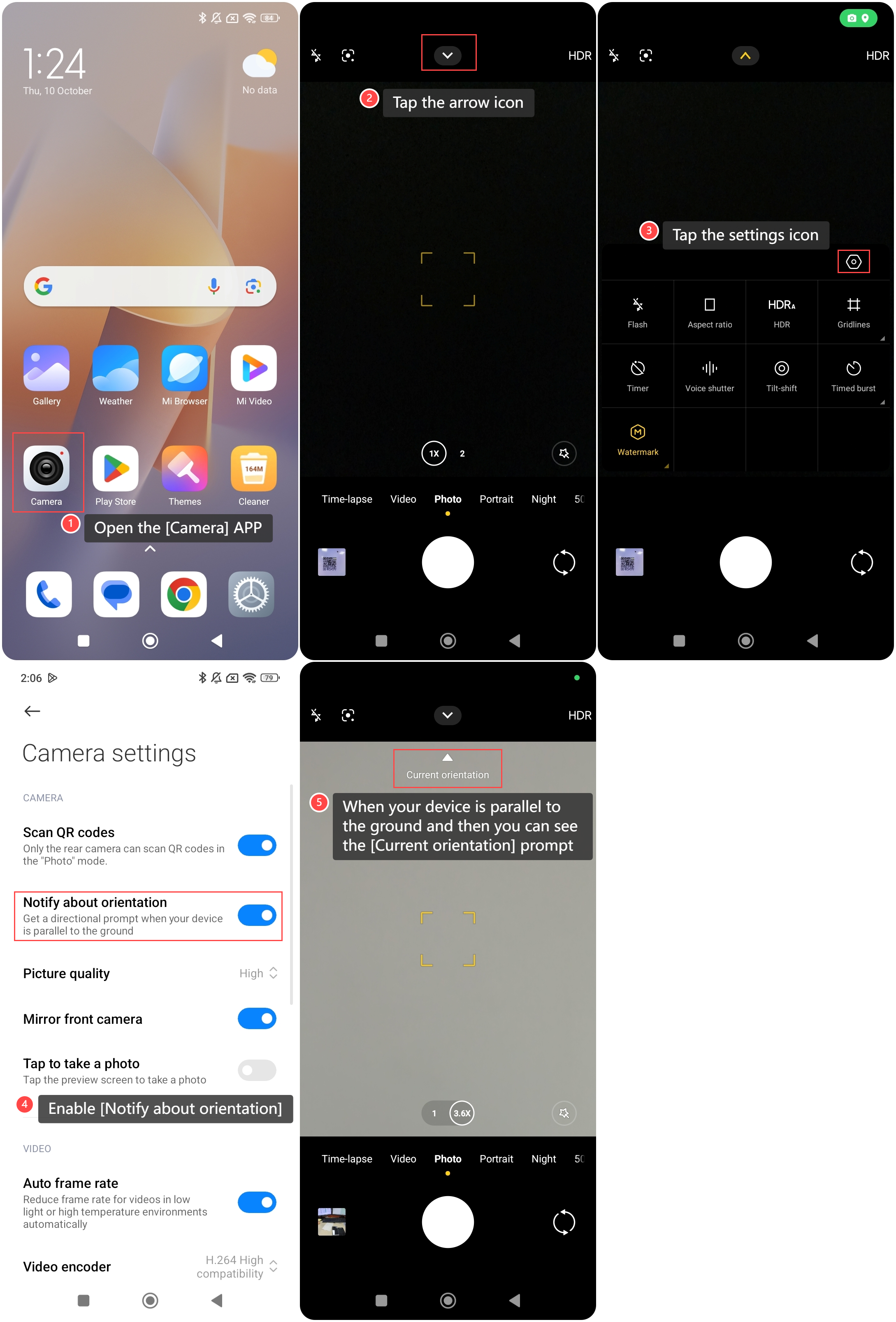
To enable the Notify about orientation feature on your phone, please refer to the following steps:
1. Open the [Camera] APP on your phone;
2. Tap the arrow icon on the top of the screen;
3. Tap the settings icon;
4. Enable [Notify about orientation];
5. Go back to the homepage of the camera, when your device is parallel to the ground and then you can see the [Current orientation] prompt on the screen.
To enable the Notify about orientation feature on your phone, please refer to the following steps:
1. Open the [Camera] APP on your phone;
2. Tap the arrow icon on the top of the screen;
3. Tap the settings icon;
4. Enable [Notify about orientation];
5. Go back to the homepage of the camera, when your device is parallel to the ground and then you can see the [Current orientation] prompt on the screen.
Does it help?
Yes
No