

How to hide APPs on the Redmi 13C?
The Redmi 13C supports hiding APPs, which allows you to make certain APPs invisible or inaccessible from the home screen and APP drawer without uninstalling them. Hiding APPs can protect sensitive information or prevent unauthorized access to certain APPs, such as banking, messaging, or social media APPs. This is useful if you share your phone or if others frequently borrow it. Besides, hiding APPs that you don’t use frequently can prevent accidental taps or openings, particularly for APPs that have important functions like settings or financial management.
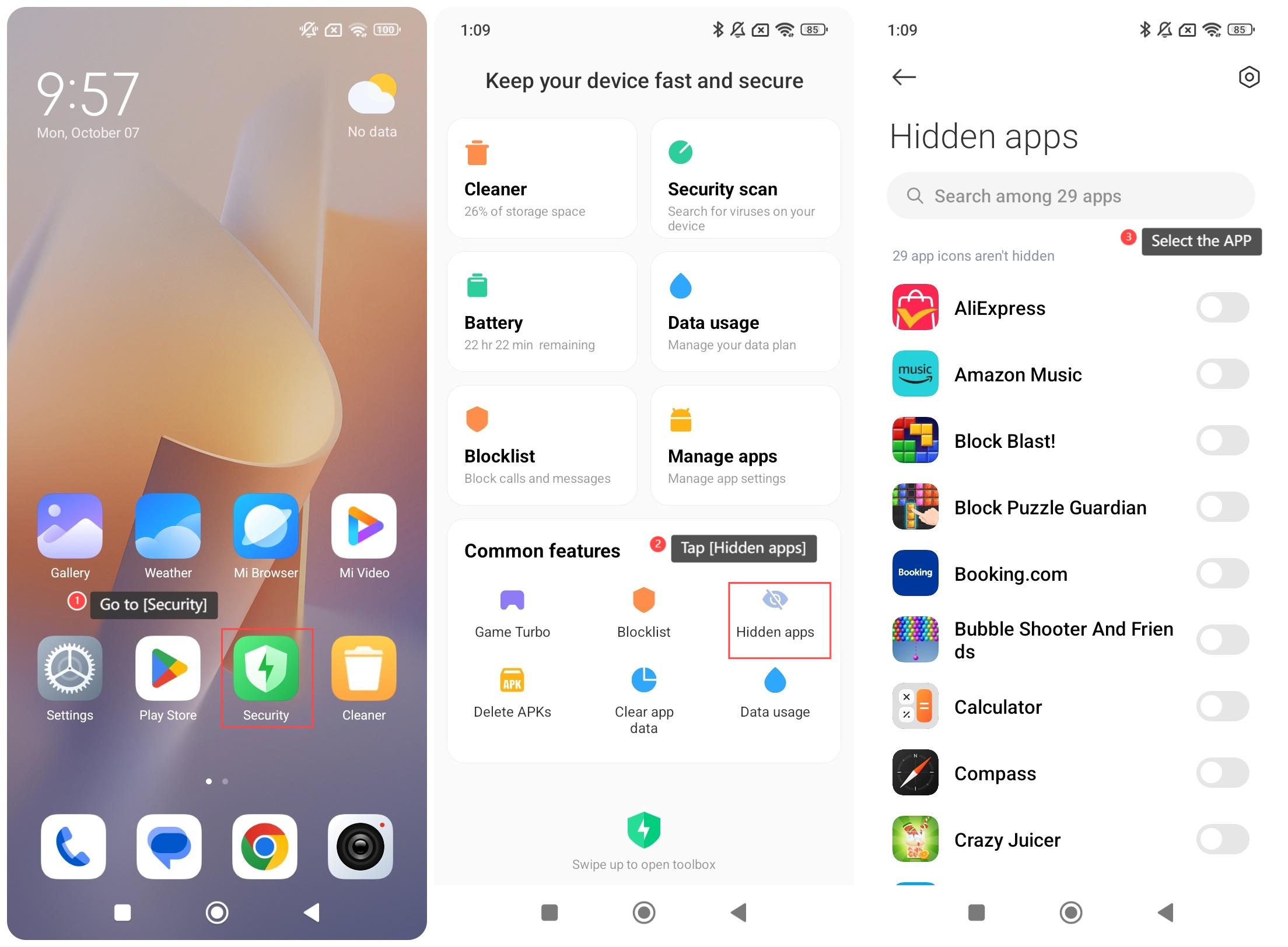
To hide APPs on your phone, please refer to the following steps:
1. Go to [Security];
2. Swipe down to find and tap [Hidden apps];
3. Select the APP that you want to hide.
Note:
Spread two fingers apart on the Home screen to view the hidden APPs.
To hide APPs on your phone, please refer to the following steps:
1. Go to [Security];
2. Swipe down to find and tap [Hidden apps];
3. Select the APP that you want to hide.
Note:
Spread two fingers apart on the Home screen to view the hidden APPs.
Does it help?
Yes
No