

How to delete an album in Gallery on the Redmi 13C?
Deleting an album in the Gallery on the Redmi 13C helps to declutter your photo library, frees up storage space, and organizes your media more efficiently, allowing for easier access to the albums you actually use.
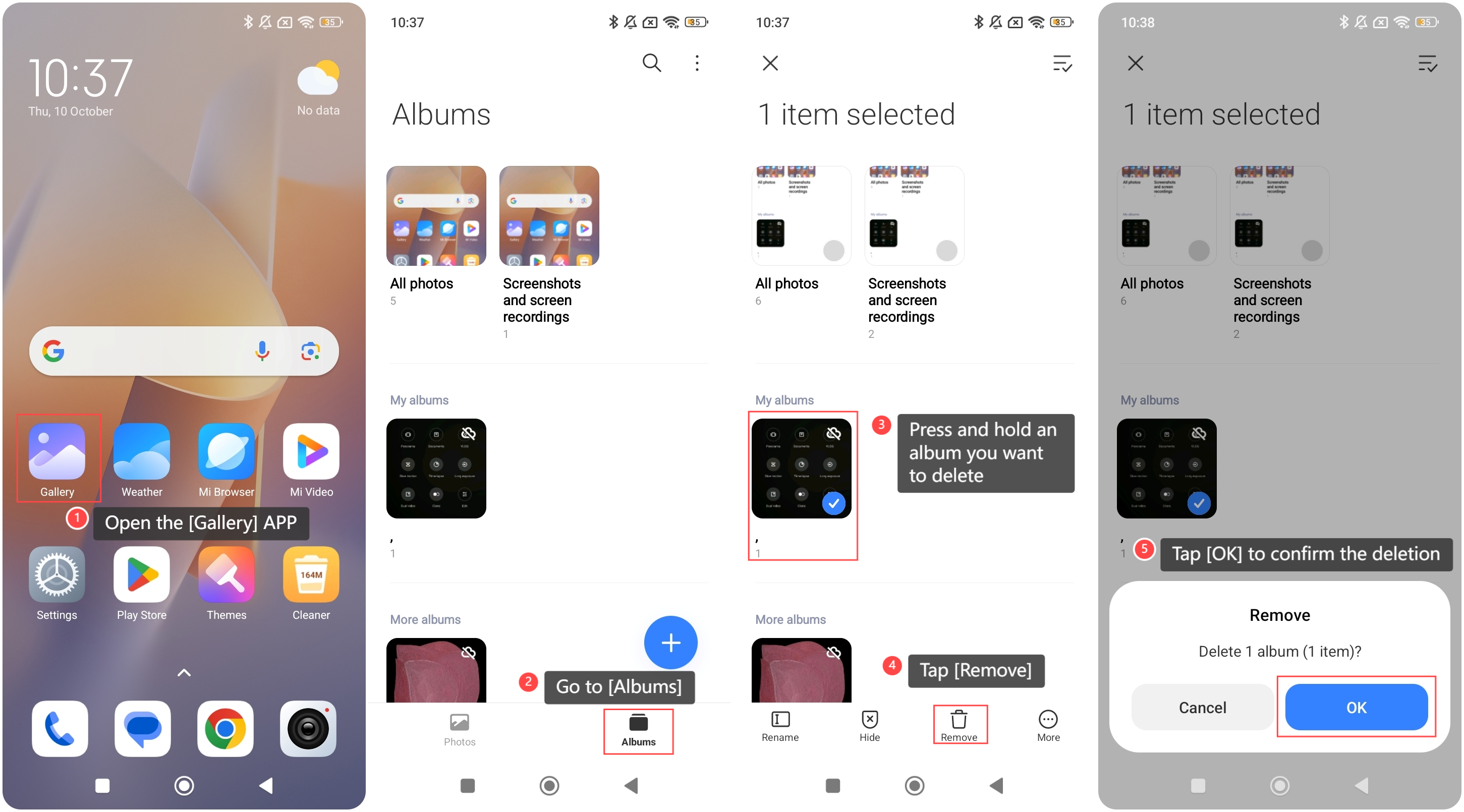
To delete an album in the Gallery on the Redmi 13C, please refer to the following steps:
1. Open the [Gallery] APP on your phone;
2. Go to [Albums];
3. Press and hold an album you want to delete;
4. Tap [Remove];
5. Tap [OK] to confirm the deletion.
To delete an album in the Gallery on the Redmi 13C, please refer to the following steps:
1. Open the [Gallery] APP on your phone;
2. Go to [Albums];
3. Press and hold an album you want to delete;
4. Tap [Remove];
5. Tap [OK] to confirm the deletion.
Note:
1. Review the photos in the album before deletion to avoid losing valuable memories;
2. Deleting an album can remove all photos. Ensure you back up any important images.
1. Review the photos in the album before deletion to avoid losing valuable memories;
2. Deleting an album can remove all photos. Ensure you back up any important images.
Does it help?
Yes
No