

How to set the shutter sound on the Redmi 13C?
Setting the shutter sound on the Redmi 13C can enhance the photography experience by providing auditory feedback when a photo is taken, helping you confirm the capture, and adding a fun element to the shooting process.
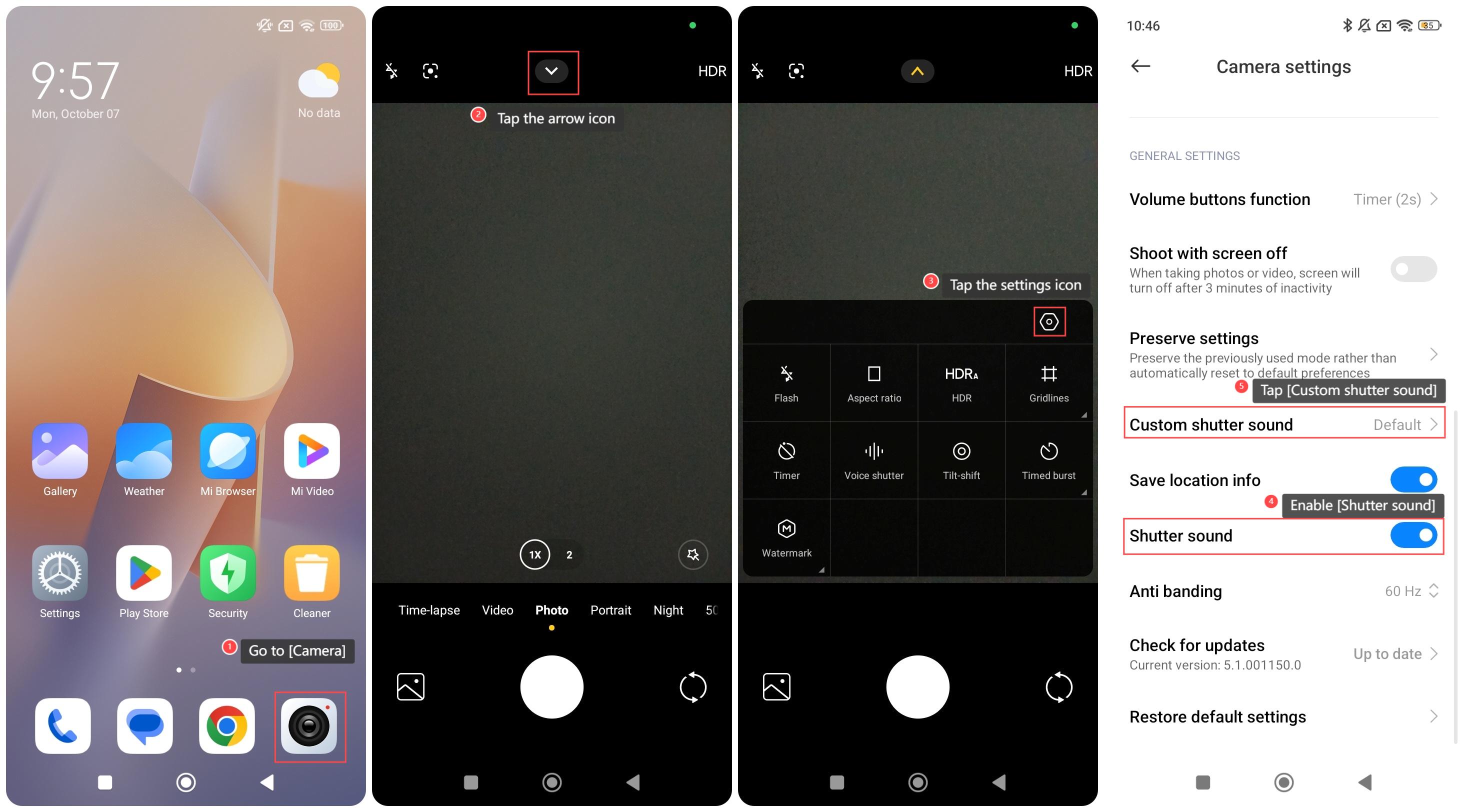
To set the shutter sound on your phone, please refer to the following steps:
1. Go to [Camera];
2. Tap the arrow icon;
3. Tap the settings icon;
4. Enable [Shutter sound];
5. Additionally, you can also tap [Custom shutter sound] to select a shutter sound.
Note:
It's advisable to consider your surroundings, as the sound can be disruptive in quiet settings like events or meetings.
To set the shutter sound on your phone, please refer to the following steps:
1. Go to [Camera];
2. Tap the arrow icon;
3. Tap the settings icon;
4. Enable [Shutter sound];
5. Additionally, you can also tap [Custom shutter sound] to select a shutter sound.
Note:
It's advisable to consider your surroundings, as the sound can be disruptive in quiet settings like events or meetings.
Does it help?
Yes
No