

How to turn on network acceleration on the Xiaomi 14T?
The network acceleration feature of the Xiaomi 14T is designed to improve Internet connectivity and performance by intelligently switching between Wi-Fi and mobile data, reducing latency, improving download and upload speeds, and providing a smoother online experience, ensuring fewer interruptions and buffering in data-intensive applications.
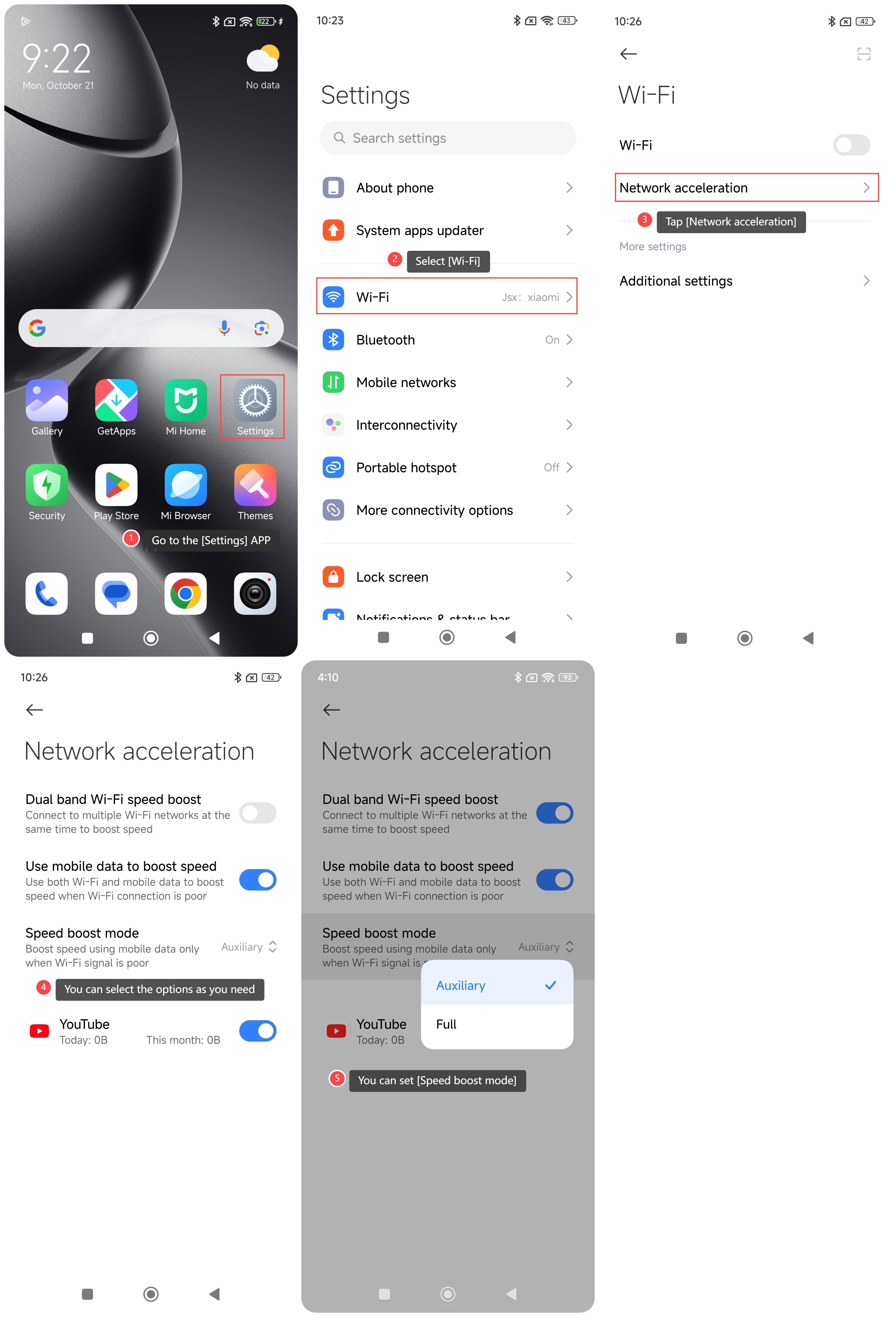
To turn on network acceleration on your phone, please refer to the following steps:
1. Go to the [Settings] APP on your phone;
2. Select [Wi-Fi];
3. Tap [Network acceleration];
4. You can select the options [Dual band Wi-Fi speed boost], [Use mobile data to boost speed] as you need;
5. If you select [Use mobile data to boost speed], you can set [Speed boost mode] ([Auxiliary] or [Full]).
Note:
1. Dual band Wi-Fi speed boost: Connect to multiple Wi-Fi networks at the same time to boost speed;
2. Use mobile data to boost speed: Use both Wi-Fi and mobile data to boost speed when Wi-Fi connection is poor.
To turn on network acceleration on your phone, please refer to the following steps:
1. Go to the [Settings] APP on your phone;
2. Select [Wi-Fi];
3. Tap [Network acceleration];
4. You can select the options [Dual band Wi-Fi speed boost], [Use mobile data to boost speed] as you need;
5. If you select [Use mobile data to boost speed], you can set [Speed boost mode] ([Auxiliary] or [Full]).
Note:
1. Dual band Wi-Fi speed boost: Connect to multiple Wi-Fi networks at the same time to boost speed;
2. Use mobile data to boost speed: Use both Wi-Fi and mobile data to boost speed when Wi-Fi connection is poor.
Does it help?
Yes
No