

How to share the hotspot of the Xiaomi 14T Pro via Ethernet?
If you want to share the Xiaomi 14T Pro's hotspot via Ethernet, you can use a USB-to-Ethernet adapter, as the phone doesn't support direct Ethernet sharing.
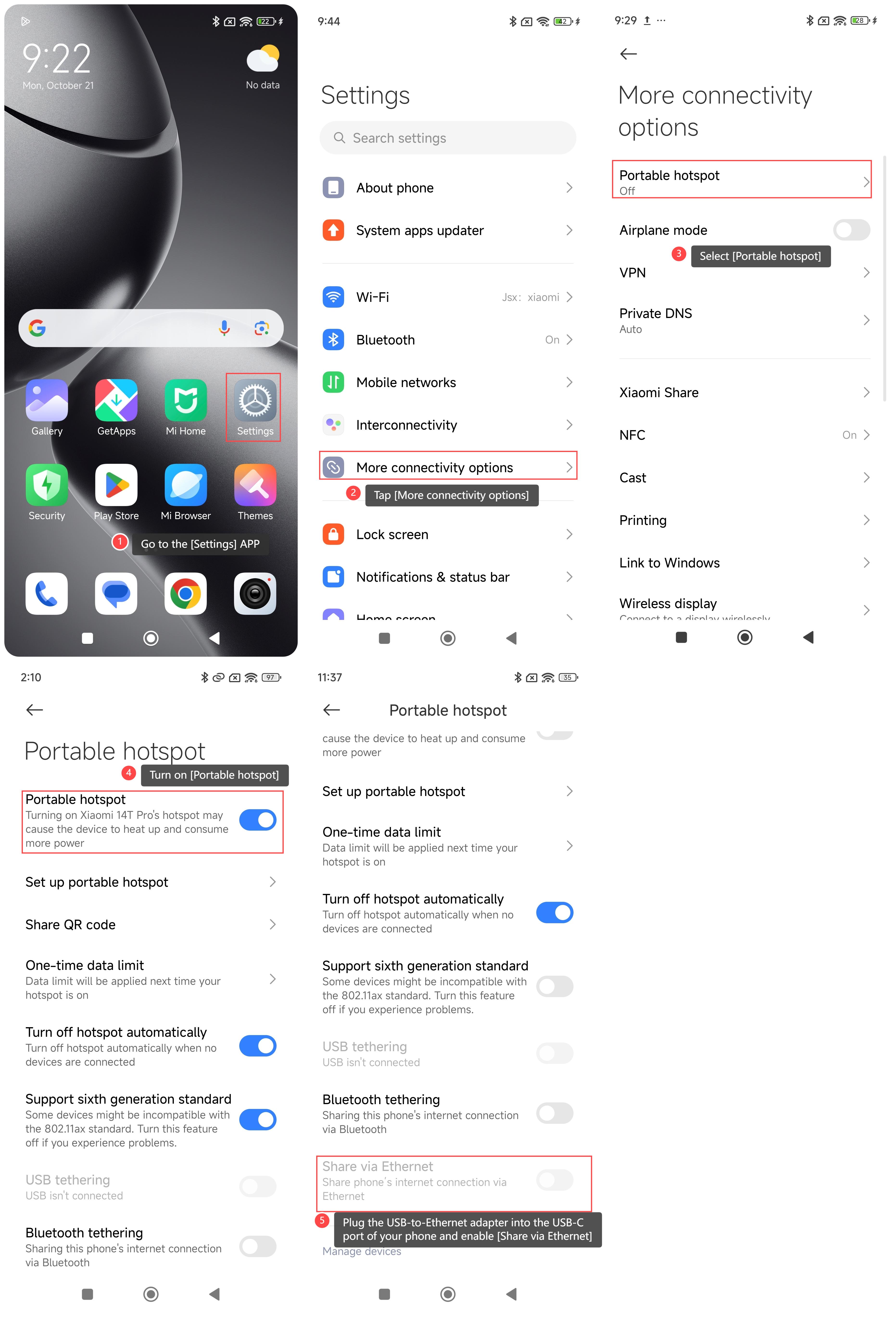
To share the hotspot of your phone via Ethernet, please refer to the following steps:
1. Go to the [Settings] APP on you phone;
2. Tap [More connectivity options];
3. Select [Portable hotspot];
4. Turn on [Portable hotspot];
5. Plug the USB-to-Ethernet adapter into the USB-C port of your phone. Enable [Share via Ethernet];
6. Attach one end of the Ethernet cable to the adapter;
7. Connect the other end of the Ethernet cable to the device you want to provide internet access to.
Note:
Please make sure the connected device (e.g., your computer) is set to obtain the IP address automatically (via DHCP).
To share the hotspot of your phone via Ethernet, please refer to the following steps:
1. Go to the [Settings] APP on you phone;
2. Tap [More connectivity options];
3. Select [Portable hotspot];
4. Turn on [Portable hotspot];
5. Plug the USB-to-Ethernet adapter into the USB-C port of your phone. Enable [Share via Ethernet];
6. Attach one end of the Ethernet cable to the adapter;
7. Connect the other end of the Ethernet cable to the device you want to provide internet access to.
Note:
Please make sure the connected device (e.g., your computer) is set to obtain the IP address automatically (via DHCP).
Does it help?
Yes
No