

How to set the volume buttons function in the camera on the Redmi 13C?
The Redmi 13C supports setting the volume buttons function in the camera, which can provide a convenient way to take photos or start video recording and allow for faster adjustments without navigating through on-screen menus. Besides, the volume buttons functions reduce camera shake when taking photos, as you can press the button without moving the phone much.
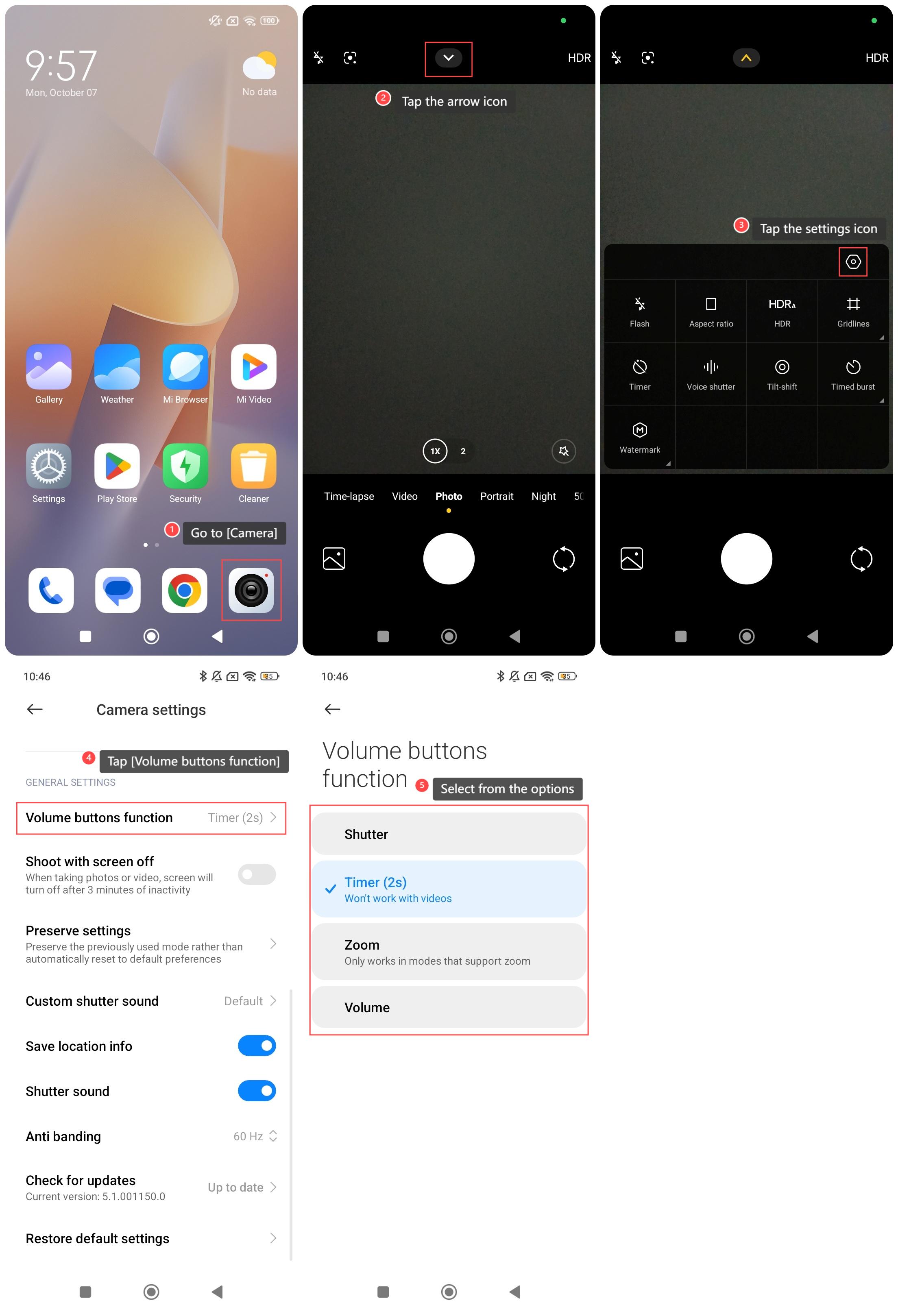
To set the volume buttons function, please refer to the following steps:
1. Go to [Camera];
2. Tap the arrow icon;
3. Tap the settings icon;
4. Swipe down to find and tap [Volume buttons function];
5. Select from the options according to your needs.
To set the volume buttons function, please refer to the following steps:
1. Go to [Camera];
2. Tap the arrow icon;
3. Tap the settings icon;
4. Swipe down to find and tap [Volume buttons function];
5. Select from the options according to your needs.
Does it help?
Yes
No