

How to take a photo on the Redmi 13C 5G by tapping the preview screen?
The Redmi 13C 5G supports taking a photo by tapping the preview screen. Instead of pressing a physical or on-screen shutter button, you can simply tap anywhere on the preview screen to take a photo, making it faster and more efficient. Tapping the screen can minimize camera shake compared to pressing a physical button, which will slightly jostle the phone and cause a blurry image, especially in low-light conditions.
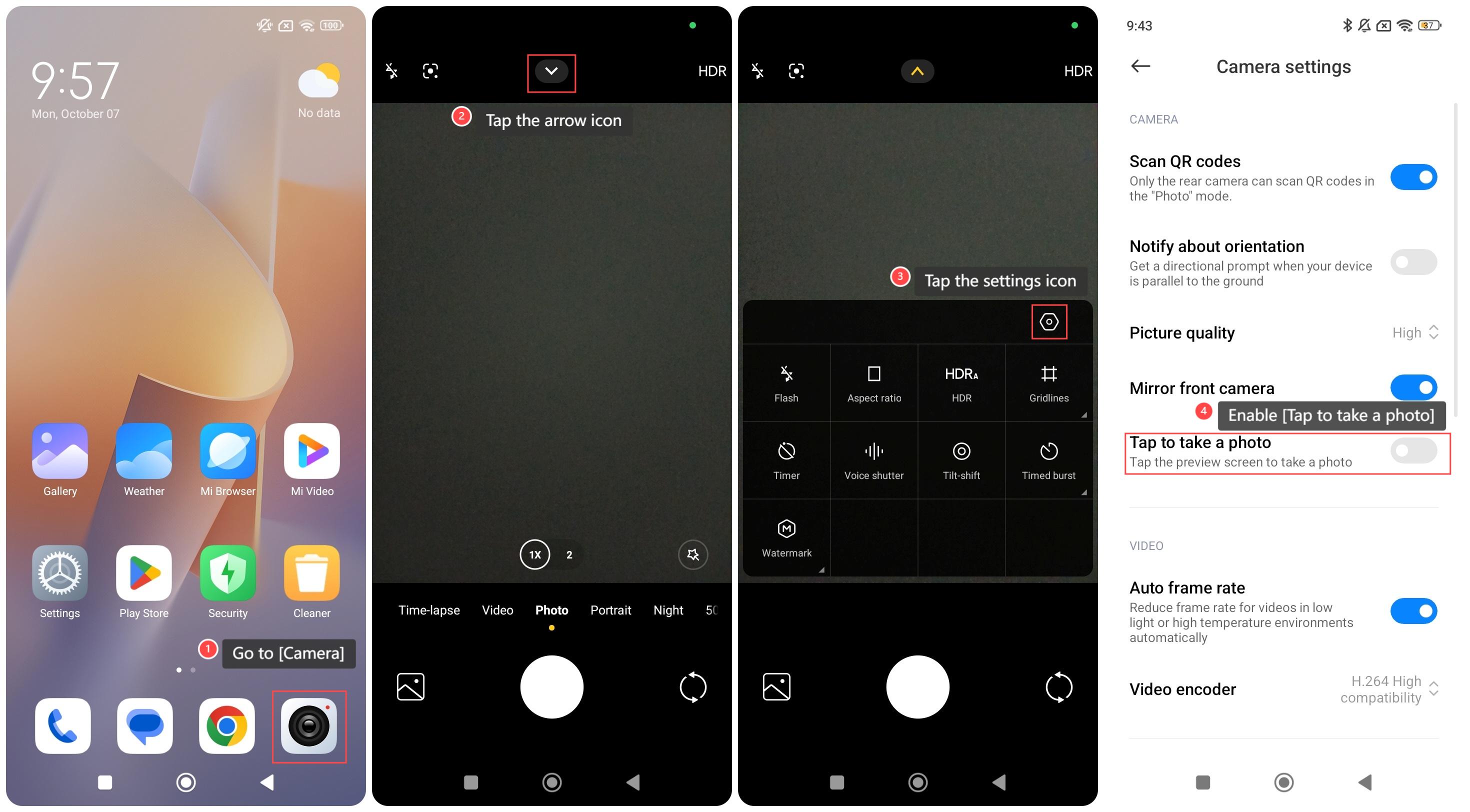
To take a photo on the Redmi 13C 5G by tapping the preview screen, please refer to the following steps:
1. Go to [Camera];
2. Tap the arrow icon;
3. Tap the settings icon;
4. Enable [Tap to take a photo].
To take a photo on the Redmi 13C 5G by tapping the preview screen, please refer to the following steps:
1. Go to [Camera];
2. Tap the arrow icon;
3. Tap the settings icon;
4. Enable [Tap to take a photo].
Does it help?
Yes
No