

How to use Parental controls on the Redmi 13C?
The Redmi 13C supports setting parental controls, which adds content restrictions and sets other limits to help your child balance screen time. Through this feature, the screen time of your child will be controlled, which will avoid eye impairment and foster the healthy development of your child.
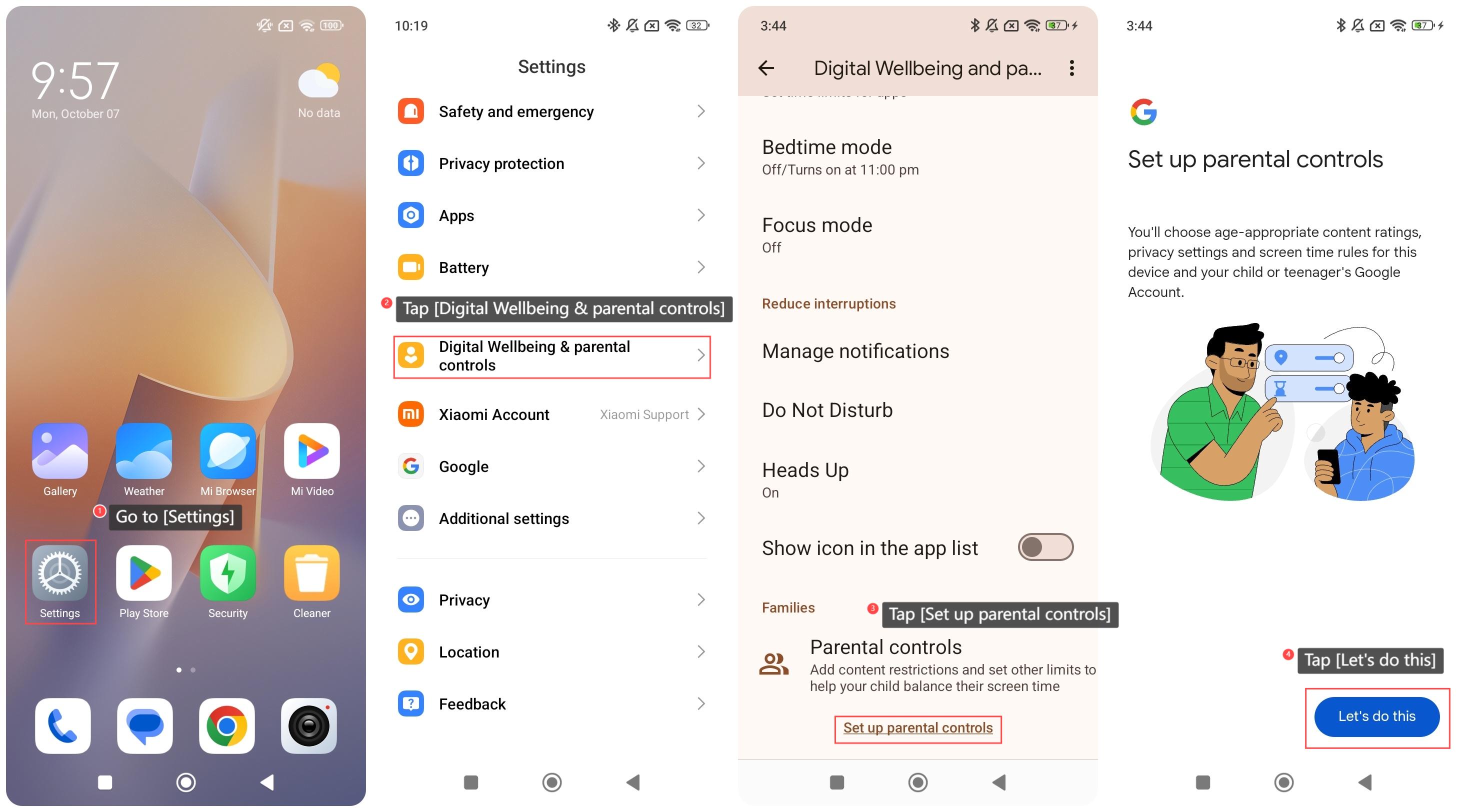
To use the Parental controls on your phone, please refer to the following steps:
1. Go to [Settings];
2. Swipe down to find and tap [Digital Wellbeing & parental controls];
3. Swipe down to find and tap [Set up parental controls];
4. Tap [Let’s do this] and follow the instructions to select the controlled account and parents’ account to use the function.
To use the Parental controls on your phone, please refer to the following steps:
1. Go to [Settings];
2. Swipe down to find and tap [Digital Wellbeing & parental controls];
3. Swipe down to find and tap [Set up parental controls];
4. Tap [Let’s do this] and follow the instructions to select the controlled account and parents’ account to use the function.
Does it help?
Yes
No