

How to check the number of charges per day on the Redmi 13C?
The Redmi 13C supports checking the number of charges per day, which helps you understand how frequently you're charging, which can indicate battery health and efficiency. Knowing your charging frequency can guide you to adjust habits to extend battery lifespan, like avoiding overnight charging. Analyzing charging habits can reveal usage patterns, helping you manage your device’s battery life more effectively.
To check the number of charges per day on your phone, please refer to the following methods:
Method 1:
1. Go to the [Settings] APP on your phone;
2. Scroll down and select [Battery];
3. Tap [Battery protection];
4. You can check [Number of charges today].

Method 2:
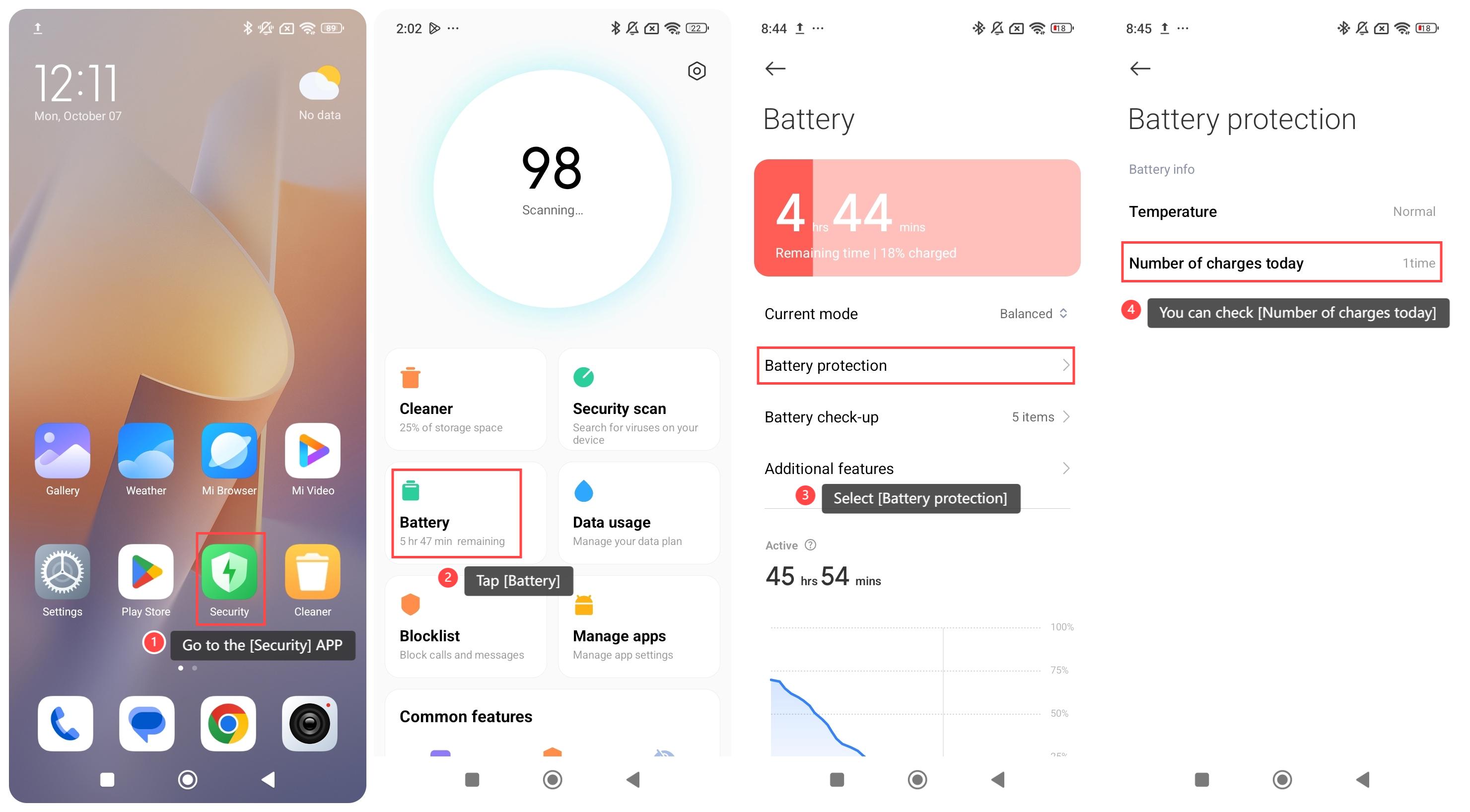
1. Go to the [Security] APP on your phone;
2. Tap [Battery];
3. Select [Battery protection];
4. You can check [Number of charges today].
To check the number of charges per day on your phone, please refer to the following methods:
Method 1:
1. Go to the [Settings] APP on your phone;
2. Scroll down and select [Battery];
3. Tap [Battery protection];
4. You can check [Number of charges today].
Method 2:
1. Go to the [Security] APP on your phone;
2. Tap [Battery];
3. Select [Battery protection];
4. You can check [Number of charges today].
Does it help?
Yes
No