

How to schedule power on/off on the Redmi 13C?
The schedule power on/off feature on the Redmi 13C allows you to set a specific time for your phone to automatically power on or off. This can be useful for conserving battery life, minimizing distractions during certain hours (like while you sleep), or maintaining a regular device usage routine. You can configure the schedule in the device's settings, and once set, the phone will turn off and power back on at the designated times without needing manual intervention. It offers convenience and energy efficiency.
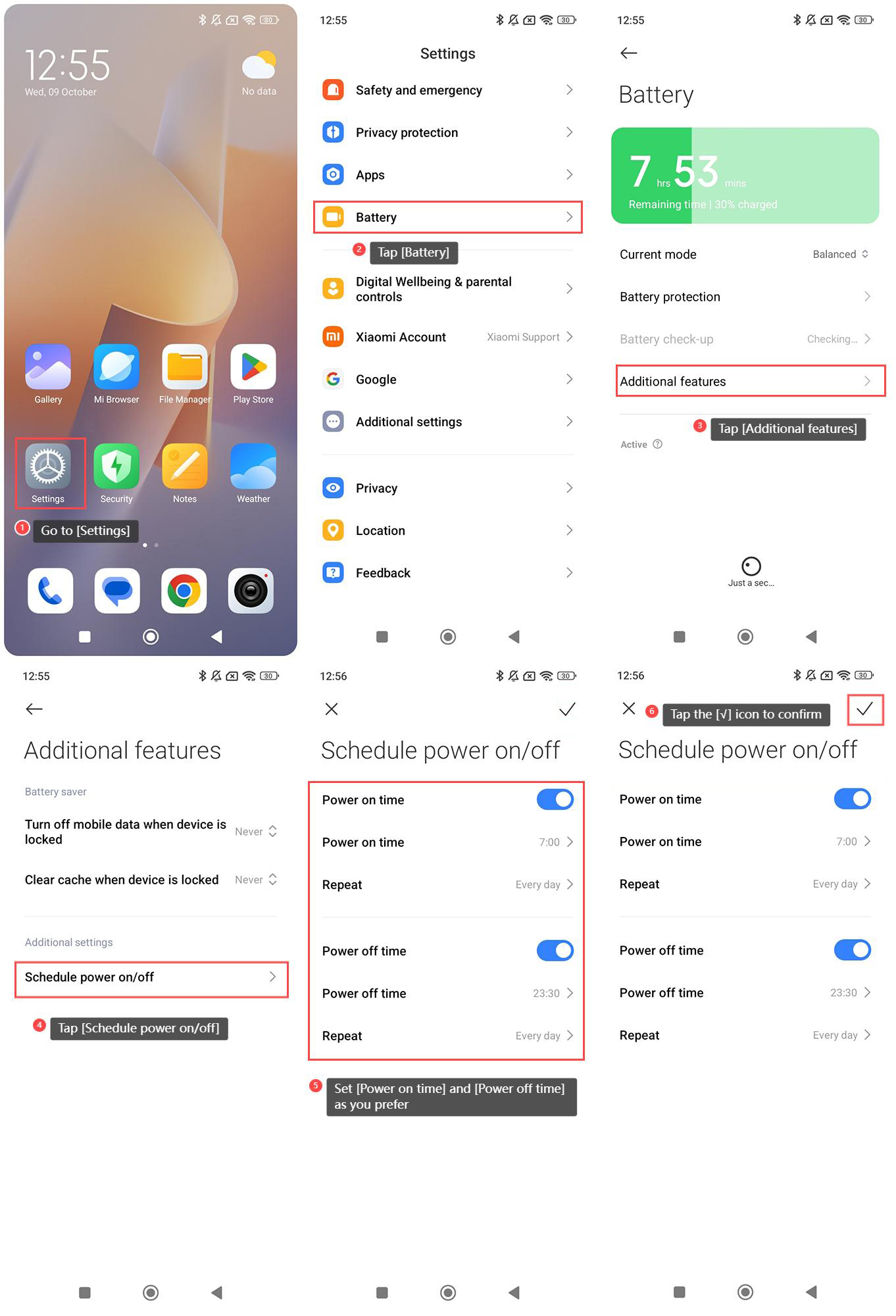
To schedule power on/off on the Redmi 13C, please refer to the following steps:
1. Go to [Settings] on your phone;
2. Tap [Battery];
3. Tap [Additional features];
4. Tap [Schedule power on/off];
5. Set [Power on time] and [Power off time] as you prefer;
6. Tap the [√] icon in the upper right corner to confirm the changes.
To schedule power on/off on the Redmi 13C, please refer to the following steps:
1. Go to [Settings] on your phone;
2. Tap [Battery];
3. Tap [Additional features];
4. Tap [Schedule power on/off];
5. Set [Power on time] and [Power off time] as you prefer;
6. Tap the [√] icon in the upper right corner to confirm the changes.
Does it help?
Yes
No