

How to rename the Redmi 13C?
Renaming the Redmi 13C means changing the device name that appears when you share data with nearby devices. This feature allows you to personalize your phone, making it easier to identify. A unique name not only enhances convenience but also adds a layer of privacy by preventing others from seeing the default device model name.
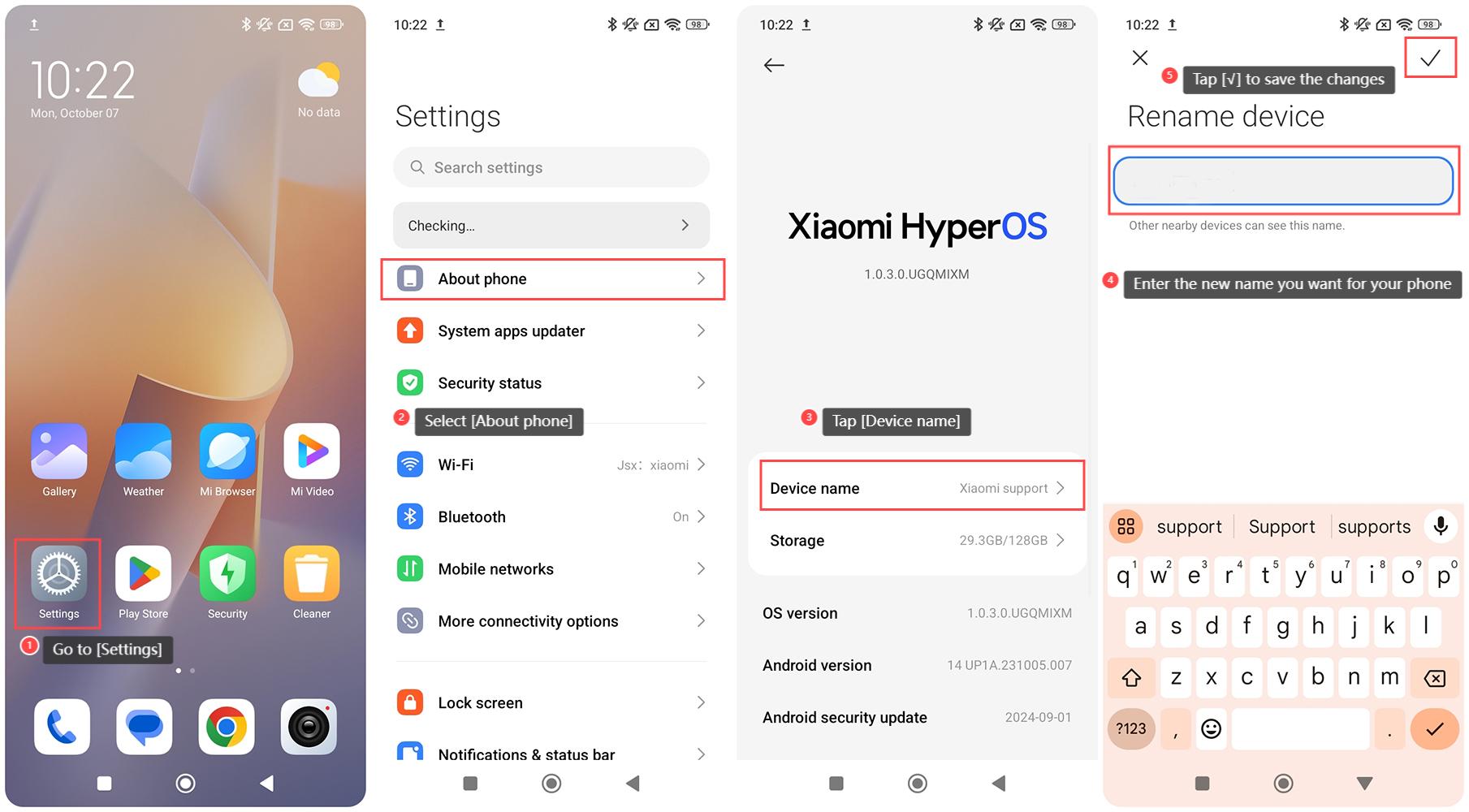
To rename the Redmi 13C, please refer to the following steps:
1. Go to [Settings] on your phone;
2. Select [About phone];
3. Tap [Device name];
4. You can see a screen that allows you to edit the device name. Enter the new name you want for your phone;
5. After entering the new name, tap [√] to save the changes.
Note:
Sometimes, changes in device names will require a restart to take effect. You can restart your phone to ensure the new name is applied.
To rename the Redmi 13C, please refer to the following steps:
1. Go to [Settings] on your phone;
2. Select [About phone];
3. Tap [Device name];
4. You can see a screen that allows you to edit the device name. Enter the new name you want for your phone;
5. After entering the new name, tap [√] to save the changes.
Note:
Sometimes, changes in device names will require a restart to take effect. You can restart your phone to ensure the new name is applied.
Does it help?
Yes
No