

Xiaomi Smart Floor Lamp FAQ
Overview
1. Q: What kind of lamp is the Xiaomi Smart Floor Lamp?
A: The Xiaomi Smart Floor Lamp is an eye-care lamp designed for study or office environments. It provides direct lighting from the bottom light source and indirect lighting from the top light source, reducing the contrast between the desk and ambient light while ensuring high illuminance on the desk. It stands at a height of 2055mm, features a 90° rotatable lamp head, and supports control via a wireless Bluetooth remote, the Mi Home/Xiaomi Home APP, and voice control through Google and Alexa (Alexa is not supported in Taiwan).
2. Q: What are the selling points of the Xiaomi Smart Floor Lamp?
A: For your reference, here are some selling points of the Xiaomi Smart Floor Lamp:
1. The Xiaomi Smart Floor Lamp features uniform light and high brightness, with a central illuminance greater than 1800lx and uniformity close to 1, resulting in almost no hand shadows while writing under the lamp;
2. Its 90° rotatable lamp head allows for flexible light coverage in the study area;
3. The lamp utilizes custom full-spectrum LEDs with Ra98 high color rendering, providing true-to-life colors for a natural light experience while drawing;
4. It offers multiple control methods, including remote control, the Mi Home/Xiaomi Home APP, and voice control via Google or Alexa (Alexa is not supported in Taiwan), and supports soft on/off functionality.
3. Q: What is contained in the packing of the Xiaomi Smart Floor Lamp?
A: The package contents include a Lamp head, a Base, an Upper lamp pole, a Lower lamp pole, a Wireless Bluetooth remote control, nine No. 1 mounting screws, three No. 2 mounting screws, three No. 3 mounting screws, a Power cord, a Lamp head bar cover, a Hex key (2.5 mm), a Hex key (3 mm), a pair of White gloves, a User manual, and a Warranty card.
Note:
Each screw accessory bag includes one extra screw, with an additional spare provided for each of the three different screw types.
Installation and setup
1. Q: How to install the Xiaomi Smart Floor Lamp?
A: To install the Xiaomi Smart Floor Lamp, please refer to the following steps:
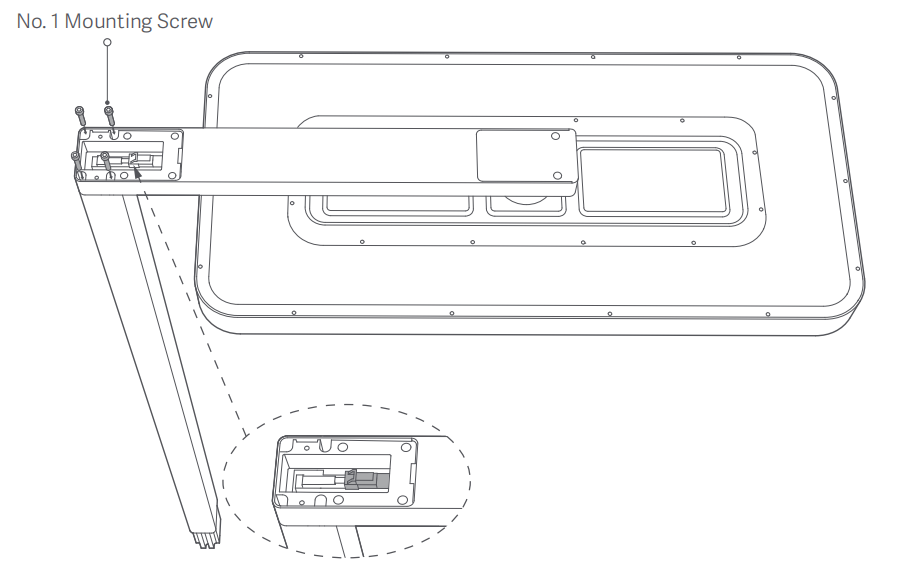
1. Take out four screws from the No.1 accessory bag to fasten the lamp head bar onto the upper lamp pole. Then connect the wiring terminal inside the lamp head bar and the upper lamp pole;
Note:
There are two screw holes at the bottom back end of the upper lamp pole. Make sure to install the pole in the correct direction.
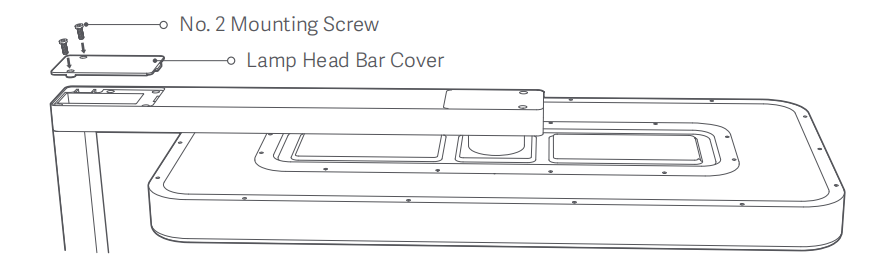
2. Take out the lamp head bar cover from the accessory bag and securely fasten it in place using the two screws in the No. 2 accessory bag;
Note:
The packaging box's inner holder can help install the base and the lower lamp pole. Before installing, take out all inner holders from the box.
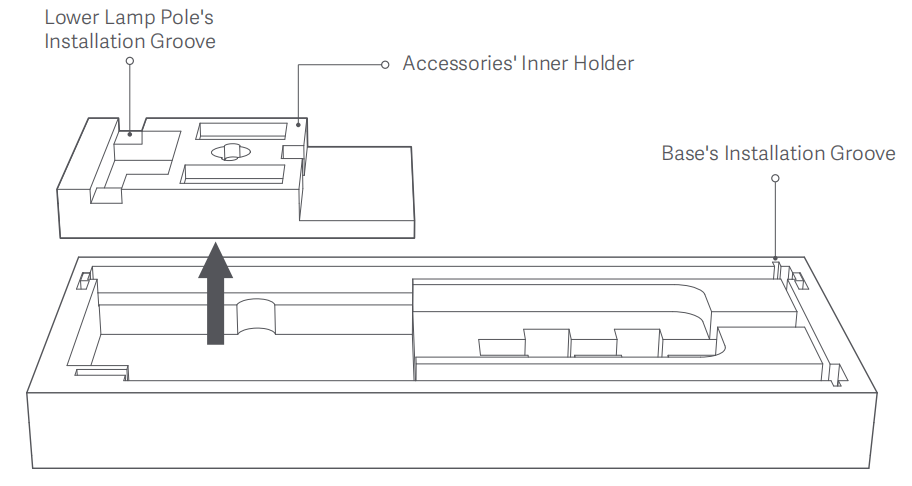
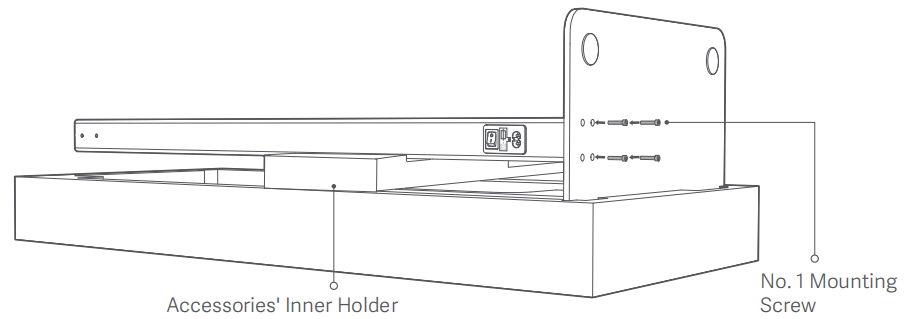
3. Place the long side of the base into its installation groove and position the accessories' inner holder on top of the packaging box's inner holder as support for the installation of the lower lamp pole. Insert the lower lamp pole into its installation groove on the accessories' inner holder, and align the four screw holes at the bottom of the pole with those of the base. Secure the lower lamp pole to the base from the back of the base by using the four screws in the No. 1 accessory bag;
Note:
There is a power port at the bottom back end of the lower lamp pole. Make sure to install the pole in the correct direction.
4. After completing the above assembly, connect the wiring terminal between the upper and lower lamp poles, and secure two lamp poles together by using the two screws in the No. 3 accessory bag;
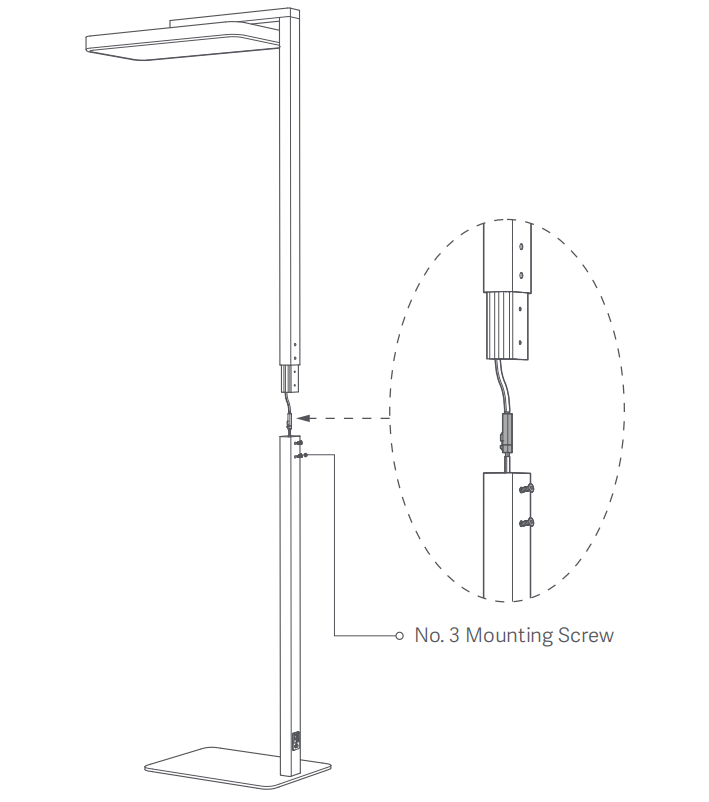
5. Insert the power plug into the power port at the bottom back of the lower lamp pole. Then position the lamp as needed and, if necessary, rotate the lamp head 90° to better fit your desk.
Note:
1. Make sure to use the corresponding accessories provided for installation and do not replace them on your own to prevent any potential damage to the lamp or improper assembly;
2. Do not connect the lamp to power before complete installation to prevent electric shocks;
3. Strictly follow the user manual for the installation. Failure to do so can result in product malfunction.
2. Q: How to install the remote control batteries of the Xiaomi Smart Floor Lamp?
A: To install the remote control batteries of the Xiaomi Smart Floor Lamp, please refer to the following steps:
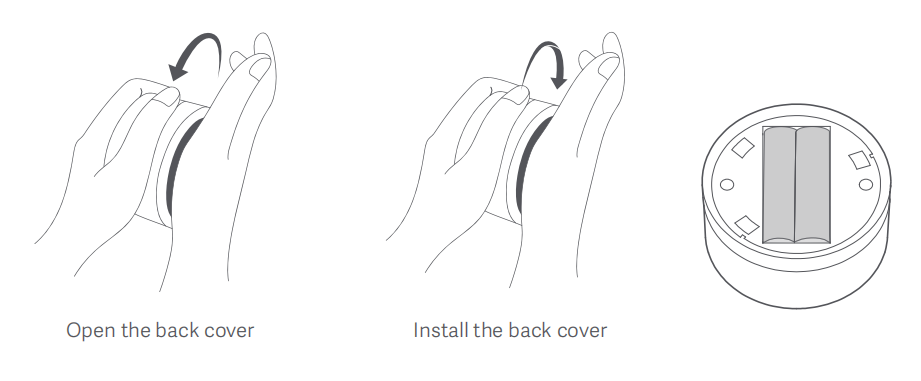
1. Open the back cover of the remote control. Put the anti-slip pad at the bottom of the remote control against your palm, then hold the bottom edge of the remote control with the other hand to turn the remote control counterclockwise;
2. Install two AAA batteries according to the positive (+) and negative (-) poles of the battery compartment;
3. Align the triangle on the bottom edge of the remote control with the lock symbol on the anti-slip pad to put the back cover into the bottom of the remote control smoothly;
4. To secure the back cover, put the anti-slip pad at the bottom of the remote control against your palm, then hold the bottom edge of the remote control with the other hand to turn the remote control clockwise.
Note:
The remote control needs two AAA alkaline batteries, which need to be purchased separately.
3. Q: How to use the hex keys of the Xiaomi Smart Floor Lamp?
A: The hex key (3mm) is suitable for No.1 mounting screws, while the hex key (2.5mm) is suitable for No.2 and No.3 mounting screws. The size information is marked on the back of the handle.
4. Q: Can the Xiaomi Smart Floor Lamp be controlled using the Mi Home/Xiaomi Home APP or voice?
A: Yes, it can connect to Wi-Fi and be controlled by the Mi Home/Xiaomi Home APP, as well as voice control via Google or Alexa (Alexa is not supported in Taiwan).
Specifications
1. Q: What are the dimensions of the Xiaomi Smart Floor Lamp?
A: 1. The dimensions of the lamp head are 600 × 280 × 40mm;
2. The dimensions of the base are 480 × 330mm;
3. The thickness of the base plate is 8mm, the thickness of the anti-slip strip is 2mm, and the thickness of the total base is 10mm (±1mm);
4. The total lamp height is 2055mm;
5. The dimensions of the remote control are Φ55.4 × 33.85mm.
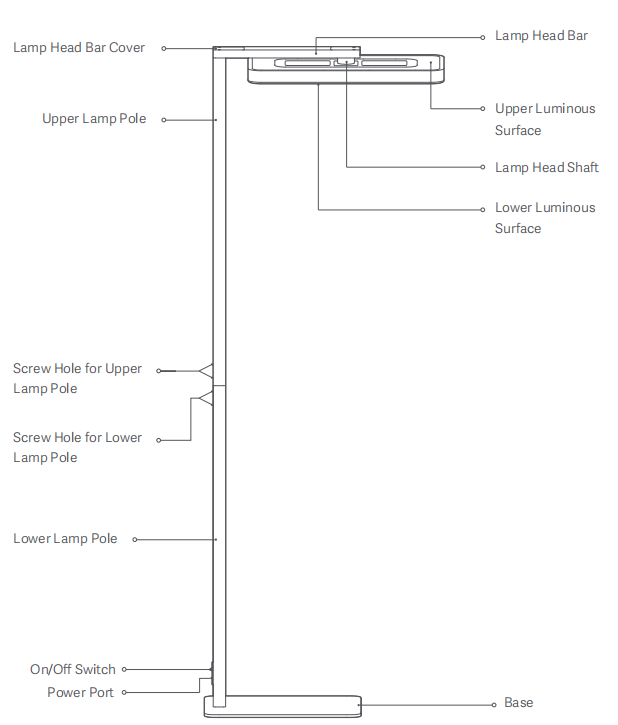
The Xiaomi Smart Floor Lamp’s overall structure is as follows:
2. Q: What is the rated voltage of the Xiaomi Smart Floor Lamp?
A: 100-120V~50/60Hz.
3. Q: What is the weight of the Xiaomi Smart Floor Lamp?
A: The net weight is 16.5kg (± 0.5kg), and the gross weight is 20.5kg (± 0.5kg).
4. Q: What is the luminous flux of the Xiaomi Smart Floor Lamp?
A: The luminous flux of the top light source is 7000lm (± 10%), and the luminous flux of the bottom light source is 3000lm (± 10%).
5. Q: What is the rated power of the Xiaomi Smart Floor Lamp?
A: The rated power of the Xiaomi Smart Floor Lamp is 130W.
6. Q: How is the color rendering of the Xiaomi Smart Floor Lamp?
A: The Xiaomi Smart Floor Lamp uses custom full-spectrum LEDs, providing color reproduction close to sunlight. The Ra is 98 ± 1, the CQS is 99 ± 2, the Rg is 100 ± 2, the Rf is 98 ± 2, and the R9 is 94 ± 2.
7. Q: How is the illuminance and uniformity of the Xiaomi Smart Floor Lamp?
A: In an environment with a height of 2.7m and a horizontal plane height of 750mm, the measured central illuminance is >1800lx, with central area illuminance (500 × 300mm rounded rectangular area) >1700lx and uniformity of 1.04. The total area (700 × 500mm rounded rectangular area) has an average illuminance of >1700lx and a uniformity of 1.1.
Note:
1. Different testing environments and equipment can cause variations;
2. The closer the uniformity is to 1, the better, indicating a more even distribution of illuminance on the desk.
8. Q: What is the blue light hazard testing level of the Xiaomi Smart Floor Lamp?
A: The Xiaomi Smart Floor Lamp tests at RG0 exempt group, tested on the bottom illuminated surface at maximum brightness.
9. Q: Is the Xiaomi Smart Floor Lamp flicker-free?
A: Yes, it is.
Smart control
1. Q: How to pair the remote control with the Xiaomi Smart Floor Lamp?
A: Turn on the lamp by flipping the switch at the bottom of the lamp pole (ensure that the power has been off for more than 2 seconds before powering on), and then press and hold the remote control within 1 minute. The light will enter a breathing state, indicating that pairing is successful.
Note:
1. If the remote control is lost or faulty, and the lamp requires pairing with a new remote control, please follow the steps above for pairing;
2. A maximum of 3 remote controls can be bound to one lamp.
2. Q: How to unpair the remote control from the Xiaomi Smart Floor Lamp?
A: If you need to unpair the lamp from a remote control, open the Mi Home/Xiaomi Home APP and go to the plug-in settings for the lamp currently paired with the remote control, tap [Remote control], then tap [Unpair] on the right of the paired remote control to unpair.
3. Q: How to control the Xiaomi Smart Floor Lamp using the remote control?
A: The functions of the remote control are as follows:
1. Press to turn on/off the lamp;
2. Rotate to adjust the brightness;
3. Double press to enable the focus mode.
4. Q: How does the focus mode of the Xiaomi Smart Floor Lamp work?
A: After enabling the focus mode, the lamp will breathe three times as a reminder that the timer for the focus mode has been activated. After 45 minutes, the lamp will breathe again to indicate that the 10-minute rest period has begun. The focus mode will cycle twice by default and will automatically be disabled when the cycles are complete. The durations for the focus and the rest, as well as the number of cycles, can be set in the Mi Home/Xiaomi Home APP.
5. Q: Can the Xiaomi Smart Floor Lamp be used without plugging it in?
A: No, the lamp is designed to be used when plugged in.
6. Q: How many prongs does the power plug of the Xiaomi Smart Floor Lamp have?
A: Two.
Usage
1. Q: How many degrees can the lamp head of the Xiaomi Smart Floor Lamp rotate?
A: The lamp head can rotate 90°, ensuring that the illuminated surface covers the child's study area, regardless of the desk's length. Please adjust it according to the child's study area and the lamp's placement.
2. Q: Does the lamp pole of the Xiaomi Smart Floor Lamp have a control area (or buttons)?
A: No, the lamp is controlled via the wireless Bluetooth remote, the Mi Home/Xiaomi Home APP, and voice control through Google or Alexa (Alexa is not supported in Taiwan).
3. Q: Does the Xiaomi Smart Floor Lamp support color temperature adjustment?
A: No, the lamp only supports on/off and brightness adjustment.
4. Q: What is the purpose of the top illuminated surface of the Xiaomi Smart Floor Lamp?
A: The light from the top illuminated surface reflects off the ceiling in all directions, enhancing ambient light brightness and reducing the contrast in illuminance between the ambient light and the study area, making it more comfortable for the child's eyes.
5. Q: Is there almost no hand shadow at any position on the desk when using the Xiaomi Smart Floor Lamp?
A: It is recommended to study directly under the illuminated surface of the lamp head to achieve an effect close to having no hand shadows.
6. Q: Is the Xiaomi Smart Floor Lamp safe given its weight?
A: Yes, the base has passed EU 6° anti-tipping tests, with a front-to-back anti-tipping angle of 15°. It has a large flat base weighing 10kg, making it very stable and safe.
7. Q: Can the top and bottom light sources of the Xiaomi Smart Floor Lamp be controlled separately?
A: No, the bottom light source provides bright main illumination, while the top light source offers diffused ambient light. Synchronous control is designed to avoid significant differences in ambient light brightness, thus reducing eye strain.
8. Q: How to reset the Xiaomi Smart Floor Lamp?
A: Toggle the on/off switch at the bottom of the lamp pole to turn the lamp on and off five times (turning it on for about two seconds and off for about two seconds). When the lamp has been turned on for the fifth time, the lamp light will breathe before remaining on, indicating that the lamp has been reset successfully.
Note:
To use the lamp in a new network environment, you need to restore it to the factory settings first, and then connect it to the new network.
9. Q: Why hasn’t the Xiaomi Smart Floor Lamp shown a breathing effect after resetting?
A: The Xiaomi Smart Floor Lamp has a higher power rating, and the modules' power-off time can vary. It is recommended to slightly extend the interval between power on and off during the reset for successful operation.
10. Q: Does the Xiaomi Smart Floor Lamp support soft on/off?
A: Yes, it supports soft on/off, with a default duration of 1 second. You can customize the soft on/off duration in the Mi Home/Xiaomi Home APP.
Troubleshooting
1. Q: Is it normal for the lamp head of the Xiaomi Smart Floor Lamp to wobble?
A: Yes, it is normal for the lamp head to wobble slightly due to its weight and height. If the lamp pole is touched, it can cause a slight movement of the entire lamp.
2. Q: Why is there a difference between the illuminance measured with a light meter and the advertised values of the Xiaomi Smart Floor Lamp?
A: For example, in the case of measuring central illuminance, inaccuracies in the placement of the light meter, obstruction by desk or bookshelves, desk height below 750mm, room height, and testing precision can all contribute to differences in illuminance values.
3. Q: What to do if the remote control of the Xiaomi Smart Floor Lamp is not working?
A: If the remote control is not functioning, please change the batteries or remove the two batteries and reinsert them to restart the remote and re-pair it with the lamp. If these troubleshooting steps do not resolve the issue, please contact the after-sales service.
4. Q: Why does the Xiaomi Smart Floor Lamp blink a few times?
A: It is because the focus mode was activated by double pressing the remote control. This feature can be disabled in the Mi Home/Xiaomi Home APP.
5. Q: What is the focus mode of the Xiaomi Smart Floor Lamp?
A: The focus mode is a feature designed to help children manage their study and eye-use time. By double-pressing the remote control twice, the lamp will slowly breathe three times to indicate that the function is activated. After a period of study, the lamp will breathe three times again to remind the children to take a break and start timing. The duration of study, break, and the number of cycles can all be set in the Mi Home/Xiaomi Home APP.
6. Q: Why does the Xiaomi Smart Floor Lamp not come on when turning it on after plugged in?
A: The Xiaomi Smart Floor Lamp has a default power-off memory function. If you last turned it off using the remote control, the Mi Home/Xiaomi Home APP, or voice command, the lamp will be in a soft-off state. At this time, if you try to turn it on using the switch at the bottom of the lamp pole, it will not turn on due to this memory state. Additionally, if you quickly press the switch multiple times, the chip will not have completely powered off, also preventing the lamp from turning on.
If this occurs, please refer to the following methods:
1. Press the switch at the bottom of the lamp pole to turn it off for more than 5 seconds, then press the switch again to turn it on, which should allow normal control via the remote control or the Mi Home/Xiaomi Home APP;
2. If the first method does not work, try pressing the switch at the bottom of the lamp pole to turn it off for more than 5 seconds, then press the switch once more, wait for 5 seconds (not exceeding 10 seconds), then press the switch to turn it off and wait for 5 seconds before pressing it again to turn it on. This will trigger a second quick power-on and force the lamp to turn on.
Note:
The power-off memory function is designed to prevent the lamp from automatically turning on when power returns after an outage while no one is at home. You can disable this feature in the Mi Home/Xiaomi Home APP.
1. Q: What kind of lamp is the Xiaomi Smart Floor Lamp?
A: The Xiaomi Smart Floor Lamp is an eye-care lamp designed for study or office environments. It provides direct lighting from the bottom light source and indirect lighting from the top light source, reducing the contrast between the desk and ambient light while ensuring high illuminance on the desk. It stands at a height of 2055mm, features a 90° rotatable lamp head, and supports control via a wireless Bluetooth remote, the Mi Home/Xiaomi Home APP, and voice control through Google and Alexa (Alexa is not supported in Taiwan).
2. Q: What are the selling points of the Xiaomi Smart Floor Lamp?
A: For your reference, here are some selling points of the Xiaomi Smart Floor Lamp:
1. The Xiaomi Smart Floor Lamp features uniform light and high brightness, with a central illuminance greater than 1800lx and uniformity close to 1, resulting in almost no hand shadows while writing under the lamp;
2. Its 90° rotatable lamp head allows for flexible light coverage in the study area;
3. The lamp utilizes custom full-spectrum LEDs with Ra98 high color rendering, providing true-to-life colors for a natural light experience while drawing;
4. It offers multiple control methods, including remote control, the Mi Home/Xiaomi Home APP, and voice control via Google or Alexa (Alexa is not supported in Taiwan), and supports soft on/off functionality.
3. Q: What is contained in the packing of the Xiaomi Smart Floor Lamp?
A: The package contents include a Lamp head, a Base, an Upper lamp pole, a Lower lamp pole, a Wireless Bluetooth remote control, nine No. 1 mounting screws, three No. 2 mounting screws, three No. 3 mounting screws, a Power cord, a Lamp head bar cover, a Hex key (2.5 mm), a Hex key (3 mm), a pair of White gloves, a User manual, and a Warranty card.
Note:
Each screw accessory bag includes one extra screw, with an additional spare provided for each of the three different screw types.
Installation and setup
1. Q: How to install the Xiaomi Smart Floor Lamp?
A: To install the Xiaomi Smart Floor Lamp, please refer to the following steps:
1. Take out four screws from the No.1 accessory bag to fasten the lamp head bar onto the upper lamp pole. Then connect the wiring terminal inside the lamp head bar and the upper lamp pole;
Note:
There are two screw holes at the bottom back end of the upper lamp pole. Make sure to install the pole in the correct direction.
2. Take out the lamp head bar cover from the accessory bag and securely fasten it in place using the two screws in the No. 2 accessory bag;
Note:
The packaging box's inner holder can help install the base and the lower lamp pole. Before installing, take out all inner holders from the box.
3. Place the long side of the base into its installation groove and position the accessories' inner holder on top of the packaging box's inner holder as support for the installation of the lower lamp pole. Insert the lower lamp pole into its installation groove on the accessories' inner holder, and align the four screw holes at the bottom of the pole with those of the base. Secure the lower lamp pole to the base from the back of the base by using the four screws in the No. 1 accessory bag;
Note:
There is a power port at the bottom back end of the lower lamp pole. Make sure to install the pole in the correct direction.
4. After completing the above assembly, connect the wiring terminal between the upper and lower lamp poles, and secure two lamp poles together by using the two screws in the No. 3 accessory bag;
5. Insert the power plug into the power port at the bottom back of the lower lamp pole. Then position the lamp as needed and, if necessary, rotate the lamp head 90° to better fit your desk.
Note:
1. Make sure to use the corresponding accessories provided for installation and do not replace them on your own to prevent any potential damage to the lamp or improper assembly;
2. Do not connect the lamp to power before complete installation to prevent electric shocks;
3. Strictly follow the user manual for the installation. Failure to do so can result in product malfunction.
2. Q: How to install the remote control batteries of the Xiaomi Smart Floor Lamp?
A: To install the remote control batteries of the Xiaomi Smart Floor Lamp, please refer to the following steps:
1. Open the back cover of the remote control. Put the anti-slip pad at the bottom of the remote control against your palm, then hold the bottom edge of the remote control with the other hand to turn the remote control counterclockwise;
2. Install two AAA batteries according to the positive (+) and negative (-) poles of the battery compartment;
3. Align the triangle on the bottom edge of the remote control with the lock symbol on the anti-slip pad to put the back cover into the bottom of the remote control smoothly;
4. To secure the back cover, put the anti-slip pad at the bottom of the remote control against your palm, then hold the bottom edge of the remote control with the other hand to turn the remote control clockwise.
Note:
The remote control needs two AAA alkaline batteries, which need to be purchased separately.
3. Q: How to use the hex keys of the Xiaomi Smart Floor Lamp?
A: The hex key (3mm) is suitable for No.1 mounting screws, while the hex key (2.5mm) is suitable for No.2 and No.3 mounting screws. The size information is marked on the back of the handle.
4. Q: Can the Xiaomi Smart Floor Lamp be controlled using the Mi Home/Xiaomi Home APP or voice?
A: Yes, it can connect to Wi-Fi and be controlled by the Mi Home/Xiaomi Home APP, as well as voice control via Google or Alexa (Alexa is not supported in Taiwan).
Specifications
1. Q: What are the dimensions of the Xiaomi Smart Floor Lamp?
A: 1. The dimensions of the lamp head are 600 × 280 × 40mm;
2. The dimensions of the base are 480 × 330mm;
3. The thickness of the base plate is 8mm, the thickness of the anti-slip strip is 2mm, and the thickness of the total base is 10mm (±1mm);
4. The total lamp height is 2055mm;
5. The dimensions of the remote control are Φ55.4 × 33.85mm.
The Xiaomi Smart Floor Lamp’s overall structure is as follows:
2. Q: What is the rated voltage of the Xiaomi Smart Floor Lamp?
A: 100-120V~50/60Hz.
3. Q: What is the weight of the Xiaomi Smart Floor Lamp?
A: The net weight is 16.5kg (± 0.5kg), and the gross weight is 20.5kg (± 0.5kg).
4. Q: What is the luminous flux of the Xiaomi Smart Floor Lamp?
A: The luminous flux of the top light source is 7000lm (± 10%), and the luminous flux of the bottom light source is 3000lm (± 10%).
5. Q: What is the rated power of the Xiaomi Smart Floor Lamp?
A: The rated power of the Xiaomi Smart Floor Lamp is 130W.
6. Q: How is the color rendering of the Xiaomi Smart Floor Lamp?
A: The Xiaomi Smart Floor Lamp uses custom full-spectrum LEDs, providing color reproduction close to sunlight. The Ra is 98 ± 1, the CQS is 99 ± 2, the Rg is 100 ± 2, the Rf is 98 ± 2, and the R9 is 94 ± 2.
7. Q: How is the illuminance and uniformity of the Xiaomi Smart Floor Lamp?
A: In an environment with a height of 2.7m and a horizontal plane height of 750mm, the measured central illuminance is >1800lx, with central area illuminance (500 × 300mm rounded rectangular area) >1700lx and uniformity of 1.04. The total area (700 × 500mm rounded rectangular area) has an average illuminance of >1700lx and a uniformity of 1.1.
Note:
1. Different testing environments and equipment can cause variations;
2. The closer the uniformity is to 1, the better, indicating a more even distribution of illuminance on the desk.
8. Q: What is the blue light hazard testing level of the Xiaomi Smart Floor Lamp?
A: The Xiaomi Smart Floor Lamp tests at RG0 exempt group, tested on the bottom illuminated surface at maximum brightness.
9. Q: Is the Xiaomi Smart Floor Lamp flicker-free?
A: Yes, it is.
Smart control
1. Q: How to pair the remote control with the Xiaomi Smart Floor Lamp?
A: Turn on the lamp by flipping the switch at the bottom of the lamp pole (ensure that the power has been off for more than 2 seconds before powering on), and then press and hold the remote control within 1 minute. The light will enter a breathing state, indicating that pairing is successful.
Note:
1. If the remote control is lost or faulty, and the lamp requires pairing with a new remote control, please follow the steps above for pairing;
2. A maximum of 3 remote controls can be bound to one lamp.
2. Q: How to unpair the remote control from the Xiaomi Smart Floor Lamp?
A: If you need to unpair the lamp from a remote control, open the Mi Home/Xiaomi Home APP and go to the plug-in settings for the lamp currently paired with the remote control, tap [Remote control], then tap [Unpair] on the right of the paired remote control to unpair.
3. Q: How to control the Xiaomi Smart Floor Lamp using the remote control?
A: The functions of the remote control are as follows:
1. Press to turn on/off the lamp;
2. Rotate to adjust the brightness;
3. Double press to enable the focus mode.
4. Q: How does the focus mode of the Xiaomi Smart Floor Lamp work?
A: After enabling the focus mode, the lamp will breathe three times as a reminder that the timer for the focus mode has been activated. After 45 minutes, the lamp will breathe again to indicate that the 10-minute rest period has begun. The focus mode will cycle twice by default and will automatically be disabled when the cycles are complete. The durations for the focus and the rest, as well as the number of cycles, can be set in the Mi Home/Xiaomi Home APP.
5. Q: Can the Xiaomi Smart Floor Lamp be used without plugging it in?
A: No, the lamp is designed to be used when plugged in.
6. Q: How many prongs does the power plug of the Xiaomi Smart Floor Lamp have?
A: Two.
Usage
1. Q: How many degrees can the lamp head of the Xiaomi Smart Floor Lamp rotate?
A: The lamp head can rotate 90°, ensuring that the illuminated surface covers the child's study area, regardless of the desk's length. Please adjust it according to the child's study area and the lamp's placement.
2. Q: Does the lamp pole of the Xiaomi Smart Floor Lamp have a control area (or buttons)?
A: No, the lamp is controlled via the wireless Bluetooth remote, the Mi Home/Xiaomi Home APP, and voice control through Google or Alexa (Alexa is not supported in Taiwan).
3. Q: Does the Xiaomi Smart Floor Lamp support color temperature adjustment?
A: No, the lamp only supports on/off and brightness adjustment.
4. Q: What is the purpose of the top illuminated surface of the Xiaomi Smart Floor Lamp?
A: The light from the top illuminated surface reflects off the ceiling in all directions, enhancing ambient light brightness and reducing the contrast in illuminance between the ambient light and the study area, making it more comfortable for the child's eyes.
5. Q: Is there almost no hand shadow at any position on the desk when using the Xiaomi Smart Floor Lamp?
A: It is recommended to study directly under the illuminated surface of the lamp head to achieve an effect close to having no hand shadows.
6. Q: Is the Xiaomi Smart Floor Lamp safe given its weight?
A: Yes, the base has passed EU 6° anti-tipping tests, with a front-to-back anti-tipping angle of 15°. It has a large flat base weighing 10kg, making it very stable and safe.
7. Q: Can the top and bottom light sources of the Xiaomi Smart Floor Lamp be controlled separately?
A: No, the bottom light source provides bright main illumination, while the top light source offers diffused ambient light. Synchronous control is designed to avoid significant differences in ambient light brightness, thus reducing eye strain.
8. Q: How to reset the Xiaomi Smart Floor Lamp?
A: Toggle the on/off switch at the bottom of the lamp pole to turn the lamp on and off five times (turning it on for about two seconds and off for about two seconds). When the lamp has been turned on for the fifth time, the lamp light will breathe before remaining on, indicating that the lamp has been reset successfully.
Note:
To use the lamp in a new network environment, you need to restore it to the factory settings first, and then connect it to the new network.
9. Q: Why hasn’t the Xiaomi Smart Floor Lamp shown a breathing effect after resetting?
A: The Xiaomi Smart Floor Lamp has a higher power rating, and the modules' power-off time can vary. It is recommended to slightly extend the interval between power on and off during the reset for successful operation.
10. Q: Does the Xiaomi Smart Floor Lamp support soft on/off?
A: Yes, it supports soft on/off, with a default duration of 1 second. You can customize the soft on/off duration in the Mi Home/Xiaomi Home APP.
Troubleshooting
1. Q: Is it normal for the lamp head of the Xiaomi Smart Floor Lamp to wobble?
A: Yes, it is normal for the lamp head to wobble slightly due to its weight and height. If the lamp pole is touched, it can cause a slight movement of the entire lamp.
2. Q: Why is there a difference between the illuminance measured with a light meter and the advertised values of the Xiaomi Smart Floor Lamp?
A: For example, in the case of measuring central illuminance, inaccuracies in the placement of the light meter, obstruction by desk or bookshelves, desk height below 750mm, room height, and testing precision can all contribute to differences in illuminance values.
3. Q: What to do if the remote control of the Xiaomi Smart Floor Lamp is not working?
A: If the remote control is not functioning, please change the batteries or remove the two batteries and reinsert them to restart the remote and re-pair it with the lamp. If these troubleshooting steps do not resolve the issue, please contact the after-sales service.
4. Q: Why does the Xiaomi Smart Floor Lamp blink a few times?
A: It is because the focus mode was activated by double pressing the remote control. This feature can be disabled in the Mi Home/Xiaomi Home APP.
5. Q: What is the focus mode of the Xiaomi Smart Floor Lamp?
A: The focus mode is a feature designed to help children manage their study and eye-use time. By double-pressing the remote control twice, the lamp will slowly breathe three times to indicate that the function is activated. After a period of study, the lamp will breathe three times again to remind the children to take a break and start timing. The duration of study, break, and the number of cycles can all be set in the Mi Home/Xiaomi Home APP.
6. Q: Why does the Xiaomi Smart Floor Lamp not come on when turning it on after plugged in?
A: The Xiaomi Smart Floor Lamp has a default power-off memory function. If you last turned it off using the remote control, the Mi Home/Xiaomi Home APP, or voice command, the lamp will be in a soft-off state. At this time, if you try to turn it on using the switch at the bottom of the lamp pole, it will not turn on due to this memory state. Additionally, if you quickly press the switch multiple times, the chip will not have completely powered off, also preventing the lamp from turning on.
If this occurs, please refer to the following methods:
1. Press the switch at the bottom of the lamp pole to turn it off for more than 5 seconds, then press the switch again to turn it on, which should allow normal control via the remote control or the Mi Home/Xiaomi Home APP;
2. If the first method does not work, try pressing the switch at the bottom of the lamp pole to turn it off for more than 5 seconds, then press the switch once more, wait for 5 seconds (not exceeding 10 seconds), then press the switch to turn it off and wait for 5 seconds before pressing it again to turn it on. This will trigger a second quick power-on and force the lamp to turn on.
Note:
The power-off memory function is designed to prevent the lamp from automatically turning on when power returns after an outage while no one is at home. You can disable this feature in the Mi Home/Xiaomi Home APP.
Does it help?
Yes
No